

Availability (Beta). A/B testing is available on US and UK enterprise clusters behind a feature flag. Ask your PolyAI representative to enable it for your project.
How it works
- The current Live version is the control (A). The version you promote from Pre-release is the variant (B).
- At test start you set a traffic split between A and B (between 5% / 95% and 95% / 5%, in 5% steps; defaults to 50 / 50).
- Both versions handle real customer traffic. Calls are routed at the start of the conversation and stay on the assigned version for the whole call.
- The split is fixed for the duration of the test. (Mid-test adjustments are on the roadmap.)
- Only one A/B test can be active per project at a time.
- You end the test by picking a winner. The chosen version is promoted to Live and receives 100% of traffic. The losing version stays in its previous environment.
Before you start
You need:- An active Live deployment (this becomes the control).
- A version in Pre-release that you want to test against it (this becomes the variant). Get there with the standard promote flow.
- No other A/B test currently running on the project.
- The
ab_testsfeature flag enabled for the project.
Start a test
- Open Deployments in the sidebar and go to the Pre-release tab.
- On the Pre-release version you want to test, open the overflow menu (three dots) and select Run A/B test.
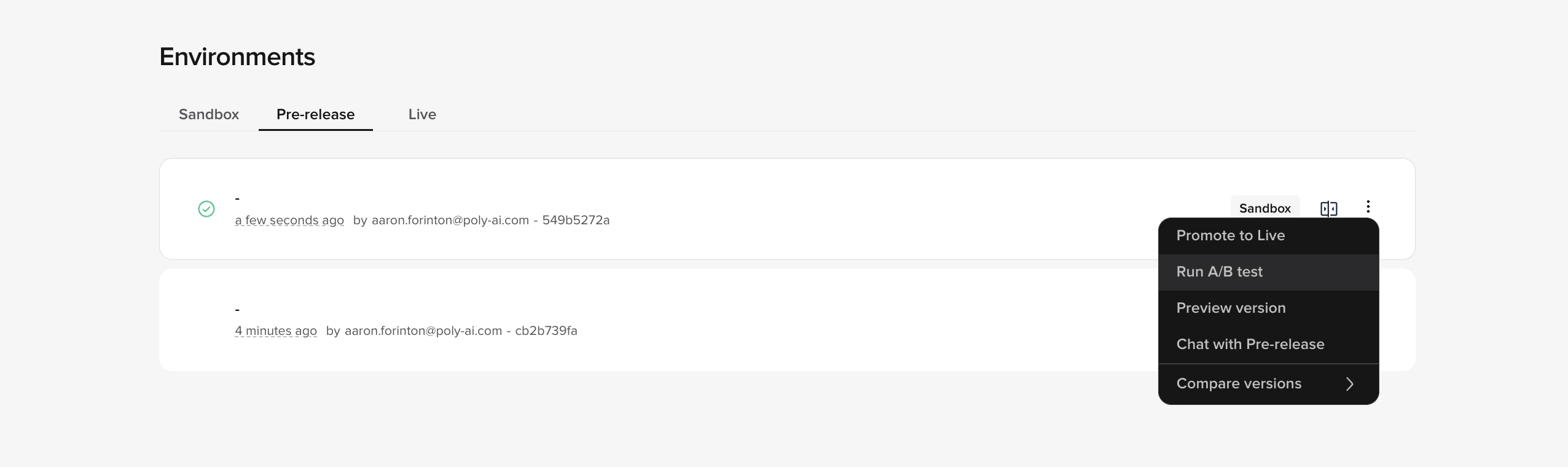
Pre-release tab with the version overflow menu open, showing the Run A/B test option alongside Promote to Live, Preview version, Chat with Pre-release, and Compare versions
- In the Start A/B test modal:
- Name — defaults to the current date and time. Override with something you’ll recognize in history (for example,
Refund flow rewrite). - Traffic split — use the slider to set the split between A (control / current Live) and B (variant / Pre-release). Steps of 5%, from 5/95 to 95/5.
- Review both version cards to confirm you’re testing the right deployments.
- Name — defaults to the current date and time. Override with something you’ll recognize in history (for example,
- Tick Please confirm both versions will start receiving live customer traffic and click Start test.
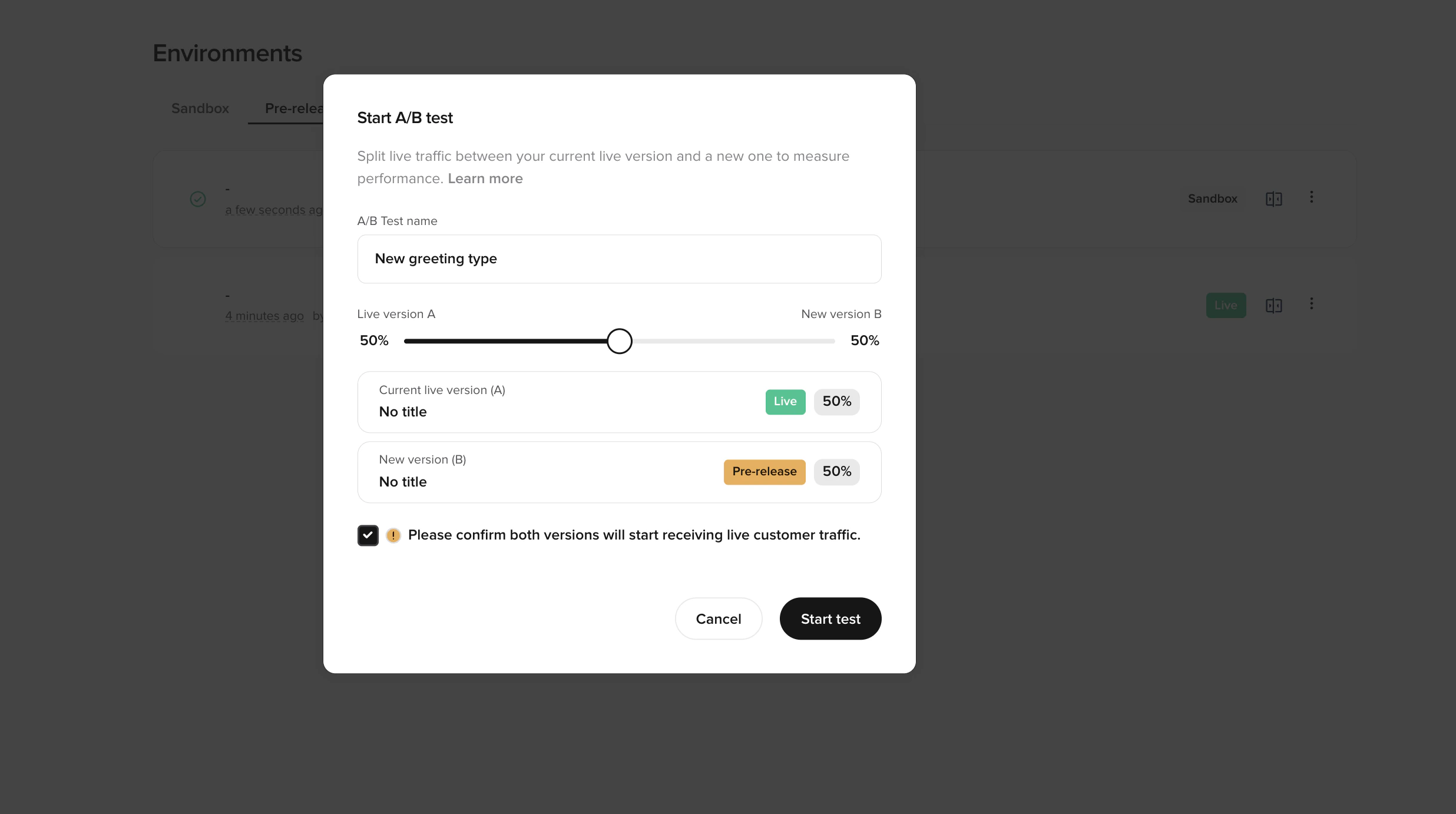
Start A/B test modal with a name field, a traffic-split slider defaulting to 50/50, cards for the current Live version (A) and the new Pre-release version (B), and a confirmation checkbox above Cancel and Start test buttons
While a test is running
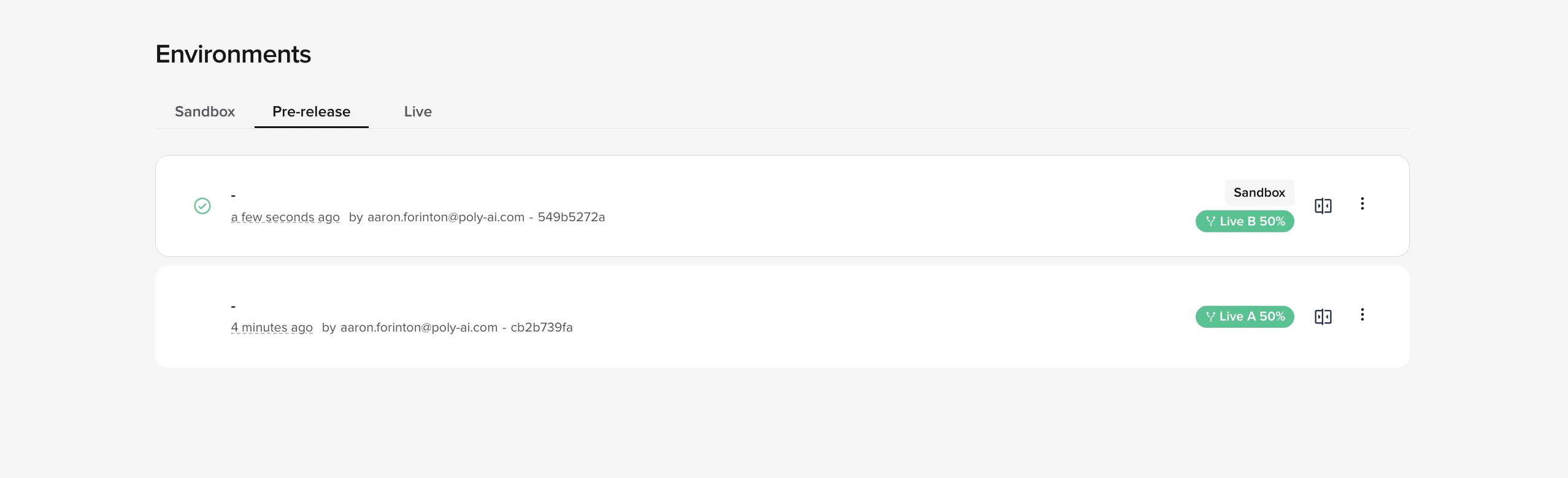
Pre-release tab in Environments during an active A/B test, with both versions tagged Live A 50% and Live B 50%
- Both versions stay visible on the Pre-release tab with their traffic share shown next to each row (for example, Live A 50% and Live B 50%), and the active test appears as a grouped card on the Live tab.
- The Agent Studio chat and call panels show a banner: “A/B test in progress, you may be served either live version.” Either version may answer when you test from inside Studio.
- Other promotions to Live are blocked until the test ends — you’ll see “End A/B test before promoting a new version to live” on the promote action.
- Rollback of the control version is also blocked while a test is active. End the test first.
- You can still promote other versions through Sandbox → Pre-release; only the final promotion to Live is gated.
Track performance
Compare A vs B in your existing dashboards. Both versions write to the same analytics tables, tagged with their deployment version.- Open Analytics > Dashboards (QuickSight).
- Filter by deployed version to slice any metric — CSAT, containment, latency, handover rate, function errors, anything you already track.
- Compare the two version IDs side by side over the duration of the test.
End the test
- On the Environments page, click End A/B test on the active test group (top-right of the grouped card).
- In the End A/B test modal, select the version you want to keep as Live — either the control (A) or the variant (B).
- Click Confirm.
No automated significance testing yet. You decide when there’s enough data to call a winner based on your own thresholds. Statistical comparison is on the roadmap.
History
Ended A/B tests appear in the Live Version History section of the Environments page, grouped under the test name with:- Both versions and their traffic shares at the time the test ran.
- An indicator on the chosen winner.
- The end timestamp.
Limits and roadmap
Today:- One active A/B test per project.
- Traffic split is set at test start and fixed for the test’s duration.
- Variant must be promoted from Pre-release.
- No automated significance testing — you read the dashboards and decide.
- Conversation Review can’t yet filter by deployment version.
- Mid-test split adjustments.
- Conversation Review filtering by version.
- Automated significance testing and statistical comparison.
Related pages
The deployment pipeline
How versions move through Sandbox, Pre-release, and Live.
Compare versions
Side-by-side diff of any two versions before promoting.
Project history
Audit trail of published versions, including A/B test history.
Testing
Automated regression checks to run before promoting a variant.