

start_function that runs before every call’s greeting.
The Start tool (Python identifier: start_function) runs when a conversation begins, before the greeting plays. Use it to initialize conversation state, read SIP headers, or make API calls. A broken or slow start_function delays or prevents the greeting from playing, affecting every inbound call.
Access the start tool in the UI
The start tool is a built-in tool that ships with every agent – you don’t create it from scratch. Find it under Tools, in the Start and end tool calls section at the top of the page. This section contains two pre-built cards (Start tool and End tool) that are automatically invoked before and after every conversation.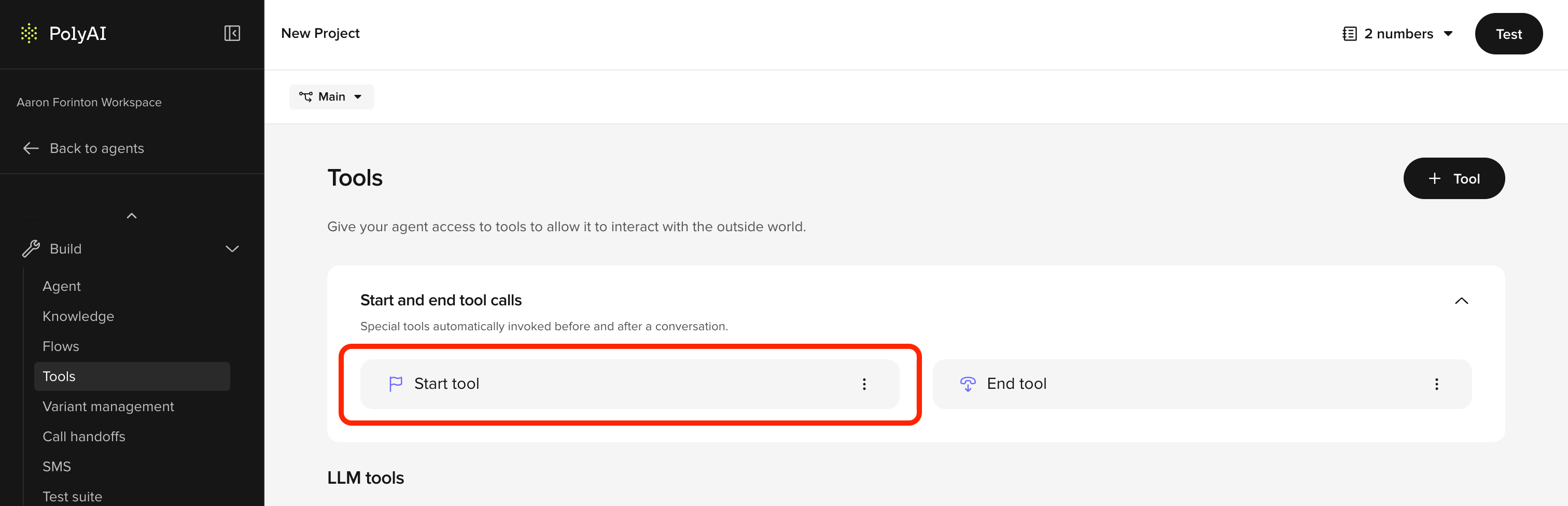
- From your agent’s main page, open Tools in the sidebar.
- In the Start and end tool calls section, click Start tool.
- Write your Python in the Function definition field. The function is already named
start_functionand receives a singleconv: Conversationargument – do not rename it. - Save your changes. The function runs at the start of every conversation in that environment from the next call onwards.
start_function has variable latency, the only mitigation is to keep it fast or move slow operations into a flow step.
When to use the start tool vs. a flow step
Not every API call belongs in the start tool. Use this decision framework:
If an API call is not strictly needed before the greeting, move it to the first step of your flow to avoid timeout risk.
Key features
- Synchronous execution: Completes before the greeting plays
- Context preparation: Stores data for use throughout the conversation
Use cases
Detect channel type
Detect channel type
Use
conv.channel_type to determine whether the conversation is voice, webchat, or another channel – then branch accordingly. Disable call transfers for webchat, set a different persona, or inject channel-specific prompts.Read connection metadata
Read connection metadata
Capture SIP headers (voice) or URL parameters (webchat) to determine the caller’s origin – for example, mapping a dialled number to a business branch.
Retrieve date and time
Retrieve date and time
Initialize state with the current date, time, or day of the week for timestamping or scheduling logic.
Make API calls
Make API calls
Fetch external data such as user preferences, account information, or customer records to preload personalized context.
Set the active variant
Set the active variant
Use
conv.set_variant() to route the conversation to a specific variant based on SIP headers, callee number, or other metadata. This is the standard way to configure multi-site agents.Detect language and branch
Detect language and branch
Read a language header or parameter and configure the agent accordingly – set the variant, choose a language-specific TTS voice, or store language-specific prompt rules in state.
Read outbound call metadata
Read outbound call metadata
For outbound agents, read lead data or campaign metadata from SIP headers injected by the calling platform.
Read integration attributes
Read integration attributes
Access
conv.integration_attributes to read metadata passed from external integrations (e.g. DNIs pooling, Chat API).conv.integration_attributes can only be read in start_function. Extract values and store them in conv.state for use later.Configure a TTS provider
Configure a TTS provider
Set the TTS provider in
start_function. Supported providers include Cartesia, PlayHT, and Rime. See voice configuration and tool classes.Implementation example
Below is a Python implementation of the start tool. The function must be namedstart_function:
Return values
The start tool supports the same return values as other tools. The most common patterns are:Empty string (default)
Returnstr() when start_function only needs to set up state. The agent greeting defined in the Agent settings will play as normal.
Dynamic greeting
Return anutterance to override the default greeting with a dynamically generated message. This is useful when the greeting depends on data fetched during start_function (e.g. the caller’s name or site-specific wording).
Listen configuration
Return alisten object to configure ASR behavior for the first turn.
Best practices
- Keep it fast: The start tool blocks the greeting. Target under 1 second total execution time. Move slow or unreliable API calls to a flow step.
-
Never hardcode credentials: Use
conv.utils.get_secret()for all API keys, tokens, and passwords. Hardcoded credentials in tool code are a security risk and may be exposed in logs or version history. -
Error handling:
- Handle missing or malformed data and avoid runtime errors.
- Provide fallbacks for incomplete or invalid information (like missing SIP headers or unavailable APIs).
-
State initialization:
-
Predefine and initialize all state variables needed for the conversation to avoid undefined behaviors. Reading an unset
conv.statevariable returnsNone(it does not raise), so initializing toNone– or a sensible default like""or0– makes intent explicit and keeps prompt templates andis Nonechecks predictable. -
Extract
conv.integration_attributeshere – they are only available instart_function.
-
Predefine and initialize all state variables needed for the conversation to avoid undefined behaviors. Reading an unset
-
Contextual relevance:
- Only include setup steps that are directly relevant to the conversation’s purpose.
- Avoid overloading the start tool with unnecessary logic.
Common patterns
Multi-site variant routing
Multi-site variant routing
The most common advanced use of the start tool is routing to a variant based on the dialled number, SIP headers, or other metadata. This is how multi-site agents (hotels, restaurant chains, retail) determine which location’s content to use.Hardcoded map – use when the number-to-variant mapping is small and static:Dynamic lookup from variant attributes – use when you store the phone number (or any routing key) as an attribute in the variant table. For example, if your variant table has a Replace
callee column containing each variant’s phone number:variant.callee with whatever attribute name you defined in Knowledge > Variants (e.g., variant.phone_number, variant.routing_id).Full article: VariantsLanguage detection and branching
Language detection and branching
Read a language code from SIP headers or integration data, set the appropriate variant, and configure a language-specific TTS voice.Force a language by dialled number (DNIS) – use See Multi-language for the full setup.
conv.callee_number and conv.set_language() when each market has its own phone number and you want to skip auto-detection. The language code must already be configured under Behavior > Additional languages (or be the main language); otherwise the agent falls back to the default language.Channel-type branching
Channel-type branching
Use
conv.channel_type to disable voice-only features (like call transfers) for webchat, or to inject channel-specific prompts.Multi-voice configuration
Multi-voice configuration
The start tool is where you configure which TTS voice the agent uses for a given call. This is required when running multiple voices across variants or channels, because the Voice page UI may not expose all available providers.Full article: Multi-voice
Dynamic user identification
Dynamic user identification
Use
conv.caller_number or metadata from an API call to personalize the greeting or preload account context.Preloading context
Preloading context
Make a fast API call to fetch scheduling information, past bookings, or account details so the agent has context from the first turn.