

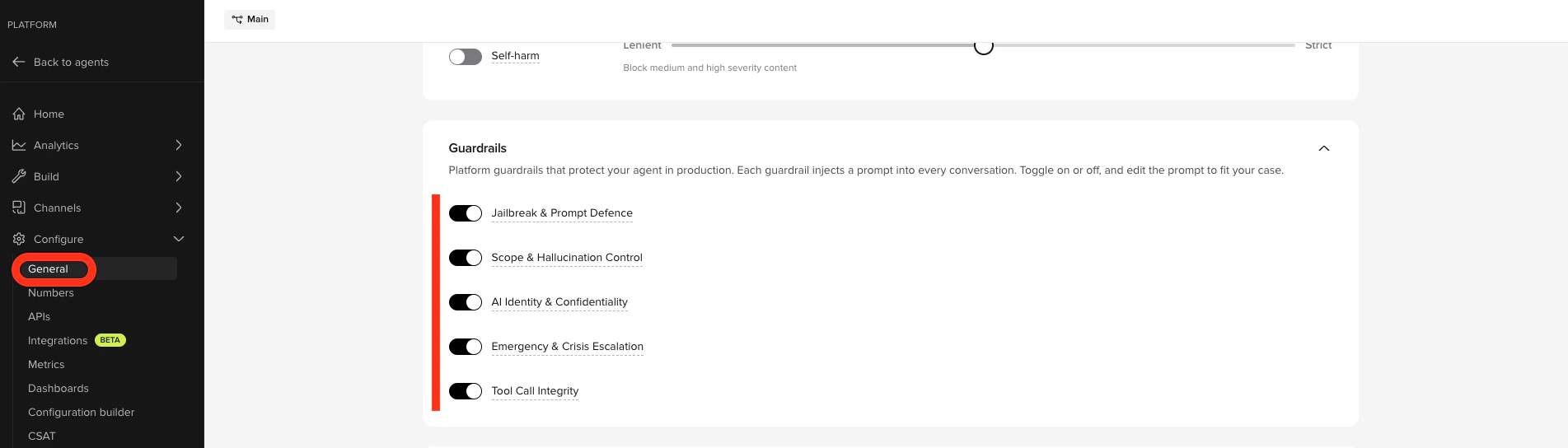
Platform guardrails are applied automatically, standardized across projects, and maintained by PolyAI — no per-agent prompt engineering required.
The five guardrails
The underlying prompts are managed by PolyAI and are not currently visible or editable in Agent Studio.| Guardrail | What it does |
|---|---|
| Jailbreak & Prompt Defence | Blocks attempts to extract your agent’s instructions, override its behavior, or impersonate a different AI. |
| Scope & Hallucination Control | Restricts the agent to its knowledge base. Prevents fabrication of phone numbers, prices, or policies. |
| AI Identity & Confidentiality | Prevents the agent from disclosing which LLM, provider, or platform powers it. |
| Emergency & Crisis Escalation | Escalates immediately if a caller expresses suicidal ideation, self-harm, threats, or a medical emergency. Catches conversational distress signals that content filters miss. |
| Tool Call Integrity | Prevents the agent from speaking internal function calls or tool names aloud. |
Enable or disable a guardrail
- Open Configure > General then sccroll to Guardrails.
- Toggle a guardrail off or on. Disabling prompts you to confirm.
- Test with Chat with Agent before promoting to a higher environment.
Observe when guardrails fire
Guardrail events are recorded on every conversation.- In a transcript: open a conversation in Conversations, open transcript display options, and toggle on Guardrails. Each turn where a guardrail fired is annotated inline.
- Across conversations: filter by guardrail in the QA category of the conversation filters.
- Guardrails are stored per-project and travel through environments and versions – the configuration is part of each published version.
How guardrails fit with safety filters
Platform guardrails are prompt-level instructions to the LLM. They run alongside the input/output safety filters:- Safety filters classify each user input and agent output against hate, violence, sexual, and self-harm categories at the model layer. Configure thresholds per category in Configure > General and override per channel.
- Jailbreak detection is always-on at the model layer and is independent of the Jailbreak & Prompt Defence guardrail. The guardrail tells the LLM how to respond; the detector blocks input upstream.
- Emergency & Crisis Escalation catches conversational distress signals that content filters miss – for example, “I don’t want to be here anymore” said in a measured tone.
Related pages
Behavior rules
Add custom rules for terminology, tone, and edge cases on top of the platform guardrails.
Conversation review
See guardrail events inline in transcripts and filter by guardrail in QA category.
Safety filters
Per-channel content filters for hate, sexual, violence, and self-harm.
Safety dashboard
Track jailbreak attempts and other safety signals across all conversations.
Agent Builder
Validate guardrail behavior in the preview before promoting a version.