

This page covers custom API integrations configured in the APIs tab in Agent Studio — that is, outbound HTTP calls your agent makes at runtime. For PolyAI’s public APIs (Chat, Conversations, Agents, Handoff, etc.), see the API Reference. For pre-built third-party integrations (e.g., OpenTable, Salesforce, Zendesk), contact your PolyAI account manager to enable them via the Integrations tab.
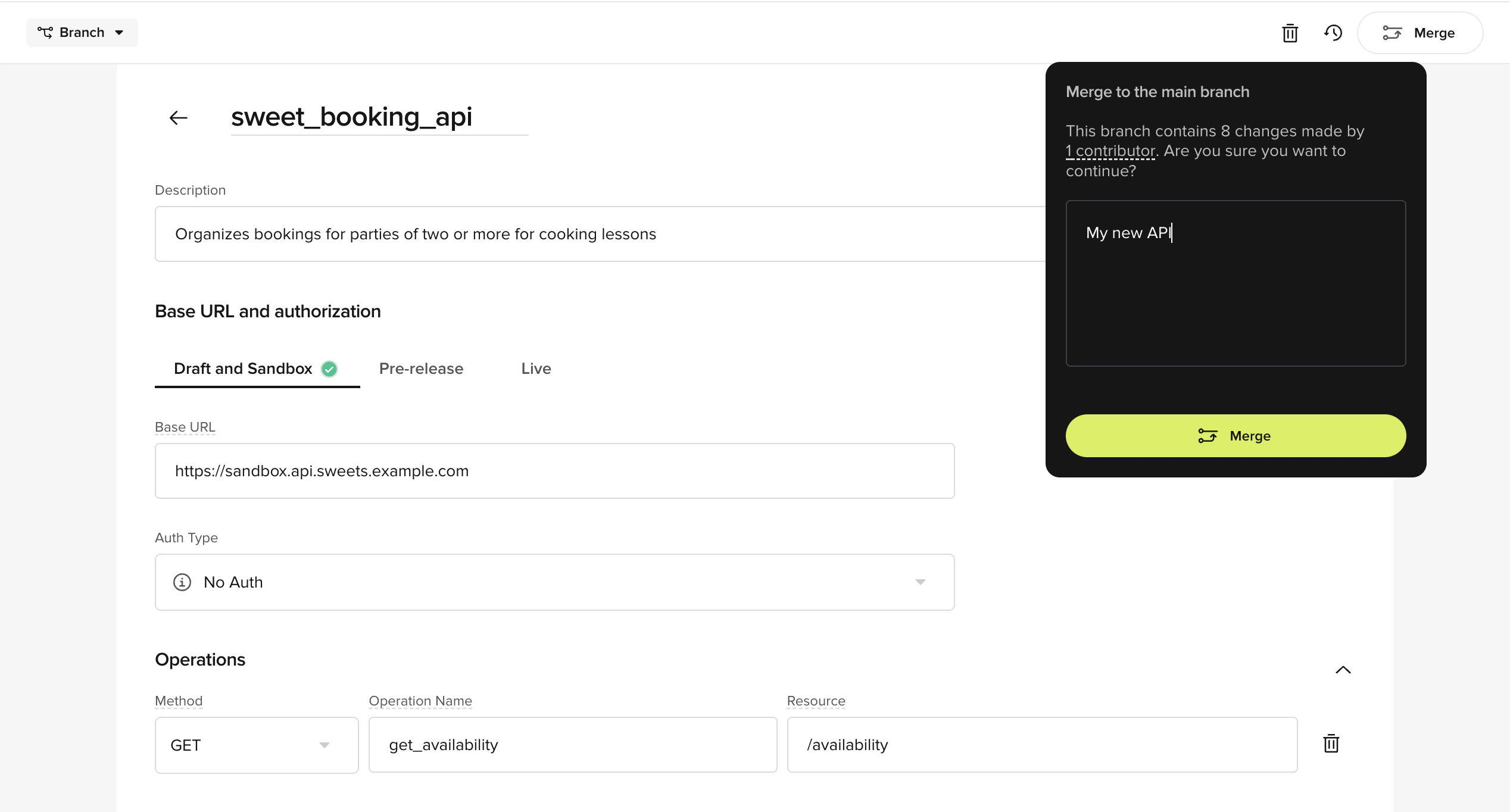
- A shared, inspectable API definition
- Environment-specific base URLs
- A consistent calling interface inside
conv.api
What API integrations are for
Use the APIs tab when you want your agent to:- Fetch or send data to an external system
- Call internal services (CRM, ticketing, booking, payments)
- Avoid maintaining potentially weighty custom HTTP logic in tools
- Look up a ticket, booking, or account
- Create or update a record
- Trigger downstream systems from a flow
How API definitions work
An API definition consists of:- A named API
- Environment-specific base URLs
- One or more operations
API name
The API name becomes the namespace underconv.api.
Use
snake_case for API names and operation names (e.g., my_service, get_contact).- API name:
salesforce - Runtime access:
conv.api.salesforce
Base URL and environments
Each API supports separate configuration for:- Draft and Sandbox
- Pre-release
- Live
- Test against staging services
- Promote safely without changing code
- Keep flows identical across environments
Operations
Each operation represents a single HTTP endpoint. You define:- Method (
GET,POST,PATCH,PUT, orDELETE) - Operation name
- Resource path
/tickets/{ticket_id}
Path variables are automatically exposed as arguments when calling the operation.
Referencing APIs while you are building an agent
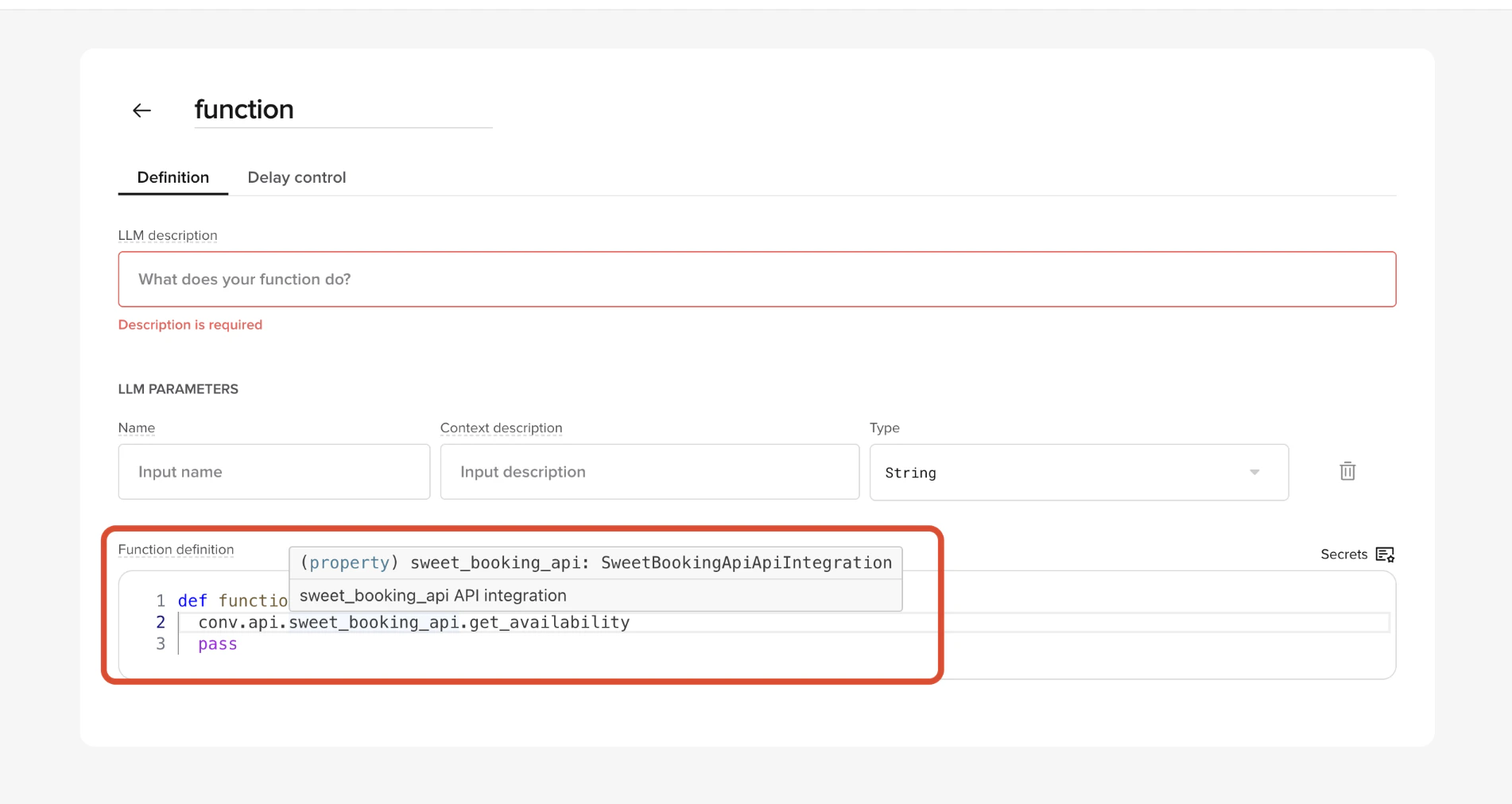
conv.api object.
The structure is:
What gets returned from an API call
Calling an operation returns arequests.Response-like object (a standard Python HTTP response object).
This means you can:
- Check
response.status_code - Access
response.text - Call
response.json()to parse JSON responses
conv.log.info(), conv.log.warning(), or conv.log.error().
Debugging with conv.log
Use conv.log.info(), conv.log.warning(), or conv.log.error() to add custom log entries that appear in Conversation Review alongside the automatic request log. This is useful when troubleshooting failed or unexpected API calls.
Example: reading JSON from a response
Assume your API returns the following JSON:Error handling
Always check the response status before processing data. Non-200 responses may indicate the API call failed or the resource was not found.response.raise_for_status() to raise an exception on non-2xx responses:
Returning values from your function
After calling an API and processing the response, your function must return a dictionary. There are two common patterns:1. Return natural language content
Use this when you want the LLM to continue the conversation naturally:2. Return a programmatic utterance
Use this when you want to return a fully controlled response:"content"lets the model incorporate your result into a broader response."utterance"returns a fixed, deterministic reply.
Path variables
You can pass path variables as positional or keyword arguments. Examples:Query parameters, body, and headers
Operations accept arbitrary keyword arguments at call time. You can pass:- Query parameters
- JSON bodies
- Custom headers
Authentication
Authentication is configured per environment (Draft and Sandbox, Pre-release, Live) on each API. This lets you point each environment at the appropriate credentials without changing code. Supported authentication types:- No auth – No authentication required.
- Basic auth – Username and password encoded in the
Authorizationheader. - API key – A key sent in a header or query parameter.
- OAuth 2.0 – Token-based authentication using the client credentials grant, with automatic token refresh. You configure the access token URL, client ID, client secret, scope, whether credentials are sent as a header or in the body, and optional auth header name and token prefix.
- Type – The authentication method (
No auth,Basic auth,API key, orOAuth 2.0). - Location – For API keys, where the credential is sent (
HeaderorQuery). - Secret value – The credential itself, managed securely by Agent Studio.
Summary
The APIs tab provides:- Centralized API configuration
- Environment-aware routing
- A simple runtime interface with
conv.api - A
requests.Response-like return object that you process withresponse.json() - Automatic request logging, plus custom log entries via
conv.log.info(),conv.log.warning(), andconv.log.error()
Related pages
Tools
Call defined APIs from your agent tools.
Flows
Reference APIs in flow steps and actions.
Conversation Review
Debug API calls using conversation logs.