

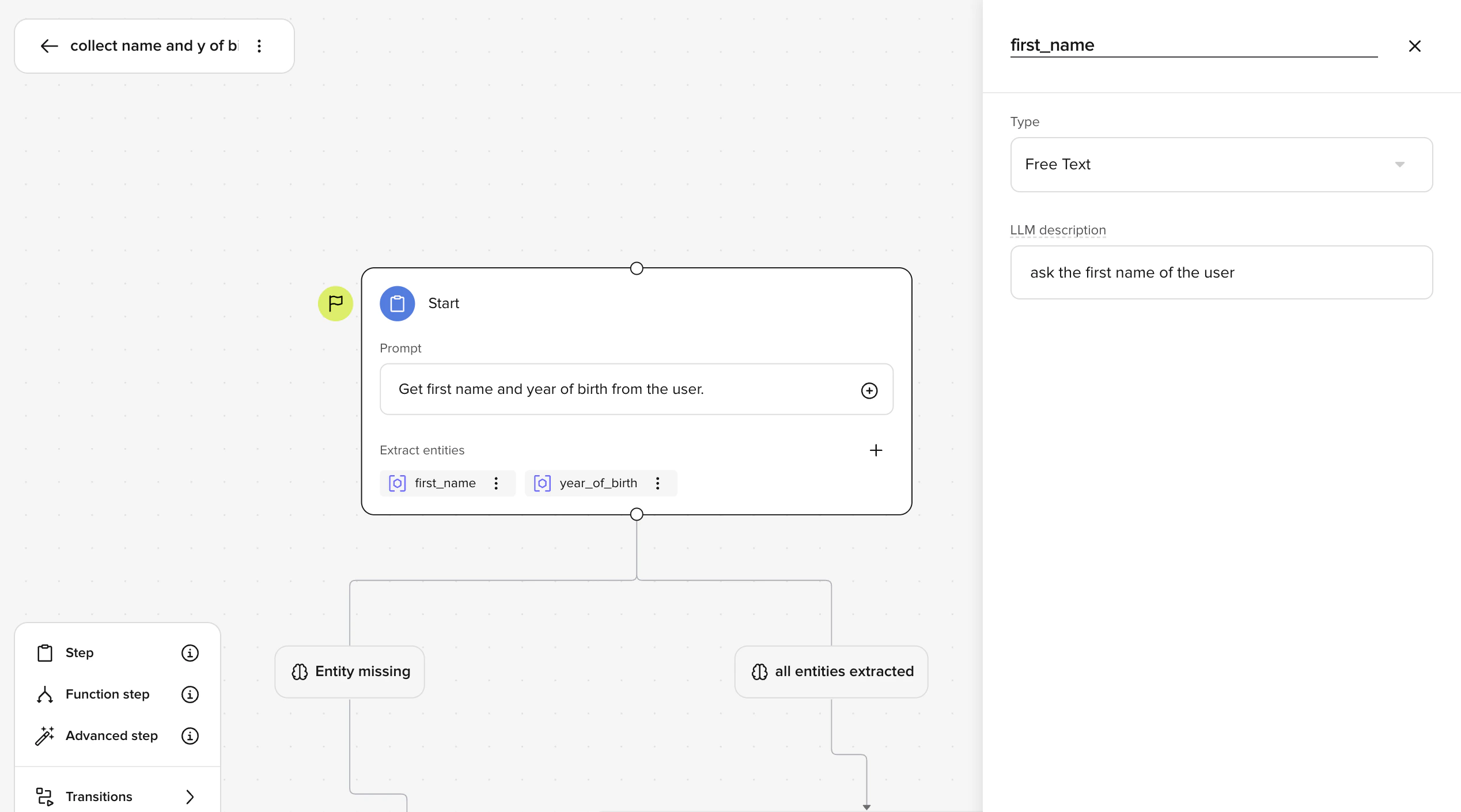
Example no-code flow rules
Use Default steps (no-code) when routing can be expressed with labeled branches and entity extraction. Use Function steps instead when you need API calls, strict numeric comparisons, or custom business logic. Use code-driven flows instead when the entire flow requires Python control.
- Ask for information (intent)
- Extract structured data (entities)
- Route based on what was collected (conditions)
- Continue the conversation in the correct branch
- End cleanly with an exit flow
Step types
Choosing a step type
Start with Default steps. Move to a Function step only when you need code (API calls, numeric comparisons, custom validation). Use an Advanced step when you need per-step ASR biasing, DTMF collection, or direct control over transition function references in the prompt.
Default step (no-code)
Use Default steps for most of your flow. They let you:- Write natural-language instructions (prompt)
- Extract entities
- Branch to other steps using labeled edges
- Step 1: Collect an entity (e.g. number of passengers)
- Step 2: Route to the correct branch (e.g. Individual Booking vs Group Booking)
- Step 3: Continue collecting relevant details
Function step (low-code, still visual)
Use Function steps only when you need more control, such as:- Calling an API
- Applying strict business rules
- Performing numeric comparisons
- Writing state changes
- They contain code only — there is no prompt field.
- They support conditions for visual routing, but conditions on Function steps do not have required entities — your code handles all validation.
- They do not support ASR biasing, DTMF, or other per-step audio configuration.
Exit flow
Use Exit flows to:- End the conversation cleanly
- Represent a handoff
- Make terminal paths obvious in the editor
How flow logic actually runs
There are two execution models inside flows. Understanding this prevents most confusion.Default steps (LLM-driven) — no code required
In a Default step:- The agent collects entities from what the caller says and checks them against the type rules you configured.
- Once an entity passes validation, the agent considers which condition to take. Conditions with required entities only activate when those entities have valid values.
- If the caller gives an invalid value (wrong format, out of range, etc.), the agent asks them to try again.
/entities. This inserts {{entity:entity_name}}, which resolves to the entity’s value at runtime. Entities are available in the same step they are collected – you do not need a separate step.
Default step prompts support entity and variant attribute references, but do not support function references. To call transition functions or global functions from a prompt, use an Advanced step.
Function steps (code-driven) — for developers
The following section covers writing Python code to control flow logic. If you are building flows without code, you can skip this section. Function steps behave differently.- Conditions are evaluated in your Python code.
- The condition label on the edge is decorative.
- You must explicitly move the flow forward.
Accessing collected entities in a function
Validated entities are available two ways:conv.state stores numeric entities as int or float based on the entity configuration. conv.entities.<name>.value is always a string — cast to int() or float() before numeric comparisons. See Entities — Accessing entities in code.Moving to another step from a function
A Function step does not automatically transition. You must call:flow.goto_step(), the flow will not move.
To leave the current flow entirely and enter a different one, use conv.goto_flow("flow_name") instead.
Step naming rules
- Step names must be unique in a flow (case-sensitive).
- The start step cannot be deleted — reassign the start step to a different node first.
Canvas controls
The flow editor provides controls to help you work with complex flows:- Zoom in/out — adjust the view scale (minimum 25%)
- Fit to view — auto-centers and scales to show all nodes
- Tidy up — auto-arranges nodes in a top-to-bottom layout with consistent spacing
- Snap to grid — nodes align to a 30px grid for clean positioning
Working with nodes
- Drag steps using the drag handle at the top of each node
- Copy/paste nodes using keyboard shortcuts
- Connect steps by clicking the + handle at the bottom of a node and selecting the target step
- Pan the canvas by holding the space bar and dragging
Conditions
When you connect a Default step to another step, a condition node appears on the edge. Each condition has:
The description field is critical for routing accuracy. A label like “large party” tells the LLM what the path is; the description tells it when to take it — for example, “The caller has confirmed they need a booking for more than 15 guests.”
Write condition labels for humans first — someone reading the flow should understand the routing logic from labels alone.