

API versions
Only the Conversations API is versioned. Other APIs are currently unversioned.v3 – current and recommended
v3 is the fully supported release of the Conversations API. It runs on PolyAI’s event-sourced data platform and improves on v1 by offering:- reliable, scalable ingestion and querying
- consistent ISO8601 timestamps
- empty strings ("") instead of
nullfor empty text fields - additional turn-level metadata such as
latency,translated_user_input, andenglish_agent_response
https://api.{region}.platform.polyai.app/v3/{account_id}/{project_id}/conversations
v2
v2 uses the same schema and event-sourced backend as v3, but retains the legacy authentication model. Existing customers can continue using v2, but new customers should use v3v1 – legacy
v1 uses an earlier data pipeline and the legacy authentication system. Deprecation timeline- From 2 March 2026, v1 moves to best-effort support (no SLA).
- From 31 August 2026, v1 remains available but is no longer supported.
Regional base URLs
Endpoint pattern:
https://api.{region}.platform.polyai.app/{version}/{account_id}/{project_id}/conversations
Authentication
The Conversations API uses API key authentication.v3 keys
v3 keys are project- and region-scoped and are issued by PolyAI. Your PolyAI representative will confirm the appropriate scope and provision access.Identifiers
account_id above is your account ID — Agent Studio’s UI calls this the Workspace ID and shows it prefixed (ws-xxxxxxxx). project_id is the same value as the Agent ID shown in Agent Studio (prefixed PROJECT-xxxxxxxx); “Project” is the legacy term for the same resource.
Both the slug form from the Agent Studio URL and the prefixed form work in API calls.
Retrieval modes (optional)
The v3 endpoint supports three optional retrieval modes powered by the same tooling Wren uses: transcript search, semantic search, and random sampling. When no retrieval mode is specified, the endpoint returns all conversations matching the given filters (default behavior). Only one mode may be used per request.Query parameters
The Conversations API supports several query parameters for filtering and controlling the response:Time range parameters
Retrieval mode parameters (optional)
Optional filters
Optional response fields
Response structure
Conversation object
Turn object
Pagination
The v3 endpoint supports two pagination strategies. Use cursor-based pagination for any new integration — it is faster on large result sets and stays consistent when new conversations are written between page requests.Cursor-based pagination
On the first request, omitcursor. The response includes a cursor field — pass it as the cursor query parameter on the next request to fetch the following page. Keep all other filters (start_time, end_time, client_env, limit, etc.) identical between requests. When cursor is null, you have reached the end of the result set.
Cursors are opaque, URL-safe strings — do not parse or generate them yourself. A malformed cursor returns a 400 Bad Request.
Offset-based pagination (legacy)
When results exceed the limit, the response includesnext_offset. Use this value as the offset parameter in your next request to fetch the next page. Offset pagination becomes slower as you advance deep into the result set and pages may shift if conversations are written between requests — use cursor instead where possible.
Large response streaming
By default, the API builds the full JSON response in memory before sending it. For large pages — typicallylimit in the hundreds combined with include_context_state=true or include_turn_metadata=true — that response can be hundreds of megabytes and slow or unstable to download.
When chunked response streaming is enabled for your project, the API instead sends conversations incrementally using HTTP chunked transfer encoding. The response body is the same JSON shape; only the transport changes. Streaming responses also expose the cursor field, so you can combine streaming with cursor-based pagination to walk through very large result sets without ever buffering a full page.
Streaming is gated by a per-project setting managed by PolyAI. To turn it on, ask your PolyAI representative to enable chunked response streaming for the project. No client changes are required — clients that already parse the JSON response work unchanged, and clients that parse incrementally (for example, with a streaming JSON parser) start receiving conversations as soon as the server emits them.
Examples
All examples use the v3 endpoint:GET https://api.{region}.platform.polyai.app/v3/{account_id}/{project_id}/conversations
Retrieve all conversations in a time range
Search transcripts for a keyword
Usequery_type=transcript to find conversations containing specific text. Optionally filter by turn_type to search only user or agent turns.
Semantic search
Usequery_type=semantic to find conversations that are semantically similar to your query, even if the exact words don’t appear in the transcript.
Random sampling
Usesample=random to retrieve a random subset of conversations in a time range – useful for quality audits.
Filter by channel
Use thechannel parameter to restrict results to a specific medium. You can specify it multiple times to include several channels.
- complete turn-by-turn transcript
- consistent timestamps
- latency metrics (when
include_latency=true) - translation outputs (when enabled)
- handoff metadata (if applicable)
Understanding turns and num_turns
These two fields are often confused. Here’s how they relate:
Transcript visibility
Theturns array in the API response is controlled by the Conversation transcript toggle (underlying field: show_transcripts) in your project’s API key configuration. When transcript access is disabled, the API returns an empty turns array even though num_turns still reports the actual count.
This is the most common reason for missing turn data. To check or update this setting:
1
Open the API Keys page
Go to the API Keys tab on the workspace homepage in Agent Studio (next to Agents, Secrets, and Users).
2
Open Configuration
Click the Configuration button at the top right of the API Keys page.
3
Enable the Conversation transcript toggle
Inside the configuration panel, find your project and enable the Conversation transcript toggle. You can also select which Response metrics to include in API responses (e.g. 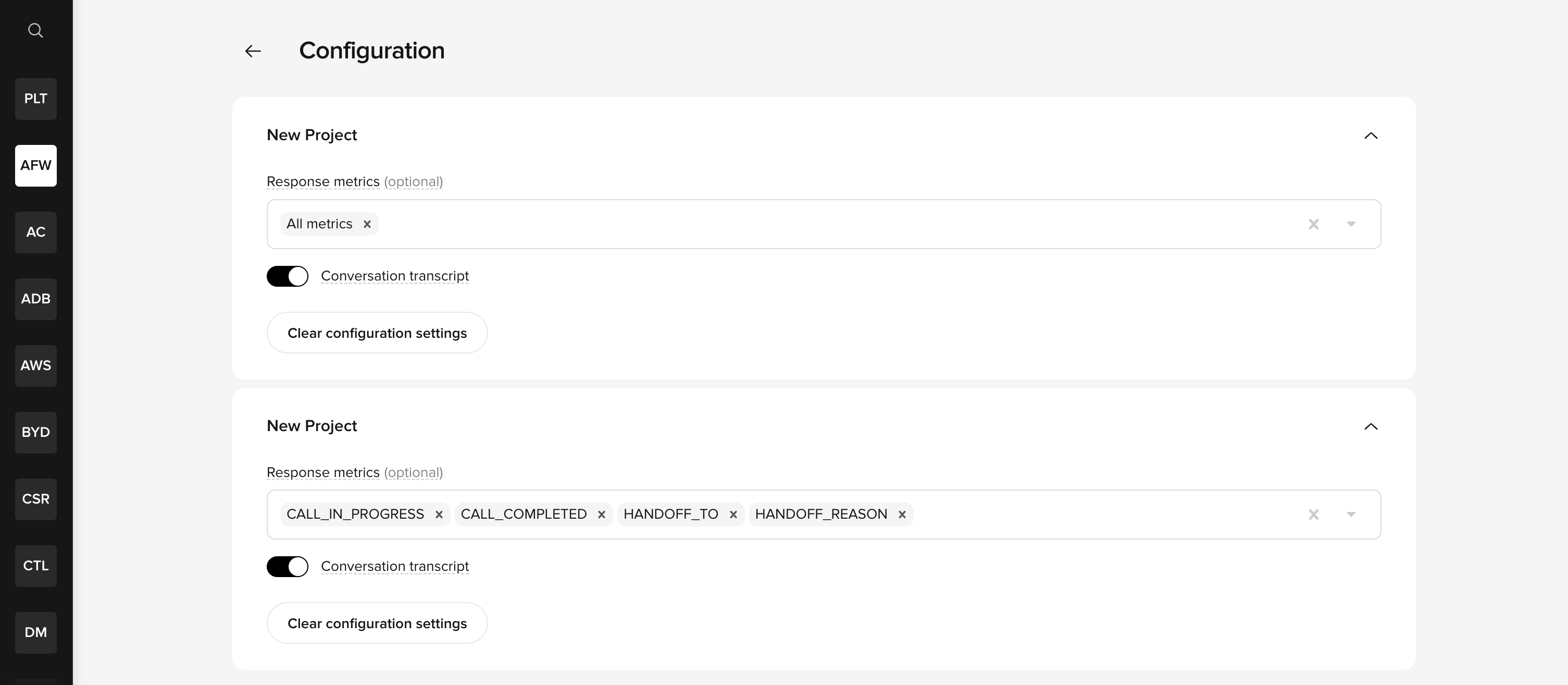
CALL_IN_PROGRESS, CALL_COMPLETED, HANDOFF_TO, HANDOFF_REASON).Troubleshooting
turns is empty but num_turns is greater than zero
This is the most common issue reported by API users. Use this decision tree to diagnose the cause:
1
Check transcript visibility (most likely fix)
Go to the API Keys tab on the workspace homepage, then click Configuration and verify that the Conversation transcript toggle is enabled for your project. This is a project-level setting. See transcript visibility for details.
2
Confirm you are using v3
Verify your endpoint URL contains
/v3/. The v1 API is deprecated and may not return full conversation data. v1 moved to best-effort support on 2 March 2026 and will be unsupported from 31 August 2026.3
Check if the conversation is in progress
If
in_progress is true, turn data may still be arriving and may not be fully available yet.4
Contact your PolyAI representative
If none of the above applies, this may indicate a data pipeline delay or ingestion issue.
Only seeing basic fields (id, account_id, project_id, started_at)
If the response only contains a subset of expected fields:
- Confirm you are on v3. The full response schema (including
latency,translated_user_input,english_agent_response, etc.) is only available on v3. Check that your base URL uses/v3/, not/v1/. Contact your PolyAI representative for help migrating from v1. - Check your API key permissions. On the API Keys tab of the workspace homepage, verify the API key has Conversations data permission enabled. The key must have the correct permission and the project must have the relevant metrics enabled.
- Check metric configuration. On the API Keys tab, click Configuration and verify the response metrics you expect are enabled (e.g.
CALL_IN_PROGRESS,CALL_COMPLETED,HANDOFF_TO). If no metrics are selected, themetricsobject in the response will be empty. - Check field whitelisting (v1 only). Projects on v1 may have field whitelisting enabled in their project configuration (
enable_whitelist: true). When active, the API only returns fields explicitly listed in the project’s API config — typically justid,started_at,account_id, andproject_id. If you are on v1 and see this behavior, migrate to v3 where field visibility is controlled through the API Keys Configuration panel instead.
include_latency is not adding data
include_latency=true adds per-turn latency metrics to each turn object, but enriches existing turn data – it does not populate an empty turns array.
If turns is empty, this parameter has no effect. Fix the underlying cause first (see transcript visibility above).