> ## Documentation Index
> Fetch the complete documentation index at: https://docs.poly.ai/llms.txt
> Use this file to discover all available pages before exploring further.
# Automated call review
> Let Wren read a stretch of recent calls on its own, find what's going wrong, and draft the fixes.
Analysis answers the questions you think to ask. Automated review is for the ones you don't. Wren reads a stretch of recent calls on its own, works out what's going wrong, and brings you a report.
## Review a stretch of calls
Start a review from the mode selector in the composer. Wren asks for:
| Option | What it does |
| ---------------------- | ------------------------------------------------------------------------------------------ |
| **Period** | The stretch of days to review. Pick a single day or a range. |
| **Draft fixes** | Wren implements what it finds on a branch and tests the fix, instead of only reporting it. |
| **Use review history** | Builds on past reviews rather than re-reporting what you've already seen. |
| **Extra instructions** | Optional. Anything specific you want it to look for. |
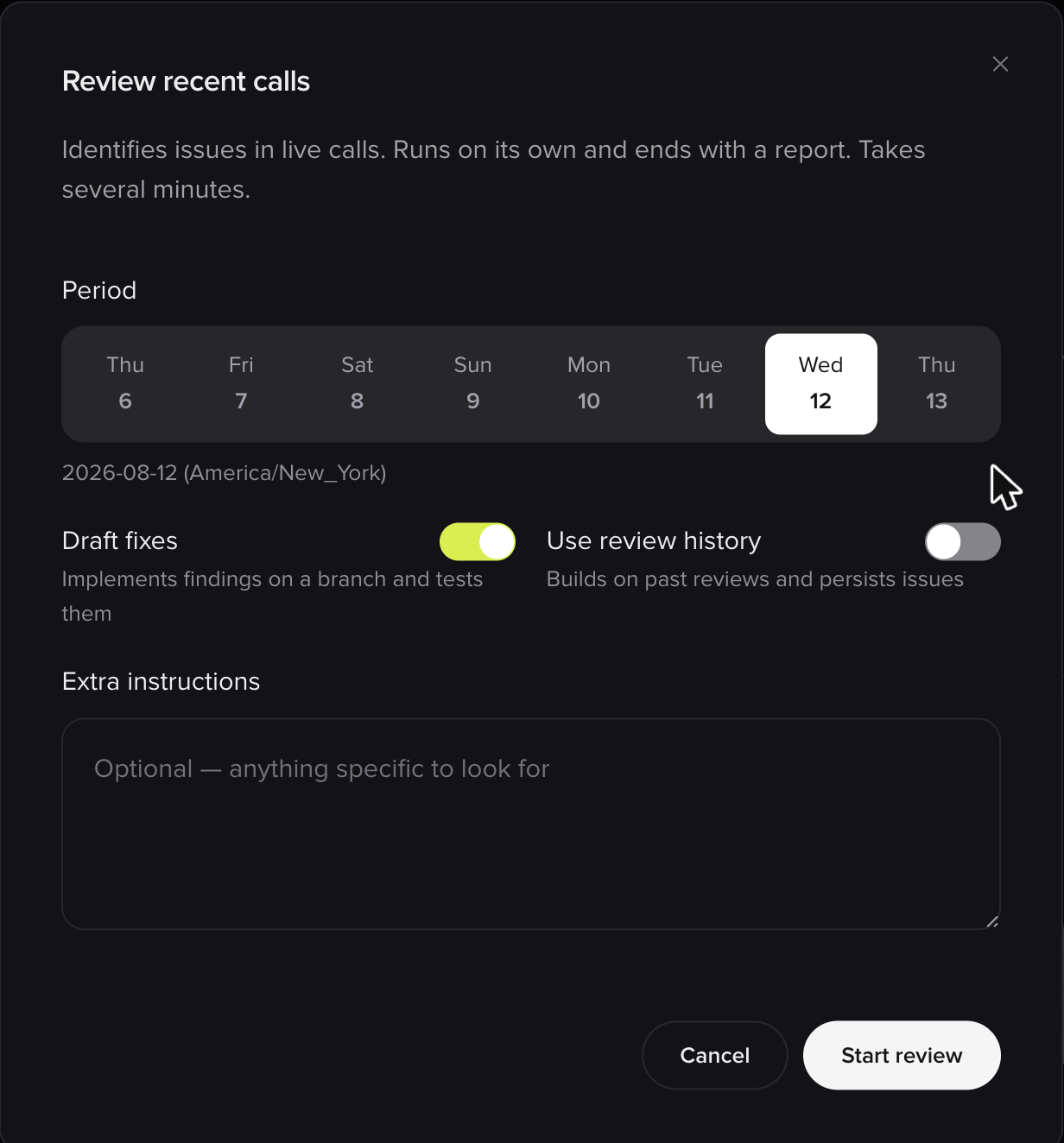 The review then runs on its own, without stopping to ask questions, and ends with a report. It reads real production calls, so expect it to take several minutes.
Reviews always run hands-off, regardless of whether you're in Interactive or Auto mode. That's why the options above are set up front.
### What a review produces
Wren works through your project area by area (the caller journey, the knowledge base, and everything else), and for each candidate problem it checks itself before reporting: it verifies the issue is real, and sizes how often it actually happens across the period.
Each finding comes with:
* **What's wrong**, and which part of the project it sits in
* **A type:** a defect, a knowledge gap, or an opportunity
* **A severity:** high, medium, or low
* **Evidence:** how many of the sampled calls were affected, with example conversations you can click straight into
Where a problem can't be reliably sized, Wren says so rather than inventing a percentage.
With **Draft fixes** enabled, Wren goes a step further on what it finds: it reproduces the problem against a test build, writes a failing test, makes the smallest change that fixes it, and re-runs to confirm. Each fix lands on its own branch.
**Wren never merges a fix.** Reviews and drafted fixes always stop at a branch. Nothing reaches `Main` or a live environment without you approving and merging it yourself.
Sometimes the cause sits outside your project: telephony, an upstream service, or the platform itself. Wren reports those too, and says plainly that it can't fix them from here.
Automated review is rolling out gradually. If you don't see it in the mode selector, ask your PolyAI contact whether it's enabled for your account.
## Continuous review
**Coming soon.** The features below are in development and not yet available on customer accounts. The screenshots are previews of work in progress, so the final version may differ. Ask your PolyAI contact if you'd like to hear when they land.
Running a review by hand is the starting point. The direction is for Wren to do it continuously, so problems find you instead of the other way around. It surfaces on the Wren home screen, under **Insights**.
The review then runs on its own, without stopping to ask questions, and ends with a report. It reads real production calls, so expect it to take several minutes.
Reviews always run hands-off, regardless of whether you're in Interactive or Auto mode. That's why the options above are set up front.
### What a review produces
Wren works through your project area by area (the caller journey, the knowledge base, and everything else), and for each candidate problem it checks itself before reporting: it verifies the issue is real, and sizes how often it actually happens across the period.
Each finding comes with:
* **What's wrong**, and which part of the project it sits in
* **A type:** a defect, a knowledge gap, or an opportunity
* **A severity:** high, medium, or low
* **Evidence:** how many of the sampled calls were affected, with example conversations you can click straight into
Where a problem can't be reliably sized, Wren says so rather than inventing a percentage.
With **Draft fixes** enabled, Wren goes a step further on what it finds: it reproduces the problem against a test build, writes a failing test, makes the smallest change that fixes it, and re-runs to confirm. Each fix lands on its own branch.
**Wren never merges a fix.** Reviews and drafted fixes always stop at a branch. Nothing reaches `Main` or a live environment without you approving and merging it yourself.
Sometimes the cause sits outside your project: telephony, an upstream service, or the platform itself. Wren reports those too, and says plainly that it can't fix them from here.
Automated review is rolling out gradually. If you don't see it in the mode selector, ask your PolyAI contact whether it's enabled for your account.
## Continuous review
**Coming soon.** The features below are in development and not yet available on customer accounts. The screenshots are previews of work in progress, so the final version may differ. Ask your PolyAI contact if you'd like to hear when they land.
Running a review by hand is the starting point. The direction is for Wren to do it continuously, so problems find you instead of the other way around. It surfaces on the Wren home screen, under **Insights**.
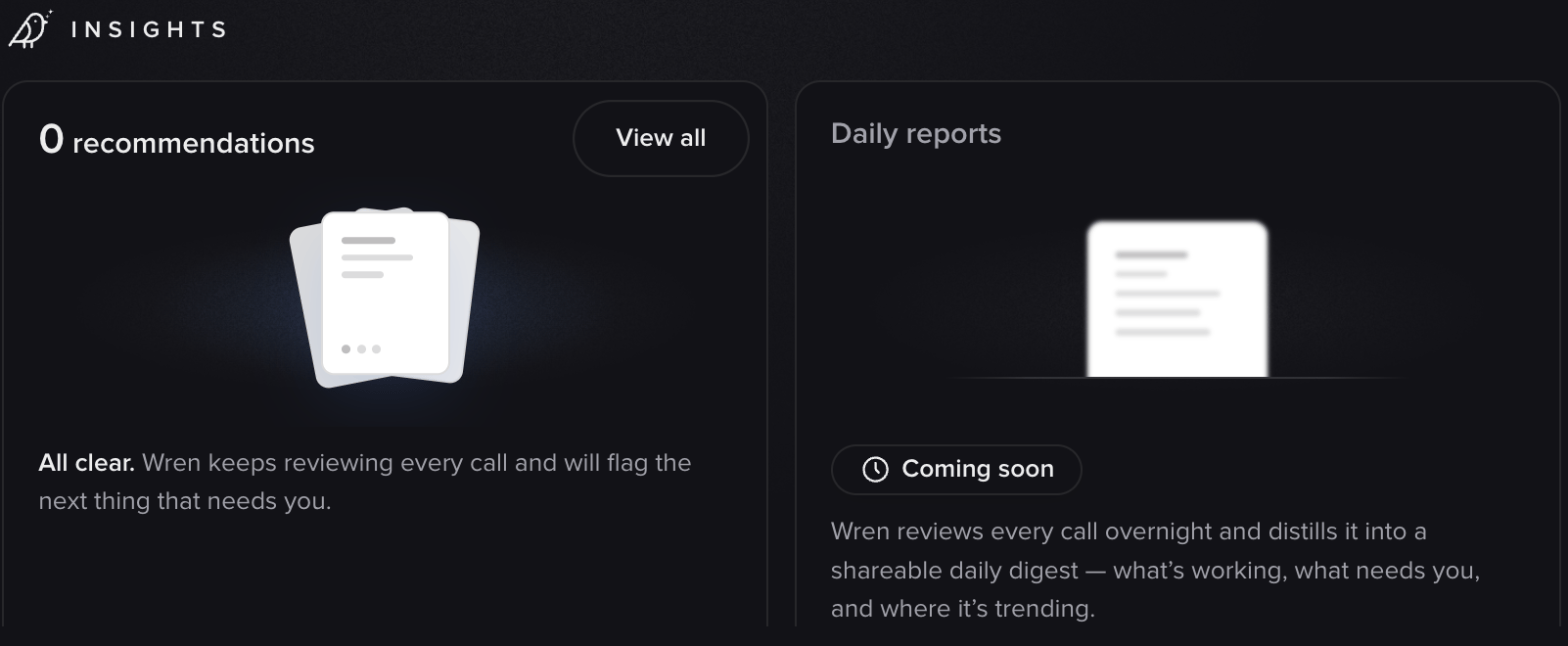 ### Recommendations
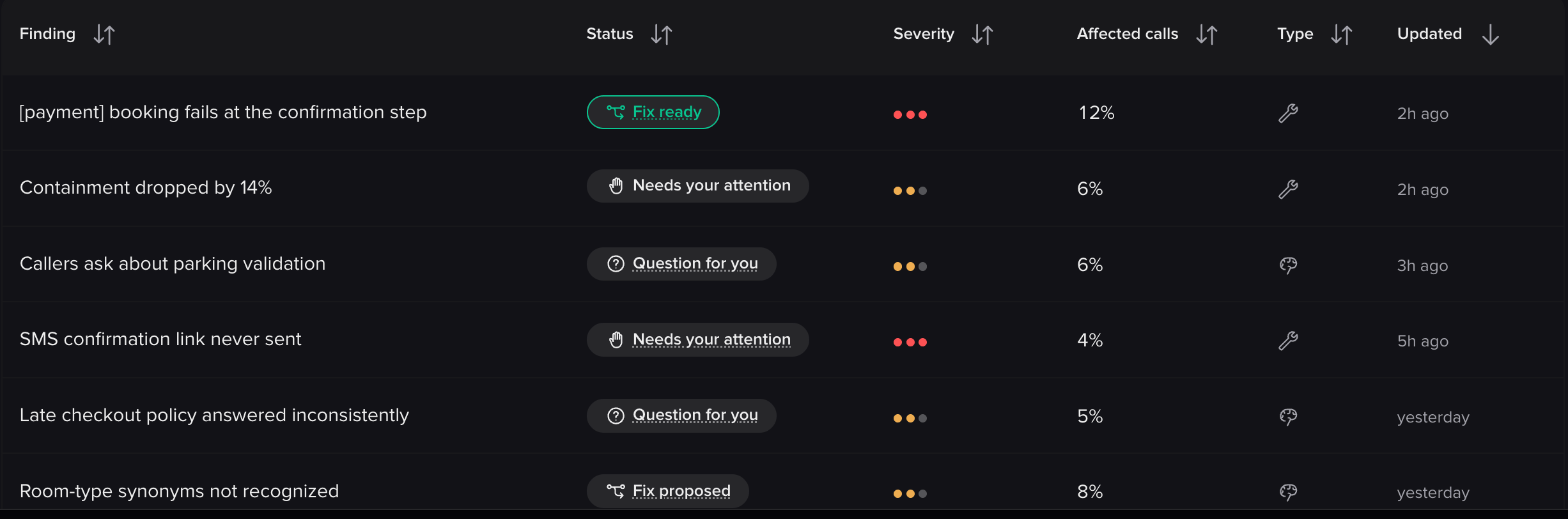
Rather than a report you read once, findings become a **standing list** on your project: an inbox of things that need your attention, each one persisting until it's resolved or dismissed. Open findings are summarized by how many are ready to act on and how severe they are.
### Recommendations
Rather than a report you read once, findings become a **standing list** on your project: an inbox of things that need your attention, each one persisting until it's resolved or dismissed. Open findings are summarized by how many are ready to act on and how severe they are.
 Each finding shows its status, severity, how many calls it affects, and whether it's a defect, a knowledge gap, or an opportunity.
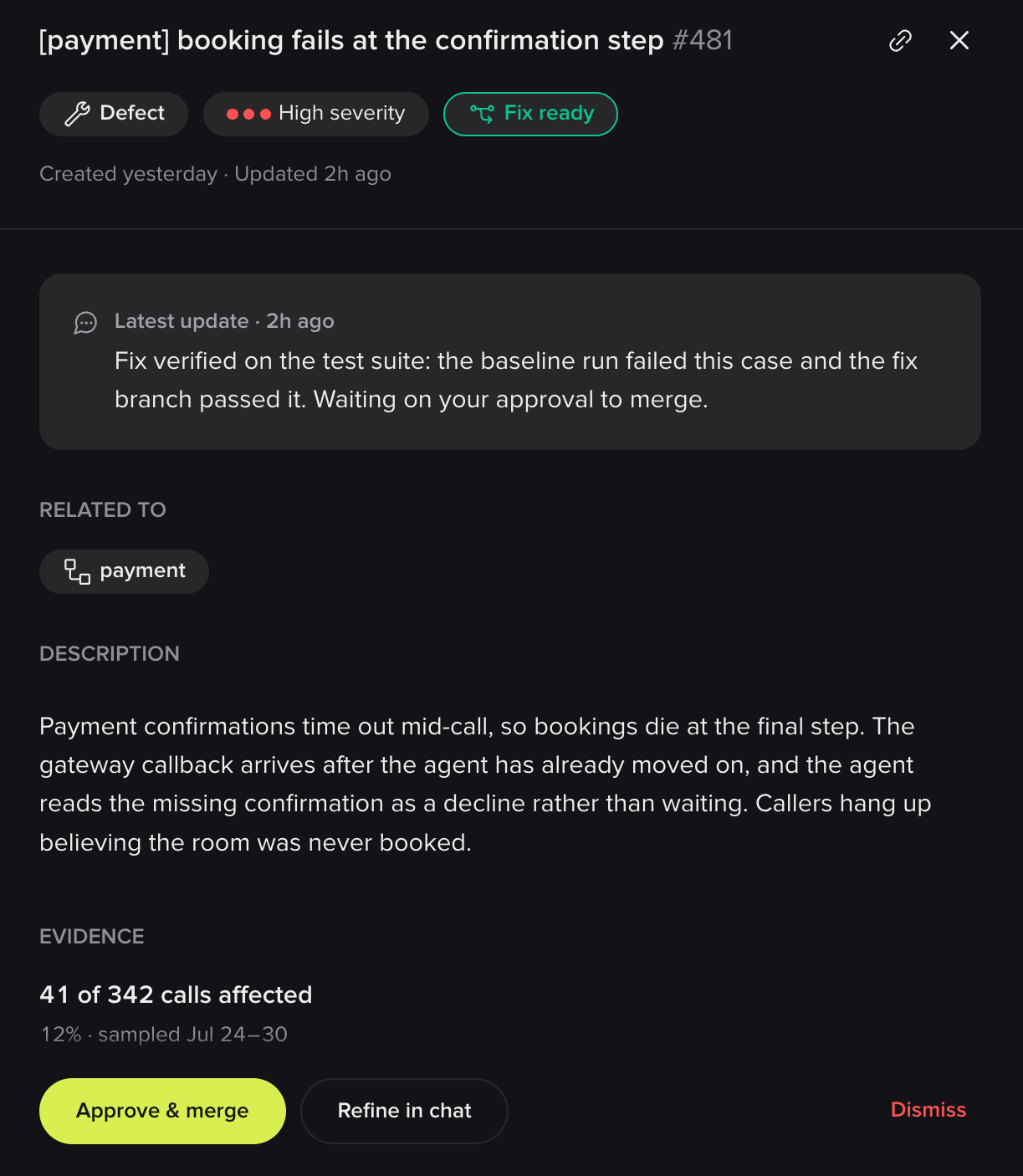
 Open one and you get the full picture: what's wrong, which part of the project it relates to, and the evidence behind it.
 Every finding will carry a status through its life: *Needs your attention*, *Question for you*, *Fix proposed*, *Fix ready*, *Resolved*, or *Dismissed*. From a finding you'll be able to:
* **Approve and merge** a fix Wren has drafted and verified
* **View the diff** before deciding
* **Refine it in chat** if the fix is close but not right
* **Answer a question** Wren has about your business rules, when it needs one to proceed
* **Dismiss it** as working as intended, already resolved, not worth addressing, or simply wrong, with the reason feeding back into what gets surfaced next
* **Revert** a change after the fact if it doesn't hold up
Where Wren has drafted a fix, it shows you the change it proposes, the branch it sits on, and proof that it works: the test case failed before the fix and passes on the branch.
Every finding will carry a status through its life: *Needs your attention*, *Question for you*, *Fix proposed*, *Fix ready*, *Resolved*, or *Dismissed*. From a finding you'll be able to:
* **Approve and merge** a fix Wren has drafted and verified
* **View the diff** before deciding
* **Refine it in chat** if the fix is close but not right
* **Answer a question** Wren has about your business rules, when it needs one to proceed
* **Dismiss it** as working as intended, already resolved, not worth addressing, or simply wrong, with the reason feeding back into what gets surfaced next
* **Revert** a change after the fact if it doesn't hold up
Where Wren has drafted a fix, it shows you the change it proposes, the branch it sits on, and proof that it works: the test case failed before the fix and passes on the branch.
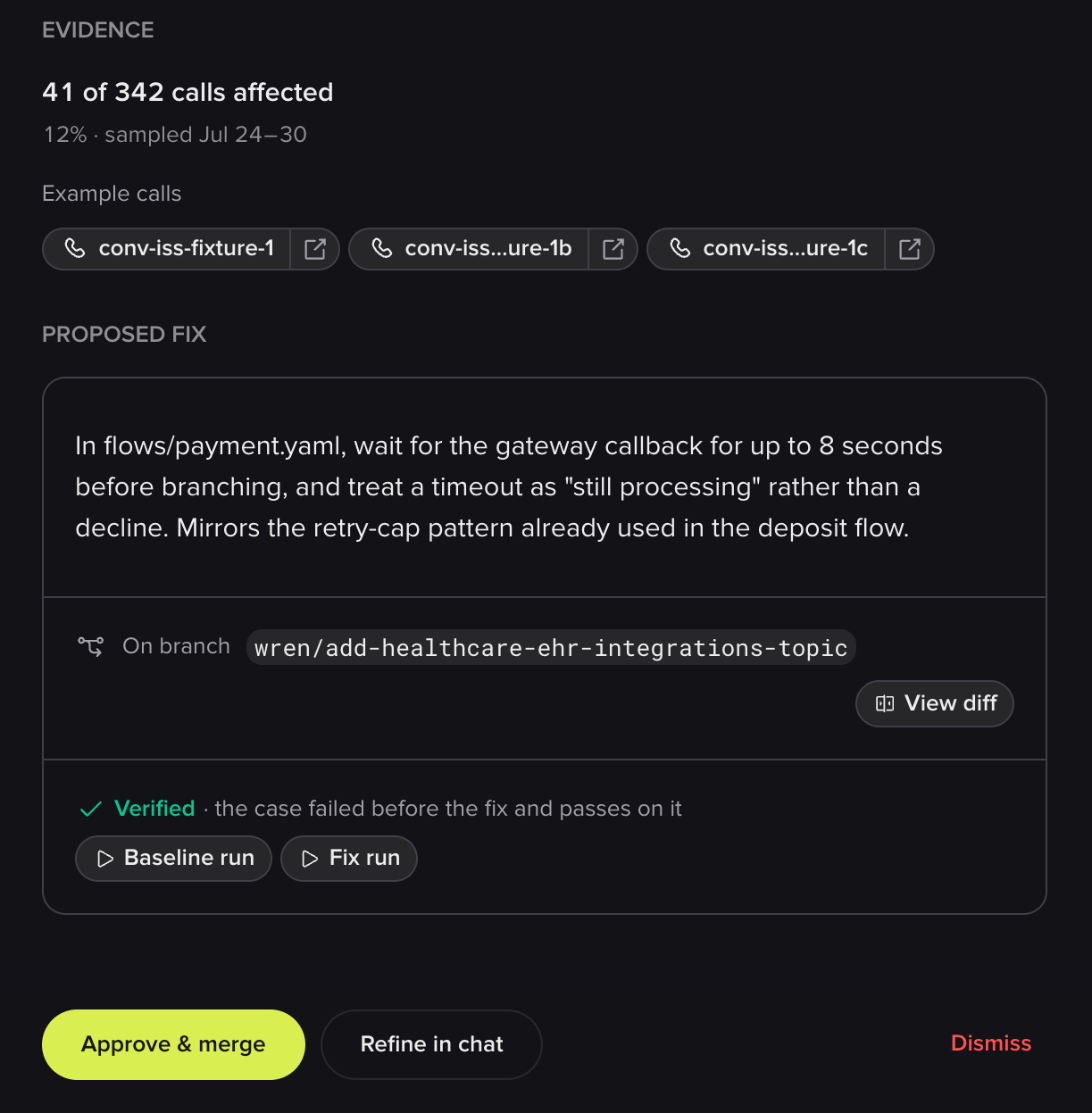 Because findings persist across reviews, Wren builds on what it already knows about your agent instead of re-reporting the same issue every time.
### Scheduled reviews
Reviews will also run on a schedule (nightly, weekly, or on a cadence you choose) against the environment you pick, with a standing prompt. You'd arrive to a digest of what happened overnight: what's working, what needs you, and where it's trending.
## Related pages
Ask your own questions about real calls.
Read the calls behind a finding.
Where verified fixes leave their test coverage.
Because findings persist across reviews, Wren builds on what it already knows about your agent instead of re-reporting the same issue every time.
### Scheduled reviews
Reviews will also run on a schedule (nightly, weekly, or on a cadence you choose) against the environment you pick, with a standing prompt. You'd arrive to a digest of what happened overnight: what's working, what needs you, and where it's trending.
## Related pages
Ask your own questions about real calls.
Read the calls behind a finding.
Where verified fixes leave their test coverage.