> ## Documentation Index
> Fetch the complete documentation index at: https://docs.poly.ai/llms.txt
> Use this file to discover all available pages before exploring further.
# Numbers
> Connect phone numbers to your agent using PolyAI, Twilio, or outbound calling
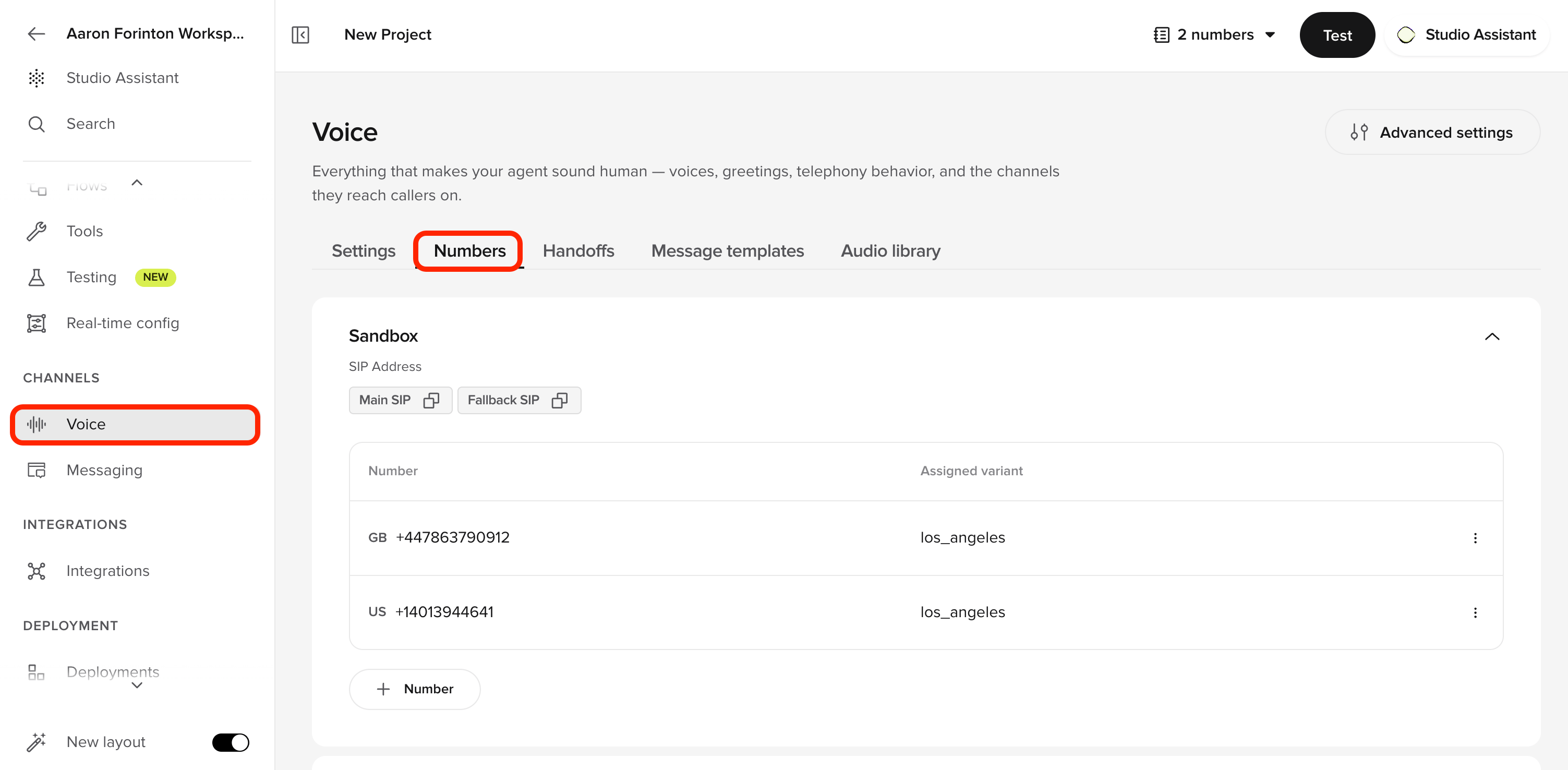
Numbers is how PolyAI connects your agent to the public phone network. Provision a number directly through PolyAI, bring your own Twilio number, or route through your existing contact-centre provider — every option terminates on the same agent runtime so the conversation logic is identical across channels. Manage everything in the **Numbers** tab on the Voice page, where you configure SIP addresses (Main SIP and Fallback SIP) and view the numbers assigned to each environment.
 | Option | Best for | What you get |
| ----------------------------------------------- | --------------------- | ---------------------------------------------------------- |
| **[Buy a number](./how-to-buy-number)** | No existing provider | Purchase directly from PolyAI. |
| **[Twilio integration](./twilio/introduction)** | Existing Twilio setup | Connect your Twilio numbers. Voice, SMS, and Flex routing. |
| **[Outbound calling](./outbound-calling)** | Proactive outreach | Agent-initiated calls through API or SIP. |
You can also connect through other contact center platforms like [Genesys](/integrations/voice/sip/genesys), [Five9](/integrations/voice/sip/five9), or [NICE CXone](/integrations/voice/sip/NICECXone) with SIP. See [Integrations](/integrations/introduction) for the full list.
## Integration options
Purchase a number directly from PolyAI.
Voice, SMS, and contact center routing with Twilio.
Agent-initiated calls for reminders and follow-ups.
## Twilio integration guides
* **[Twilio overview](./twilio/introduction)** – Benefits and setup overview
* **[Phone number integration](./twilio/how-to-integrate-voice)** – Connect a Twilio-hosted number
* **[SMS integration](/voice-channel/message-templates)** – Set up SMS messaging with Twilio
* **[Twilio Flex integration](/integrations/voice/twilio)** – Advanced contact center routing
## Outbound calling
Agent-initiated calls for reminders, follow-ups, and notifications.
* **[Outbound calling overview](./outbound-calling)** – Methods and best practices
* **[Outbound Calling API](/api-reference/outbound/introduction)** – Programmatically trigger calls
* **[SIP integration](/integrations/voice/sip/custom-sip)** – Route through your SIP infrastructure
## Automate with the Agents API
Telephony plumbing is scriptable too — helpful for bulk provisioning and for reshaping routing as part of a broader deployment.
Connectors bind phone numbers to voice infrastructure; phone numbers are E.164 strings routed through a connector. The [Agents API](/api-reference/agents/introduction) has CRUD for both.
```bash curl theme={"theme":{"light":"github-light","dark":"github-dark"}}
# Import a phone number onto an existing connector
curl -X POST https://api.us.poly.ai/v1/agents/AGENT_ID/telephony/phone-numbers/+442071234567 \
-H "x-api-key: $POLYAI_API_KEY" \
-H "Content-Type: application/json" \
-d '{ "connectorId": "conn_abc123" }'
# Reassign a number to a different connector
curl -X PATCH https://api.us.poly.ai/v1/agents/AGENT_ID/telephony/phone-numbers/+442071234567 \
-H "x-api-key: $POLYAI_API_KEY" \
-H "Content-Type: application/json" \
-d '{ "connectorId": "conn_new456" }'
```
```python Python theme={"theme":{"light":"github-light","dark":"github-dark"}}
import os, requests
BASE = "https://api.us.poly.ai"
HEADERS = {"x-api-key": os.environ["POLYAI_API_KEY"]}
# Look up which connector serves a given number
resp = requests.post(
f"{BASE}/v1/agents/{AGENT_ID}/telephony/connectors/lookup",
headers=HEADERS,
json={"phoneNumber": "+442071234567"},
)
connector = resp.json()
```
See [Connectors](/api-reference/agents/endpoint/connectors/list-all-connectors-for-a-project) and [Phone numbers](/api-reference/agents/endpoint/phone-numbers/list-all-phone-numbers-for-a-project) for the full endpoint list.
## Related pages
Configure how calls are routed to your agent
Connect to Genesys, Five9, NICE, and other platforms
Send text messages during voice conversations
Import and reassign numbers via the Agents API.
| Option | Best for | What you get |
| ----------------------------------------------- | --------------------- | ---------------------------------------------------------- |
| **[Buy a number](./how-to-buy-number)** | No existing provider | Purchase directly from PolyAI. |
| **[Twilio integration](./twilio/introduction)** | Existing Twilio setup | Connect your Twilio numbers. Voice, SMS, and Flex routing. |
| **[Outbound calling](./outbound-calling)** | Proactive outreach | Agent-initiated calls through API or SIP. |
You can also connect through other contact center platforms like [Genesys](/integrations/voice/sip/genesys), [Five9](/integrations/voice/sip/five9), or [NICE CXone](/integrations/voice/sip/NICECXone) with SIP. See [Integrations](/integrations/introduction) for the full list.
## Integration options
Purchase a number directly from PolyAI.
Voice, SMS, and contact center routing with Twilio.
Agent-initiated calls for reminders and follow-ups.
## Twilio integration guides
* **[Twilio overview](./twilio/introduction)** – Benefits and setup overview
* **[Phone number integration](./twilio/how-to-integrate-voice)** – Connect a Twilio-hosted number
* **[SMS integration](/voice-channel/message-templates)** – Set up SMS messaging with Twilio
* **[Twilio Flex integration](/integrations/voice/twilio)** – Advanced contact center routing
## Outbound calling
Agent-initiated calls for reminders, follow-ups, and notifications.
* **[Outbound calling overview](./outbound-calling)** – Methods and best practices
* **[Outbound Calling API](/api-reference/outbound/introduction)** – Programmatically trigger calls
* **[SIP integration](/integrations/voice/sip/custom-sip)** – Route through your SIP infrastructure
## Automate with the Agents API
Telephony plumbing is scriptable too — helpful for bulk provisioning and for reshaping routing as part of a broader deployment.
Connectors bind phone numbers to voice infrastructure; phone numbers are E.164 strings routed through a connector. The [Agents API](/api-reference/agents/introduction) has CRUD for both.
```bash curl theme={"theme":{"light":"github-light","dark":"github-dark"}}
# Import a phone number onto an existing connector
curl -X POST https://api.us.poly.ai/v1/agents/AGENT_ID/telephony/phone-numbers/+442071234567 \
-H "x-api-key: $POLYAI_API_KEY" \
-H "Content-Type: application/json" \
-d '{ "connectorId": "conn_abc123" }'
# Reassign a number to a different connector
curl -X PATCH https://api.us.poly.ai/v1/agents/AGENT_ID/telephony/phone-numbers/+442071234567 \
-H "x-api-key: $POLYAI_API_KEY" \
-H "Content-Type: application/json" \
-d '{ "connectorId": "conn_new456" }'
```
```python Python theme={"theme":{"light":"github-light","dark":"github-dark"}}
import os, requests
BASE = "https://api.us.poly.ai"
HEADERS = {"x-api-key": os.environ["POLYAI_API_KEY"]}
# Look up which connector serves a given number
resp = requests.post(
f"{BASE}/v1/agents/{AGENT_ID}/telephony/connectors/lookup",
headers=HEADERS,
json={"phoneNumber": "+442071234567"},
)
connector = resp.json()
```
See [Connectors](/api-reference/agents/endpoint/connectors/list-all-connectors-for-a-project) and [Phone numbers](/api-reference/agents/endpoint/phone-numbers/list-all-phone-numbers-for-a-project) for the full endpoint list.
## Related pages
Configure how calls are routed to your agent
Connect to Genesys, Five9, NICE, and other platforms
Send text messages during voice conversations
Import and reassign numbers via the Agents API.