> ## Documentation Index
> Fetch the complete documentation index at: https://docs.poly.ai/llms.txt
> Use this file to discover all available pages before exploring further.
# Start tool
> Initialize conversation state, read SIP headers, and set variant routing before the greeting plays.
**This page requires Python familiarity.** The start tool is a Python function named `start_function` that runs before every call's greeting.
The **Start tool** (Python identifier: `start_function`) runs when a conversation begins, before the greeting plays. Use it to initialize conversation state, read SIP headers, or make API calls. A broken or slow `start_function` delays or prevents the greeting from playing, affecting every inbound call.
## Access the start tool in the UI
The start tool is a built-in tool that ships with every agent – you don't create it from scratch. Find it under **Tools**, in the **Start and end tool calls** section at the top of the page. This section contains two pre-built cards (**Start tool** and **End tool**) that are automatically invoked before and after every conversation.
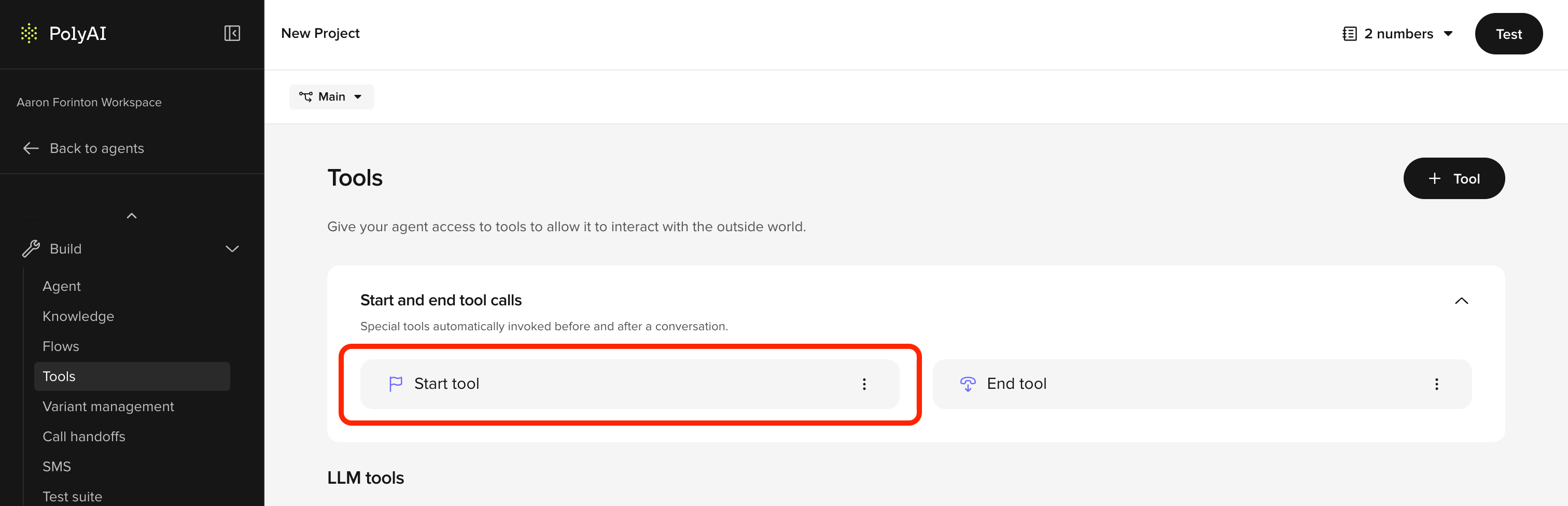 To edit the start tool:
1. From your agent's main page, open **Tools** in the sidebar.
2. In the **Start and end tool calls** section, click **Start tool**.
3. Write your Python in the **Function definition** field. The function is already named `start_function` and receives a single `conv: Conversation` argument – do not rename it.
4. Save your changes. The function runs at the start of every conversation in that environment from the next call onwards.
Unlike LLM-invoked tools, the start tool has no LLM parameters, description, or trigger configuration – it is invoked by the runtime before the greeting plays. See [Create tool](/tools/how-to-setup) for the editor walkthrough used by regular LLM tools.
```mermaid theme={"theme":{"light":"github-light","dark":"github-dark"}}
sequenceDiagram
participant Caller
participant PolyAI as PolyAI Agent
participant API as External API
Caller->>PolyAI: Inbound call
activate PolyAI
Note over PolyAI: start_function() executes
PolyAI->>PolyAI: Read SIP headers
PolyAI->>PolyAI: Initialize state variables
PolyAI->>API: Fetch customer data (optional)
API-->>PolyAI: Customer record
deactivate PolyAI
PolyAI->>Caller: Greeting plays
Note over Caller,PolyAI: Conversation begins
```
`start_function` is **synchronous** — it must complete before the greeting plays, so keep it fast. On timeout the greeting may not play and the conversation can land in an unexpected state.
**Outbound:** if the recipient hangs up before `start_function` completes, it may be skipped entirely. Handle this gracefully.
[Delay control](/tools/delay-control) (filler utterances) is **not supported** on the start tool. If `start_function` has variable latency, the only mitigation is to keep it fast or move slow operations into a flow step.
### When to use the start tool vs. a flow step
Not every API call belongs in the start tool. Use this decision framework:
| Scenario | Where to place it |
| ------------------------------------------------------------------------------------ | -------------------------------------------------------------- |
| Data needed **before** the greeting (e.g. caller lookup for a personalized greeting) | Start tool |
| Fast, reliable API (\<1s response time) | Start tool – reduces mid-conversation latency |
| Slow or unreliable API (external CRM, third-party lookup) | First [flow step](/flows/introduction) – protects the greeting |
| Data only needed mid-conversation | Flow step |
If an API call is not strictly needed before the greeting, move it to the first step of your flow to avoid timeout risk.
## Key features
* **Synchronous execution**: Completes before the greeting plays
* **Context preparation**: Stores data for use throughout the conversation
## Use cases
Use [`conv.channel_type`](/tools/classes/conv-object#channel_type) to determine whether the conversation is voice, webchat, or another channel – then branch accordingly. Disable call transfers for webchat, set a different persona, or inject channel-specific prompts.
Capture SIP headers (voice) or URL parameters (webchat) to determine the caller's origin – for example, mapping a dialled number to a business branch.
Initialize state with the current date, time, or day of the week for timestamping or scheduling logic.
Fetch external data such as user preferences, account information, or customer records to preload personalized context.
Use [`conv.set_variant()`](/tools/classes/conv-object#set_variant) to route the conversation to a specific [variant](/knowledge/variants/introduction) based on SIP headers, callee number, or other metadata. This is the standard way to configure multi-site agents.
Read a language header or parameter and configure the agent accordingly – set the variant, choose a language-specific TTS voice, or store language-specific prompt rules in state.
For outbound agents, read lead data or campaign metadata from SIP headers injected by the calling platform.
Access [`conv.integration_attributes`](/tools/classes/conv-object#integration_attributes) to read metadata passed from external integrations (e.g. DNIs pooling, Chat API).
`conv.integration_attributes` can only be read in `start_function`. Extract values and store them in `conv.state` for use later.
Set the TTS provider in `start_function`. Supported providers include [Cartesia](https://docs.cartesia.ai/api-reference/tts/tts), [PlayHT](https://docs.play.ht/reference/api-getting-started), and [Rime](https://docs.rime.ai/api-reference/voices). See [voice configuration](/voice-channel/advanced/call-settings) and [tool classes](/tools/classes).
## Implementation example
Below is a Python implementation of the start tool. The function must be named `start_function`:
```python theme={"theme":{"light":"github-light","dark":"github-dark"}}
import datetime as dt
def start_function(conv: Conversation):
# Retrieve the current date and time
now = dt.datetime.now()
conv.state.current_date = now.strftime("%A %d-%m-%Y")
conv.state.current_weekday = now.strftime("%A")
conv.state.current_time = now.strftime("%H:%M")
# Initialize state variables
conv.state.available_times = None
conv.state.user_bookings = None
# Store the caller's phone number
conv.state.phone_number = conv.caller_number
# Detect channel type for multi-channel agents
conv.state.is_voice = conv.channel_type == "sip.polyai"
# Set variant based on dialled number (multi-site routing)
site_map = {
"+441234567890": "london",
"+442345678901": "new_york",
}
site = site_map.get(conv.callee_number, "default")
conv.set_variant(site)
# Store integration attributes (only available in start_function)
if conv.integration_attributes:
conv.state.shared_id = conv.integration_attributes.get("shared_id")
# Return an empty string to indicate successful execution
return str()
```
## Return values
The start tool supports the same [return values](/tools/return-values) as other tools. The most common patterns are:
### Empty string (default)
Return `str()` when `start_function` only needs to set up state. The agent greeting defined in the Agent settings will play as normal.
```python theme={"theme":{"light":"github-light","dark":"github-dark"}}
return str()
```
### Dynamic greeting
Return an `utterance` to override the default greeting with a dynamically generated message. This is useful when the greeting depends on data fetched during `start_function` (e.g. the caller's name or site-specific wording).
```python theme={"theme":{"light":"github-light","dark":"github-dark"}}
return {
"utterance": f"Welcome to {conv.variant.site_name}. How can I help you today?"
}
```
Returning an `utterance` from `start_function` overrides the configured channel greeting. Test carefully if you use both.
### Listen configuration
Return a `listen` object to configure ASR behavior for the first turn.
```python theme={"theme":{"light":"github-light","dark":"github-dark"}}
return {
"utterance": "Welcome. Please say or enter your account number.",
"listen": {
"asr": {
"timeout": 15
}
}
}
```
See [return values](/tools/return-values) for the full list of supported return types.
## Best practices
1. **Keep it fast**: The start tool blocks the greeting. Target under 1 second total execution time. Move slow or unreliable API calls to a [flow step](/flows/introduction).
2. **Never hardcode credentials**: Use [`conv.utils.get_secret()`](/secrets/introduction) for all API keys, tokens, and passwords. Hardcoded credentials in tool code are a security risk and may be exposed in logs or version history.
```python theme={"theme":{"light":"github-light","dark":"github-dark"}}
api_key = conv.utils.get_secret("my_api_key")
```
3. **Error handling**:
* Handle missing or malformed data and avoid runtime errors.
* Provide fallbacks for incomplete or invalid information (like missing SIP headers or unavailable APIs).
4. **State initialization**:
* Predefine and initialize all state variables needed for the conversation to avoid undefined behaviors. Reading an unset `conv.state` variable returns `None` (it does not raise), so initializing to `None` – or a sensible default like `""` or `0` – makes intent explicit and keeps [prompt templates](/tools/variables#prompt-templating) and `is None` checks predictable.
```python theme={"theme":{"light":"github-light","dark":"github-dark"}}
conv.state.booking_time = None # explicit "not yet collected" marker
conv.state.ooh_preface = "" # safe default for prompt templating
```
* Extract `conv.integration_attributes` here – they are only available in `start_function`.
5. **Contextual relevance**:
* Only include setup steps that are directly relevant to the conversation's purpose.
* Avoid overloading the start tool with unnecessary logic.
## Common patterns
The most common advanced use of the start tool is routing to a [variant](/knowledge/variants/introduction) based on the dialled number, SIP headers, or other metadata. This is how multi-site agents (hotels, restaurant chains, retail) determine which location's content to use.
**Hardcoded map** – use when the number-to-variant mapping is small and static:
```python theme={"theme":{"light":"github-light","dark":"github-dark"}}
def start_function(conv: Conversation):
phone_numbers = {
"+441234567890": "London",
"+442345678901": "New York",
}
conv.set_variant(phone_numbers.get(conv.callee_number, "default"))
return str()
```
**Dynamic lookup from variant attributes** – use when you store the phone number (or any routing key) as an attribute in the variant table. For example, if your variant table has a `callee` column containing each variant's phone number:
```python theme={"theme":{"light":"github-light","dark":"github-dark"}}
def start_function(conv: Conversation):
callee_map = {
variant.callee: variant_name
for variant_name, variant in conv.variants.items()
}
if conv.callee_number and conv.callee_number in callee_map:
conv.set_variant(callee_map[conv.callee_number])
return str()
```
Replace `variant.callee` with whatever attribute name you defined in **Knowledge > Variants** (e.g., `variant.phone_number`, `variant.routing_id`).
**Full article:** [Variants](/knowledge/variants/introduction)
Read a language code from SIP headers or integration data, set the appropriate variant, and configure a language-specific TTS voice.
```python theme={"theme":{"light":"github-light","dark":"github-dark"}}
def start_function(conv: Conversation):
language = conv.sip_headers.get("X-Language", "en")
conv.set_variant(language)
if language == "es":
from polyai.voice import CartesiaVoice
conv.set_voice(CartesiaVoice(provider_voice_id="your-voice-id"))
return str()
```
**Force a language by dialled number (DNIS)** – use `conv.callee_number` and `conv.set_language()` when each market has its own phone number and you want to skip auto-detection. The language code must already be configured under **Behavior > Additional languages** (or be the main language); otherwise the agent falls back to the default language.
```python theme={"theme":{"light":"github-light","dark":"github-dark"}}
def start_function(conv: Conversation):
spanish_dnis = {"+34911234567", "+34931234567"}
if conv.callee_number in spanish_dnis:
conv.set_language("es-ES")
else:
conv.set_language("en-US")
return str()
```
See [Multi-language](/behavior/language/multilingual) for the full setup.
Use `conv.channel_type` to disable voice-only features (like call transfers) for webchat, or to inject channel-specific prompts.
```python theme={"theme":{"light":"github-light","dark":"github-dark"}}
def start_function(conv: Conversation):
conv.state.is_voice = conv.channel_type == "sip.polyai"
if not conv.state.is_voice:
conv.state.transfers_enabled = False
return str()
```
The start tool is where you configure which TTS voice the agent uses for a given call. This is required when running multiple voices across variants or channels, because the Voice page UI may not expose all available providers.
**Full article:** [Multi-voice](/voice-channel/multi-voice)
Use `conv.caller_number` or metadata from an API call to personalize the greeting or preload account context.
Make a fast API call to fetch scheduling information, past bookings, or account details so the agent has context from the first turn.
## Related pages
Run post-call processing after a conversation ends.
Control agent behavior with string and dictionary returns.
Route calls to specific variants from the start tool.
To edit the start tool:
1. From your agent's main page, open **Tools** in the sidebar.
2. In the **Start and end tool calls** section, click **Start tool**.
3. Write your Python in the **Function definition** field. The function is already named `start_function` and receives a single `conv: Conversation` argument – do not rename it.
4. Save your changes. The function runs at the start of every conversation in that environment from the next call onwards.
Unlike LLM-invoked tools, the start tool has no LLM parameters, description, or trigger configuration – it is invoked by the runtime before the greeting plays. See [Create tool](/tools/how-to-setup) for the editor walkthrough used by regular LLM tools.
```mermaid theme={"theme":{"light":"github-light","dark":"github-dark"}}
sequenceDiagram
participant Caller
participant PolyAI as PolyAI Agent
participant API as External API
Caller->>PolyAI: Inbound call
activate PolyAI
Note over PolyAI: start_function() executes
PolyAI->>PolyAI: Read SIP headers
PolyAI->>PolyAI: Initialize state variables
PolyAI->>API: Fetch customer data (optional)
API-->>PolyAI: Customer record
deactivate PolyAI
PolyAI->>Caller: Greeting plays
Note over Caller,PolyAI: Conversation begins
```
`start_function` is **synchronous** — it must complete before the greeting plays, so keep it fast. On timeout the greeting may not play and the conversation can land in an unexpected state.
**Outbound:** if the recipient hangs up before `start_function` completes, it may be skipped entirely. Handle this gracefully.
[Delay control](/tools/delay-control) (filler utterances) is **not supported** on the start tool. If `start_function` has variable latency, the only mitigation is to keep it fast or move slow operations into a flow step.
### When to use the start tool vs. a flow step
Not every API call belongs in the start tool. Use this decision framework:
| Scenario | Where to place it |
| ------------------------------------------------------------------------------------ | -------------------------------------------------------------- |
| Data needed **before** the greeting (e.g. caller lookup for a personalized greeting) | Start tool |
| Fast, reliable API (\<1s response time) | Start tool – reduces mid-conversation latency |
| Slow or unreliable API (external CRM, third-party lookup) | First [flow step](/flows/introduction) – protects the greeting |
| Data only needed mid-conversation | Flow step |
If an API call is not strictly needed before the greeting, move it to the first step of your flow to avoid timeout risk.
## Key features
* **Synchronous execution**: Completes before the greeting plays
* **Context preparation**: Stores data for use throughout the conversation
## Use cases
Use [`conv.channel_type`](/tools/classes/conv-object#channel_type) to determine whether the conversation is voice, webchat, or another channel – then branch accordingly. Disable call transfers for webchat, set a different persona, or inject channel-specific prompts.
Capture SIP headers (voice) or URL parameters (webchat) to determine the caller's origin – for example, mapping a dialled number to a business branch.
Initialize state with the current date, time, or day of the week for timestamping or scheduling logic.
Fetch external data such as user preferences, account information, or customer records to preload personalized context.
Use [`conv.set_variant()`](/tools/classes/conv-object#set_variant) to route the conversation to a specific [variant](/knowledge/variants/introduction) based on SIP headers, callee number, or other metadata. This is the standard way to configure multi-site agents.
Read a language header or parameter and configure the agent accordingly – set the variant, choose a language-specific TTS voice, or store language-specific prompt rules in state.
For outbound agents, read lead data or campaign metadata from SIP headers injected by the calling platform.
Access [`conv.integration_attributes`](/tools/classes/conv-object#integration_attributes) to read metadata passed from external integrations (e.g. DNIs pooling, Chat API).
`conv.integration_attributes` can only be read in `start_function`. Extract values and store them in `conv.state` for use later.
Set the TTS provider in `start_function`. Supported providers include [Cartesia](https://docs.cartesia.ai/api-reference/tts/tts), [PlayHT](https://docs.play.ht/reference/api-getting-started), and [Rime](https://docs.rime.ai/api-reference/voices). See [voice configuration](/voice-channel/advanced/call-settings) and [tool classes](/tools/classes).
## Implementation example
Below is a Python implementation of the start tool. The function must be named `start_function`:
```python theme={"theme":{"light":"github-light","dark":"github-dark"}}
import datetime as dt
def start_function(conv: Conversation):
# Retrieve the current date and time
now = dt.datetime.now()
conv.state.current_date = now.strftime("%A %d-%m-%Y")
conv.state.current_weekday = now.strftime("%A")
conv.state.current_time = now.strftime("%H:%M")
# Initialize state variables
conv.state.available_times = None
conv.state.user_bookings = None
# Store the caller's phone number
conv.state.phone_number = conv.caller_number
# Detect channel type for multi-channel agents
conv.state.is_voice = conv.channel_type == "sip.polyai"
# Set variant based on dialled number (multi-site routing)
site_map = {
"+441234567890": "london",
"+442345678901": "new_york",
}
site = site_map.get(conv.callee_number, "default")
conv.set_variant(site)
# Store integration attributes (only available in start_function)
if conv.integration_attributes:
conv.state.shared_id = conv.integration_attributes.get("shared_id")
# Return an empty string to indicate successful execution
return str()
```
## Return values
The start tool supports the same [return values](/tools/return-values) as other tools. The most common patterns are:
### Empty string (default)
Return `str()` when `start_function` only needs to set up state. The agent greeting defined in the Agent settings will play as normal.
```python theme={"theme":{"light":"github-light","dark":"github-dark"}}
return str()
```
### Dynamic greeting
Return an `utterance` to override the default greeting with a dynamically generated message. This is useful when the greeting depends on data fetched during `start_function` (e.g. the caller's name or site-specific wording).
```python theme={"theme":{"light":"github-light","dark":"github-dark"}}
return {
"utterance": f"Welcome to {conv.variant.site_name}. How can I help you today?"
}
```
Returning an `utterance` from `start_function` overrides the configured channel greeting. Test carefully if you use both.
### Listen configuration
Return a `listen` object to configure ASR behavior for the first turn.
```python theme={"theme":{"light":"github-light","dark":"github-dark"}}
return {
"utterance": "Welcome. Please say or enter your account number.",
"listen": {
"asr": {
"timeout": 15
}
}
}
```
See [return values](/tools/return-values) for the full list of supported return types.
## Best practices
1. **Keep it fast**: The start tool blocks the greeting. Target under 1 second total execution time. Move slow or unreliable API calls to a [flow step](/flows/introduction).
2. **Never hardcode credentials**: Use [`conv.utils.get_secret()`](/secrets/introduction) for all API keys, tokens, and passwords. Hardcoded credentials in tool code are a security risk and may be exposed in logs or version history.
```python theme={"theme":{"light":"github-light","dark":"github-dark"}}
api_key = conv.utils.get_secret("my_api_key")
```
3. **Error handling**:
* Handle missing or malformed data and avoid runtime errors.
* Provide fallbacks for incomplete or invalid information (like missing SIP headers or unavailable APIs).
4. **State initialization**:
* Predefine and initialize all state variables needed for the conversation to avoid undefined behaviors. Reading an unset `conv.state` variable returns `None` (it does not raise), so initializing to `None` – or a sensible default like `""` or `0` – makes intent explicit and keeps [prompt templates](/tools/variables#prompt-templating) and `is None` checks predictable.
```python theme={"theme":{"light":"github-light","dark":"github-dark"}}
conv.state.booking_time = None # explicit "not yet collected" marker
conv.state.ooh_preface = "" # safe default for prompt templating
```
* Extract `conv.integration_attributes` here – they are only available in `start_function`.
5. **Contextual relevance**:
* Only include setup steps that are directly relevant to the conversation's purpose.
* Avoid overloading the start tool with unnecessary logic.
## Common patterns
The most common advanced use of the start tool is routing to a [variant](/knowledge/variants/introduction) based on the dialled number, SIP headers, or other metadata. This is how multi-site agents (hotels, restaurant chains, retail) determine which location's content to use.
**Hardcoded map** – use when the number-to-variant mapping is small and static:
```python theme={"theme":{"light":"github-light","dark":"github-dark"}}
def start_function(conv: Conversation):
phone_numbers = {
"+441234567890": "London",
"+442345678901": "New York",
}
conv.set_variant(phone_numbers.get(conv.callee_number, "default"))
return str()
```
**Dynamic lookup from variant attributes** – use when you store the phone number (or any routing key) as an attribute in the variant table. For example, if your variant table has a `callee` column containing each variant's phone number:
```python theme={"theme":{"light":"github-light","dark":"github-dark"}}
def start_function(conv: Conversation):
callee_map = {
variant.callee: variant_name
for variant_name, variant in conv.variants.items()
}
if conv.callee_number and conv.callee_number in callee_map:
conv.set_variant(callee_map[conv.callee_number])
return str()
```
Replace `variant.callee` with whatever attribute name you defined in **Knowledge > Variants** (e.g., `variant.phone_number`, `variant.routing_id`).
**Full article:** [Variants](/knowledge/variants/introduction)
Read a language code from SIP headers or integration data, set the appropriate variant, and configure a language-specific TTS voice.
```python theme={"theme":{"light":"github-light","dark":"github-dark"}}
def start_function(conv: Conversation):
language = conv.sip_headers.get("X-Language", "en")
conv.set_variant(language)
if language == "es":
from polyai.voice import CartesiaVoice
conv.set_voice(CartesiaVoice(provider_voice_id="your-voice-id"))
return str()
```
**Force a language by dialled number (DNIS)** – use `conv.callee_number` and `conv.set_language()` when each market has its own phone number and you want to skip auto-detection. The language code must already be configured under **Behavior > Additional languages** (or be the main language); otherwise the agent falls back to the default language.
```python theme={"theme":{"light":"github-light","dark":"github-dark"}}
def start_function(conv: Conversation):
spanish_dnis = {"+34911234567", "+34931234567"}
if conv.callee_number in spanish_dnis:
conv.set_language("es-ES")
else:
conv.set_language("en-US")
return str()
```
See [Multi-language](/behavior/language/multilingual) for the full setup.
Use `conv.channel_type` to disable voice-only features (like call transfers) for webchat, or to inject channel-specific prompts.
```python theme={"theme":{"light":"github-light","dark":"github-dark"}}
def start_function(conv: Conversation):
conv.state.is_voice = conv.channel_type == "sip.polyai"
if not conv.state.is_voice:
conv.state.transfers_enabled = False
return str()
```
The start tool is where you configure which TTS voice the agent uses for a given call. This is required when running multiple voices across variants or channels, because the Voice page UI may not expose all available providers.
**Full article:** [Multi-voice](/voice-channel/multi-voice)
Use `conv.caller_number` or metadata from an API call to personalize the greeting or preload account context.
Make a fast API call to fetch scheduling information, past bookings, or account details so the agent has context from the first turn.
## Related pages
Run post-call processing after a conversation ends.
Control agent behavior with string and dictionary returns.
Route calls to specific variants from the start tool.