> ## Documentation Index
> Fetch the complete documentation index at: https://docs.poly.ai/llms.txt
> Use this file to discover all available pages before exploring further.
# Create tool
> Write Python functions with parameters and return values to integrate APIs and business logic.
**This page requires Python familiarity.** Functions are written in Python and run inside your agent.
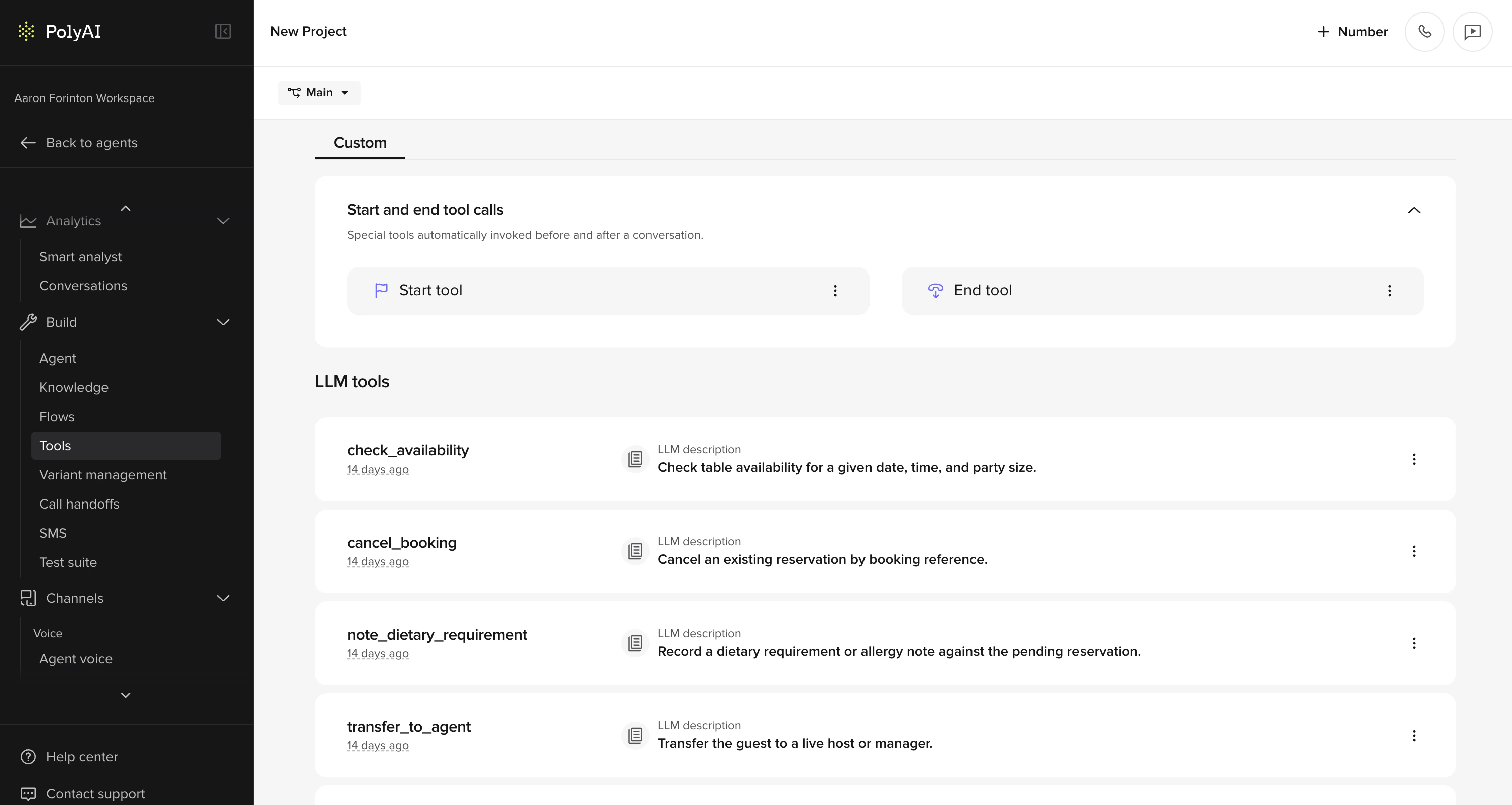
Create a function in **Tools**.
 ## Step-by-step guide
Set up a new function to integrate APIs, validate input, or add custom business logic to your agent.
### 1. **Find "Tools" in the sidebar**
* Go to the agent's main page and navigate to **Tools** in the sidebar.
### 2. **Click "Add Function"**
* Select **Add Function** to create a new function.
### 3. **Define the function name**
* At the top of the page, define the function name. Note that the function name can only contain alphanumeric characters and underscores.
Function names are processed by the LLM like any other text, so descriptive accuracy is key. Name functions to explicitly describe what they do and avoid "start" and "stop" language. For example, changing `start_package_upgrade` to `get_available_packages` prevents the LLM from assuming an unnecessary process is starting.
### 4. **Provide a description**
* Use the "Description" field to provide an accurate summary of what your function does. This helps the model understand when to call the function. Be descriptive and concise about its purpose.
### 5. **Define LLM parameters**
* In the "LLM Parameters" field, specify the parameters the LLM model will collect and use in the function.
* **Name**: Assign a clear and descriptive name to improve the accuracy of the LLM result.
* **Context Description**: Provide essential context to help the LLM accurately understand and extract the parameter from the caller.
* **Type**: Specify the parameter type. Options include "string," "number," "integer," or "boolean." Note that "number" supports decimals, while "integer" does not.
### 6. **Define the function**
* Use the "Function Definition" field to write the function in Python. You can retrieve secrets in your Python definition – see [Secrets](/secrets/introduction) for details.
* The function should return a string or dictionary. A string provides additional context for the LLM. A dictionary can control agent behavior (handoff, hangup, listen, etc.). See [Return values](/tools/return-values) for the full list of supported return types.
### 7. **Save the function**
* Click "Save" to finalize and create your function.
## Best practices
### Environment configuration
You can use the [`conv.env`](./classes/conv-object#env) property to define environment-specific functions and activate test features in sandbox or pre-release environments.
```python theme={"theme":{"light":"github-light","dark":"github-dark"}}
if conv.env == "sandbox":
# enable early feedback flow
pass
elif conv.env == "pre-release":
# activate staging tools
pass
elif conv.env == "live":
# run production features
pass
```
### Handling API response errors
When writing functions that call external APIs (e.g. to fetch user records or transactions), always handle non-`200` HTTP responses explicitly.
If `response.status_code != 200`, make sure to distinguish:
* A **true error** (e.g. invalid URL or broken integration)
* From a **valid request with no user data** (e.g. user has no transaction history)
Instead of returning a generic failure, you can hand off the call or give a clearer response depending on the cause.
Example:
```python theme={"theme":{"light":"github-light","dark":"github-dark"}}
response = requests.get(url)
if response.status_code == 404:
return {
"handoff": {
"reason": "no_transaction_data",
"utterance": "It looks like there's no recent activity on your account. Let me transfer you to someone who can help."
}
}
elif response.status_code != 200:
return {
"utterance": "Sorry, we couldn't reach your account information right now. Please try again later."
}
```
## Related pages
Standard and non-standard libraries available in functions.
Control agent behavior with string and dictionary returns.
Full reference for conv.state, conv.log, and other properties.
## Step-by-step guide
Set up a new function to integrate APIs, validate input, or add custom business logic to your agent.
### 1. **Find "Tools" in the sidebar**
* Go to the agent's main page and navigate to **Tools** in the sidebar.
### 2. **Click "Add Function"**
* Select **Add Function** to create a new function.
### 3. **Define the function name**
* At the top of the page, define the function name. Note that the function name can only contain alphanumeric characters and underscores.
Function names are processed by the LLM like any other text, so descriptive accuracy is key. Name functions to explicitly describe what they do and avoid "start" and "stop" language. For example, changing `start_package_upgrade` to `get_available_packages` prevents the LLM from assuming an unnecessary process is starting.
### 4. **Provide a description**
* Use the "Description" field to provide an accurate summary of what your function does. This helps the model understand when to call the function. Be descriptive and concise about its purpose.
### 5. **Define LLM parameters**
* In the "LLM Parameters" field, specify the parameters the LLM model will collect and use in the function.
* **Name**: Assign a clear and descriptive name to improve the accuracy of the LLM result.
* **Context Description**: Provide essential context to help the LLM accurately understand and extract the parameter from the caller.
* **Type**: Specify the parameter type. Options include "string," "number," "integer," or "boolean." Note that "number" supports decimals, while "integer" does not.
### 6. **Define the function**
* Use the "Function Definition" field to write the function in Python. You can retrieve secrets in your Python definition – see [Secrets](/secrets/introduction) for details.
* The function should return a string or dictionary. A string provides additional context for the LLM. A dictionary can control agent behavior (handoff, hangup, listen, etc.). See [Return values](/tools/return-values) for the full list of supported return types.
### 7. **Save the function**
* Click "Save" to finalize and create your function.
## Best practices
### Environment configuration
You can use the [`conv.env`](./classes/conv-object#env) property to define environment-specific functions and activate test features in sandbox or pre-release environments.
```python theme={"theme":{"light":"github-light","dark":"github-dark"}}
if conv.env == "sandbox":
# enable early feedback flow
pass
elif conv.env == "pre-release":
# activate staging tools
pass
elif conv.env == "live":
# run production features
pass
```
### Handling API response errors
When writing functions that call external APIs (e.g. to fetch user records or transactions), always handle non-`200` HTTP responses explicitly.
If `response.status_code != 200`, make sure to distinguish:
* A **true error** (e.g. invalid URL or broken integration)
* From a **valid request with no user data** (e.g. user has no transaction history)
Instead of returning a generic failure, you can hand off the call or give a clearer response depending on the cause.
Example:
```python theme={"theme":{"light":"github-light","dark":"github-dark"}}
response = requests.get(url)
if response.status_code == 404:
return {
"handoff": {
"reason": "no_transaction_data",
"utterance": "It looks like there's no recent activity on your account. Let me transfer you to someone who can help."
}
}
elif response.status_code != 200:
return {
"utterance": "Sorry, we couldn't reach your account information right now. Please try again later."
}
```
## Related pages
Standard and non-standard libraries available in functions.
Control agent behavior with string and dictionary returns.
Full reference for conv.state, conv.log, and other properties.