> ## Documentation Index
> Fetch the complete documentation index at: https://docs.poly.ai/llms.txt
> Use this file to discover all available pages before exploring further.
# Conversation API client
> Call configured APIs from functions using conv.api with automatic environment and auth handling.
**This page requires Python familiarity.** It covers calling APIs from Python functions using `conv.api`.
Use `conv.api` when your function needs to call an external service – CRM lookups, booking systems, payment providers. API definitions (base URLs, auth, operations) are configured in the **APIs** tab in Agent Studio; your function code stays clean and environment-safe.
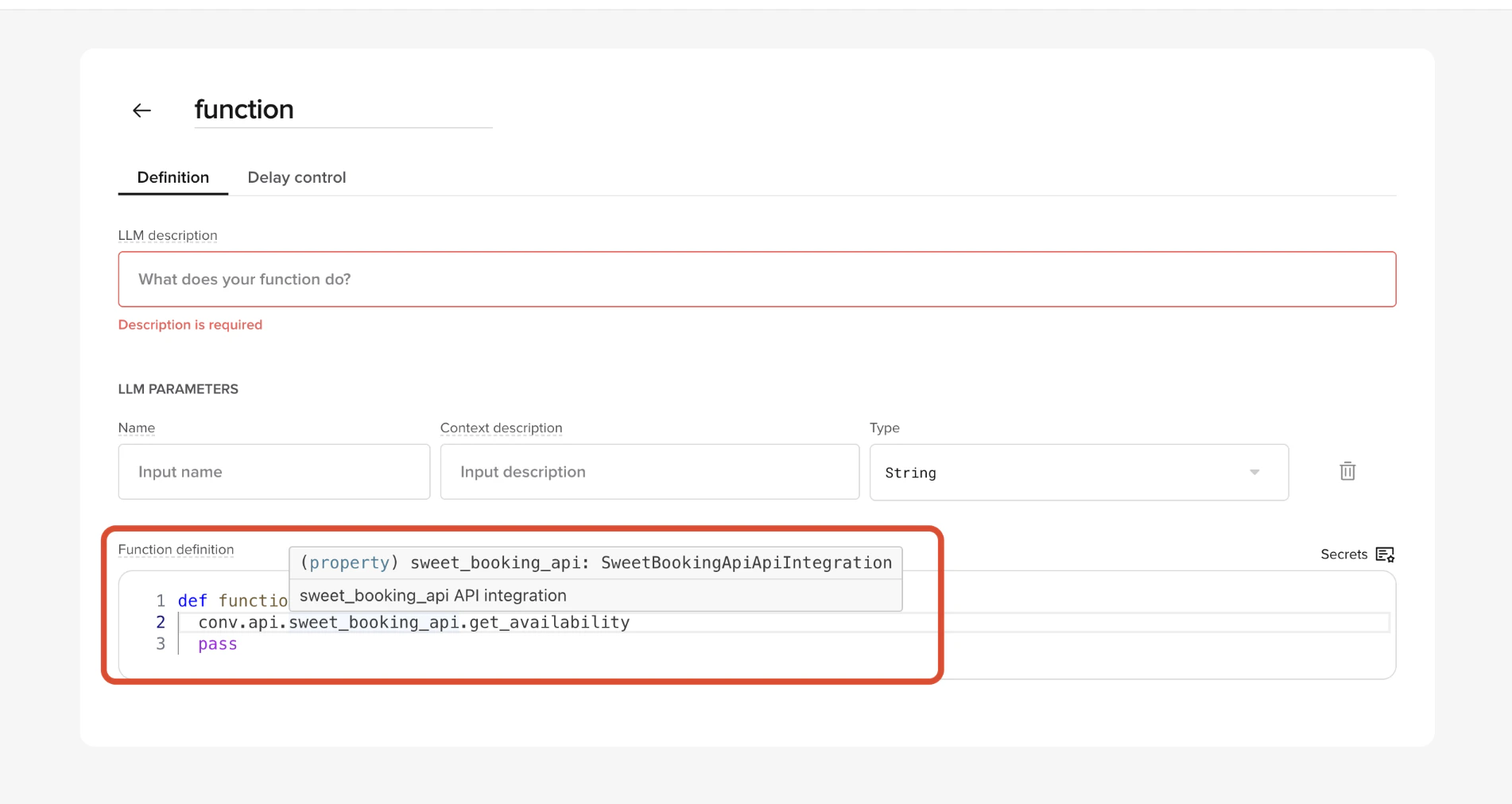 ## How it works
1. You define an API in **Agent Studio → APIs**
* Name
* Base URL (per environment)
* Auth type
* One or more operations (method + resource path)
2. Agent Studio generates a client at runtime.
3. Inside a function, you call it via:
`conv.api..(...)`
The call is executed using the environment's base URL and auth settings automatically.
## Naming rules
* API name in the UI becomes the client name under `conv.api`
* `sweet_booking_api` → `conv.api.sweet_booking_api`
* Operation name becomes the callable method
* `create_booking` → `conv.api.sweet_booking_api.create_booking()`
Use lowercase `snake_case` names to keep calls readable.
## Basic example
API defined in UI:
* API name: `sweet_booking_api`
* Base URL: `https://api.sweets.example`
* Operation:
* Method: POST
* Operation name: `create_booking`
* Resource: `/bookings`
Function usage:
```python theme={"theme":{"light":"github-light","dark":"github-dark"}}
response = conv.api.sweet_booking_api.create_booking(
json={
"party_size": 4,
"date": "2026-02-01",
"contact_phone": conv.caller_number
}
)
```
## Path variables
Path parameters defined in the resource can be passed positionally or by name.
Resource:
`/bookings/{booking_id}`
Both of these are valid:
```python theme={"theme":{"light":"github-light","dark":"github-dark"}}
response = conv.api.sweet_booking_api.get_booking("abc123")
```
```python theme={"theme":{"light":"github-light","dark":"github-dark"}}
response = conv.api.sweet_booking_api.get_booking(
booking_id="abc123"
)
```
## Query parameters
Use the `params` argument for query string parameters.
```python theme={"theme":{"light":"github-light","dark":"github-dark"}}
response = conv.api.sweet_booking_api.list_bookings(
params={
"from": "2026-02-01",
"to": "2026-02-07"
}
)
```
## Request body
Use `json` (recommended) or `data` depending on the API.
```python theme={"theme":{"light":"github-light","dark":"github-dark"}}
response = conv.api.sweet_booking_api.create_booking(
json={
"party_size": 6,
"notes": "Birthday booking"
}
)
```
## Custom headers
You can pass additional headers at call time.
```python theme={"theme":{"light":"github-light","dark":"github-dark"}}
response = conv.api.sweet_booking_api.create_booking(
json={ "party_size": 4 },
headers={
"X-Request-Source": "polyai-agent",
"X-Correlation-Id": conv.id
}
)
```
## Responses
The return value is a standard HTTP response object.
Typical fields you'll use:
* `response.status_code`
* `response.json()`
* `response.text`
Example:
```python theme={"theme":{"light":"github-light","dark":"github-dark"}}
response = conv.api.sweet_booking_api.create_booking(json=payload)
if response.status_code != 201:
conv.log.error(
"Booking API failed",
status=response.status_code,
body=response.text
)
conv.say("I couldn't complete the booking just now.")
return
booking_id = response.json().get("id")
conv.state.booking_id = booking_id
```
## Error handling
Always check status codes explicitly.
Recommended pattern:
```python theme={"theme":{"light":"github-light","dark":"github-dark"}}
response = conv.api.vendor.operation(...)
if response.status_code >= 500:
conv.log.error("Vendor API error", status=response.status_code)
conv.say("That system is unavailable right now.")
return
if response.status_code == 404:
conv.say("I couldn't find a matching record.")
return
```
## Logging API responses
For debugging and review, log responses explicitly with `conv.log_api_response()`.
```python theme={"theme":{"light":"github-light","dark":"github-dark"}}
response = conv.api.sweet_booking_api.create_booking(json=payload)
conv.log_api_response(response)
```
This records request metadata (URL, method, status code, response time, and error body on non-2xx responses) and makes it visible in:
* Conversation Review → Diagnosis
* Conversations API
### Grouping by URL pattern
Pass `override_url` when the real URL contains high-cardinality path variables (IDs, tokens) so calls group cleanly in analytics.
```python theme={"theme":{"light":"github-light","dark":"github-dark"}}
response = conv.api.sweet_booking_api.get_booking(booking_id="abc123")
conv.log_api_response(
response,
override_url="https://api.sweets.example/bookings/{booking_id}"
)
```
Without `override_url`, each booking ID would log as a distinct URL.
## Environment awareness
The same function code runs across environments.
`conv.api` automatically uses:
* Sandbox base URL in Sandbox
* Pre-release base URL in Pre-release
* Live base URL in Live
You should not branch on environment to change URLs.
## How it works
1. You define an API in **Agent Studio → APIs**
* Name
* Base URL (per environment)
* Auth type
* One or more operations (method + resource path)
2. Agent Studio generates a client at runtime.
3. Inside a function, you call it via:
`conv.api..(...)`
The call is executed using the environment's base URL and auth settings automatically.
## Naming rules
* API name in the UI becomes the client name under `conv.api`
* `sweet_booking_api` → `conv.api.sweet_booking_api`
* Operation name becomes the callable method
* `create_booking` → `conv.api.sweet_booking_api.create_booking()`
Use lowercase `snake_case` names to keep calls readable.
## Basic example
API defined in UI:
* API name: `sweet_booking_api`
* Base URL: `https://api.sweets.example`
* Operation:
* Method: POST
* Operation name: `create_booking`
* Resource: `/bookings`
Function usage:
```python theme={"theme":{"light":"github-light","dark":"github-dark"}}
response = conv.api.sweet_booking_api.create_booking(
json={
"party_size": 4,
"date": "2026-02-01",
"contact_phone": conv.caller_number
}
)
```
## Path variables
Path parameters defined in the resource can be passed positionally or by name.
Resource:
`/bookings/{booking_id}`
Both of these are valid:
```python theme={"theme":{"light":"github-light","dark":"github-dark"}}
response = conv.api.sweet_booking_api.get_booking("abc123")
```
```python theme={"theme":{"light":"github-light","dark":"github-dark"}}
response = conv.api.sweet_booking_api.get_booking(
booking_id="abc123"
)
```
## Query parameters
Use the `params` argument for query string parameters.
```python theme={"theme":{"light":"github-light","dark":"github-dark"}}
response = conv.api.sweet_booking_api.list_bookings(
params={
"from": "2026-02-01",
"to": "2026-02-07"
}
)
```
## Request body
Use `json` (recommended) or `data` depending on the API.
```python theme={"theme":{"light":"github-light","dark":"github-dark"}}
response = conv.api.sweet_booking_api.create_booking(
json={
"party_size": 6,
"notes": "Birthday booking"
}
)
```
## Custom headers
You can pass additional headers at call time.
```python theme={"theme":{"light":"github-light","dark":"github-dark"}}
response = conv.api.sweet_booking_api.create_booking(
json={ "party_size": 4 },
headers={
"X-Request-Source": "polyai-agent",
"X-Correlation-Id": conv.id
}
)
```
## Responses
The return value is a standard HTTP response object.
Typical fields you'll use:
* `response.status_code`
* `response.json()`
* `response.text`
Example:
```python theme={"theme":{"light":"github-light","dark":"github-dark"}}
response = conv.api.sweet_booking_api.create_booking(json=payload)
if response.status_code != 201:
conv.log.error(
"Booking API failed",
status=response.status_code,
body=response.text
)
conv.say("I couldn't complete the booking just now.")
return
booking_id = response.json().get("id")
conv.state.booking_id = booking_id
```
## Error handling
Always check status codes explicitly.
Recommended pattern:
```python theme={"theme":{"light":"github-light","dark":"github-dark"}}
response = conv.api.vendor.operation(...)
if response.status_code >= 500:
conv.log.error("Vendor API error", status=response.status_code)
conv.say("That system is unavailable right now.")
return
if response.status_code == 404:
conv.say("I couldn't find a matching record.")
return
```
## Logging API responses
For debugging and review, log responses explicitly with `conv.log_api_response()`.
```python theme={"theme":{"light":"github-light","dark":"github-dark"}}
response = conv.api.sweet_booking_api.create_booking(json=payload)
conv.log_api_response(response)
```
This records request metadata (URL, method, status code, response time, and error body on non-2xx responses) and makes it visible in:
* Conversation Review → Diagnosis
* Conversations API
### Grouping by URL pattern
Pass `override_url` when the real URL contains high-cardinality path variables (IDs, tokens) so calls group cleanly in analytics.
```python theme={"theme":{"light":"github-light","dark":"github-dark"}}
response = conv.api.sweet_booking_api.get_booking(booking_id="abc123")
conv.log_api_response(
response,
override_url="https://api.sweets.example/bookings/{booking_id}"
)
```
Without `override_url`, each booking ID would log as a distinct URL.
## Environment awareness
The same function code runs across environments.
`conv.api` automatically uses:
* Sandbox base URL in Sandbox
* Pre-release base URL in Pre-release
* Live base URL in Live
You should not branch on environment to change URLs.