> ## Documentation Index
> Fetch the complete documentation index at: https://docs.poly.ai/llms.txt
> Use this file to discover all available pages before exploring further.
# Simulation tests
> Author scenario-based tests with assertions, tags, and system actions.
Simulation tests run automated conversations against your agent. You describe what a simulated caller will do, assert how the agent should respond, and optionally verify that specific system actions are triggered.
## Create a test
On the **Tests** tab, select **+ Test** to open the **Add tests** panel.
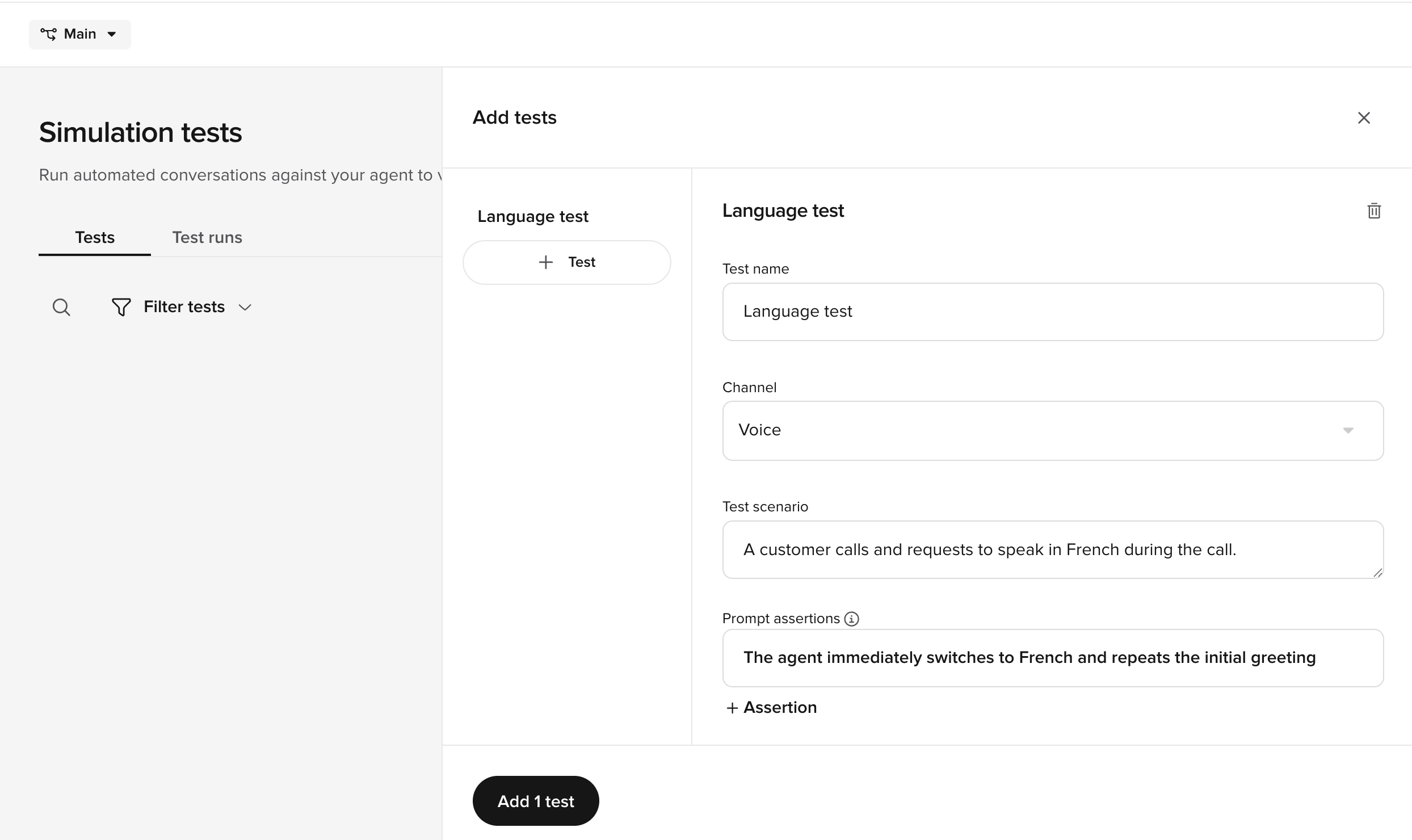 Give the test a descriptive name that summarizes the scenario (for example, "Language test" or "After-hours booking").
Select **Voice** or **Chat** from the **Channel** dropdown. The channel determines how the conversation is simulated.
Describe the caller's behavior in plain language. The simulator uses this to generate realistic caller turns.
**Example:** *A customer calls and requests to speak in French during the call.*
Assertions describe what the agent **should** do during the conversation. After the test runs, each assertion is evaluated and marked as passed or failed.
Select **+ Assertion** to add more.
**Example:** *The agent immediately switches to French and repeats the initial greeting.*
Write assertions that focus on observable agent behavior — language choice, information provided, actions taken — rather than internal implementation details.
Add **tags** to organize and filter tests. Type a tag name and press Enter. A test can have multiple tags (for example, `language` and `french`).
Use tags with the **Filter tests** control on the Tests tab to find related tests quickly.
Expand **Advanced configuration** to access optional settings:
* **Simulated variant** — select a specific [variant](/knowledge/variants/introduction) to run the test against. Leave blank to use the default.
* **System actions** — define actions the agent is expected to take during the conversation. See [System actions](#system-actions) below.
Give the test a descriptive name that summarizes the scenario (for example, "Language test" or "After-hours booking").
Select **Voice** or **Chat** from the **Channel** dropdown. The channel determines how the conversation is simulated.
Describe the caller's behavior in plain language. The simulator uses this to generate realistic caller turns.
**Example:** *A customer calls and requests to speak in French during the call.*
Assertions describe what the agent **should** do during the conversation. After the test runs, each assertion is evaluated and marked as passed or failed.
Select **+ Assertion** to add more.
**Example:** *The agent immediately switches to French and repeats the initial greeting.*
Write assertions that focus on observable agent behavior — language choice, information provided, actions taken — rather than internal implementation details.
Add **tags** to organize and filter tests. Type a tag name and press Enter. A test can have multiple tags (for example, `language` and `french`).
Use tags with the **Filter tests** control on the Tests tab to find related tests quickly.
Expand **Advanced configuration** to access optional settings:
* **Simulated variant** — select a specific [variant](/knowledge/variants/introduction) to run the test against. Leave blank to use the default.
* **System actions** — define actions the agent is expected to take during the conversation. See [System actions](#system-actions) below.
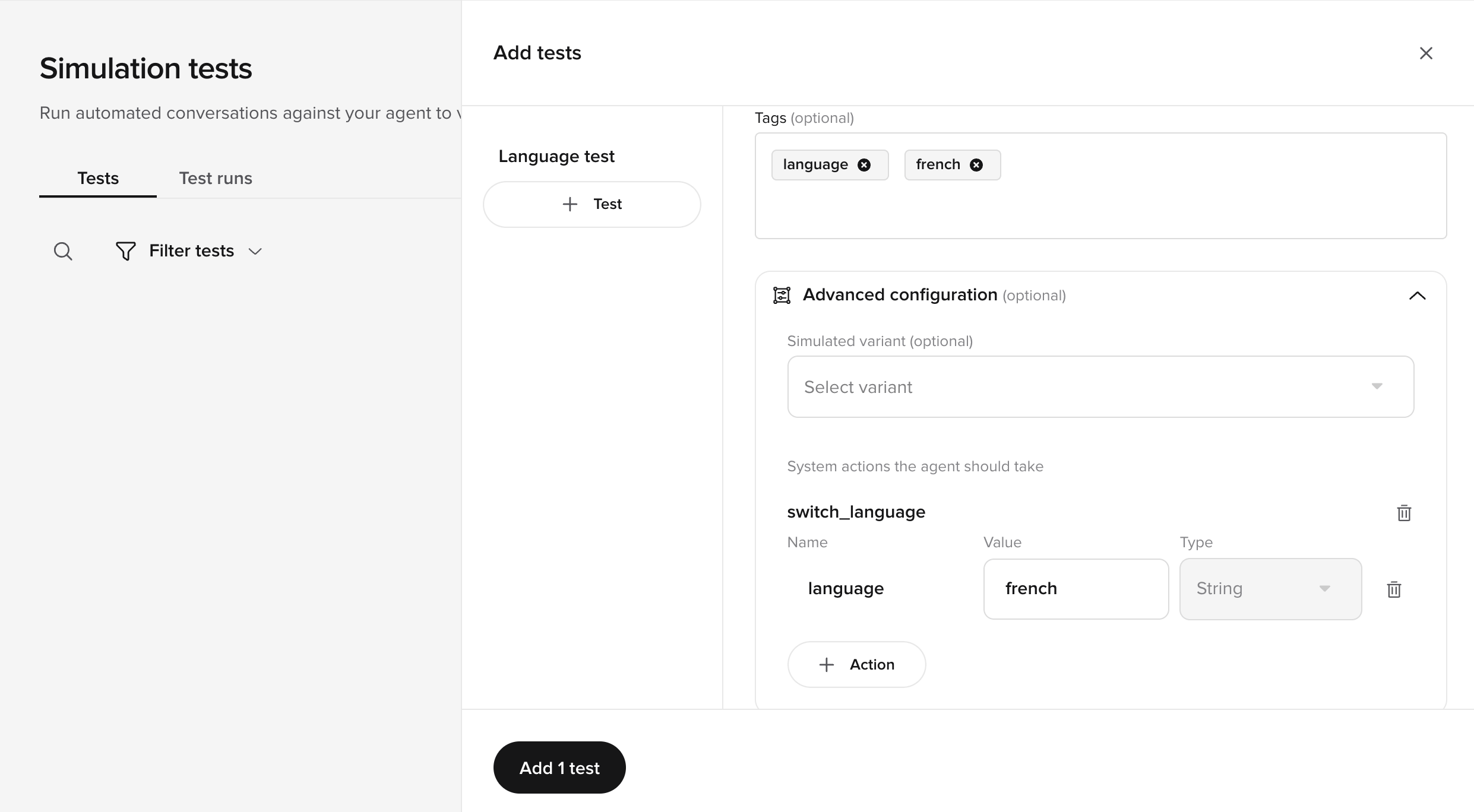 Select **Add 1 test** to save. The test appears in the Tests tab ready to run.
### System actions
System actions verify that the agent triggers the right backend operations — not just that it says the right things. Each action has:
| Field | Description |
| --------------- | --------------------------------------------------------------------------- |
| **Action name** | The system action the agent should invoke (for example, `switch_language`). |
| **Name** | The parameter name (for example, `language`). |
| **Value** | The expected parameter value (for example, `french`). |
| **Type** | The parameter data type — **String**, **Number**, or **Boolean**. |
Select **+ Action** to add more system actions to the test.
## Best practices
* **Name tests descriptively** – use names that describe the scenario, not the expected outcome (for example, "Caller cancels booking" rather than "Test 1").
* **Cover happy paths and edge cases** – include both successful flows and failure scenarios (invalid input, missing data, handoff triggers).
* **Use system actions for backend verification** – don't just test what the agent says; verify it triggers the right actions with the right parameters.
* **Use real conversations as a starting point** – save cases from [Conversation Review](/analytics/conversations/review) to test against real-world scenarios.
Select **Add 1 test** to save. The test appears in the Tests tab ready to run.
### System actions
System actions verify that the agent triggers the right backend operations — not just that it says the right things. Each action has:
| Field | Description |
| --------------- | --------------------------------------------------------------------------- |
| **Action name** | The system action the agent should invoke (for example, `switch_language`). |
| **Name** | The parameter name (for example, `language`). |
| **Value** | The expected parameter value (for example, `french`). |
| **Type** | The parameter data type — **String**, **Number**, or **Boolean**. |
Select **+ Action** to add more system actions to the test.
## Best practices
* **Name tests descriptively** – use names that describe the scenario, not the expected outcome (for example, "Caller cancels booking" rather than "Test 1").
* **Cover happy paths and edge cases** – include both successful flows and failure scenarios (invalid input, missing data, handoff triggers).
* **Use system actions for backend verification** – don't just test what the agent says; verify it triggers the right actions with the right parameters.
* **Use real conversations as a starting point** – save cases from [Conversation Review](/analytics/conversations/review) to test against real-world scenarios.