> ## Documentation Index
> Fetch the complete documentation index at: https://docs.poly.ai/llms.txt
> Use this file to discover all available pages before exploring further.
# Overview
> Store API keys and credentials securely in the Secrets Vault.
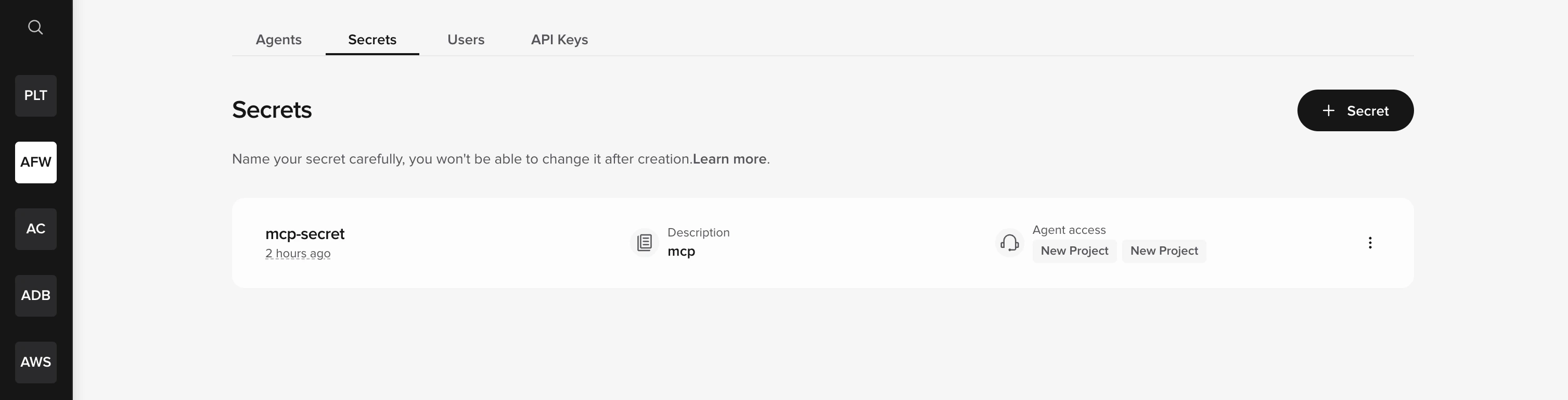
Store API keys, tokens, and credentials securely. Your agent's [tools](/tools/introduction) retrieve them at runtime – no hardcoded secrets in code, logs, or version history.
Secrets are managed at the **account level**, not inside individual agents. Access the Secrets Vault from the **Secrets** tab in the top bar of the workspace homepage.
The Secrets tab is only visible to **workspace admins** on supported workspaces. If you are an admin and the tab is not visible in your workspace, the Secrets Vault may not be enabled for your account yet — [contact PolyAI support](/learn/maintain/common-issues) to request access.
 ## How it works
1. You [create a secret](/secrets/how-to-setup) in the Secrets Vault with a name, optional description, and value.
2. You [grant access](/secrets/how-to-access-control) to specific agents.
3. Functions retrieve the secret at runtime using `conv.utils.get_secret("secret_name")`.
```python theme={"theme":{"light":"github-light","dark":"github-dark"}}
api_key = conv.utils.get_secret("stripe_api_key")
response = requests.get(url, headers={"Authorization": f"Bearer {api_key}"})
```
## Storage formats
Secrets can be stored as:
* **Single value** – A plain string (e.g., an API key).
* **Key/value pairs** – A dictionary of related credentials (e.g., `client_id` and `client_secret`).
## Next steps
Add a new secret to the Secrets Vault.
Grant secrets to specific agents.
Retrieve secrets at runtime in your code.
## How it works
1. You [create a secret](/secrets/how-to-setup) in the Secrets Vault with a name, optional description, and value.
2. You [grant access](/secrets/how-to-access-control) to specific agents.
3. Functions retrieve the secret at runtime using `conv.utils.get_secret("secret_name")`.
```python theme={"theme":{"light":"github-light","dark":"github-dark"}}
api_key = conv.utils.get_secret("stripe_api_key")
response = requests.get(url, headers={"Authorization": f"Bearer {api_key}"})
```
## Storage formats
Secrets can be stored as:
* **Single value** – A plain string (e.g., an API key).
* **Key/value pairs** – A dictionary of related credentials (e.g., `client_id` and `client_secret`).
## Next steps
Add a new secret to the Secrets Vault.
Grant secrets to specific agents.
Retrieve secrets at runtime in your code.