> ## Documentation Index
> Fetch the complete documentation index at: https://docs.poly.ai/llms.txt
> Use this file to discover all available pages before exploring further.
# Routing and handoffs
> Update handoff destinations, manage SIP routing, and test transfers without disrupting live traffic."
Update handoff destinations, add new transfer points, and manage SIP routing – all without taking the agent offline. Test changes safely in Sandbox before promoting to Live.
## Quick reference
| I need to... | Action | Time estimate |
| ----------------------------- | -------------------------------------------- | ------------- |
| Update a phone number | Edit destination → Change number → Save | 2 min |
| Add a new handoff destination | Add handoff → Fill details → Save | 5 min |
| Add SIP headers | Edit destination → Add SIP header → Save | 3 min |
| Test a handoff | Call Sandbox → Trigger transfer → Verify | 5 min |
| Connect Twilio number | Voice > Numbers > Twilio → Enter credentials | 10 min |
| Fix failed transfer | Check number format, firewall, SIP headers | 10 min |
This page covers the **UI-based Call Handoff** feature. Ask if your project uses the code-level `transfer_call` [function](/tools/introduction).
## Edit an existing destination
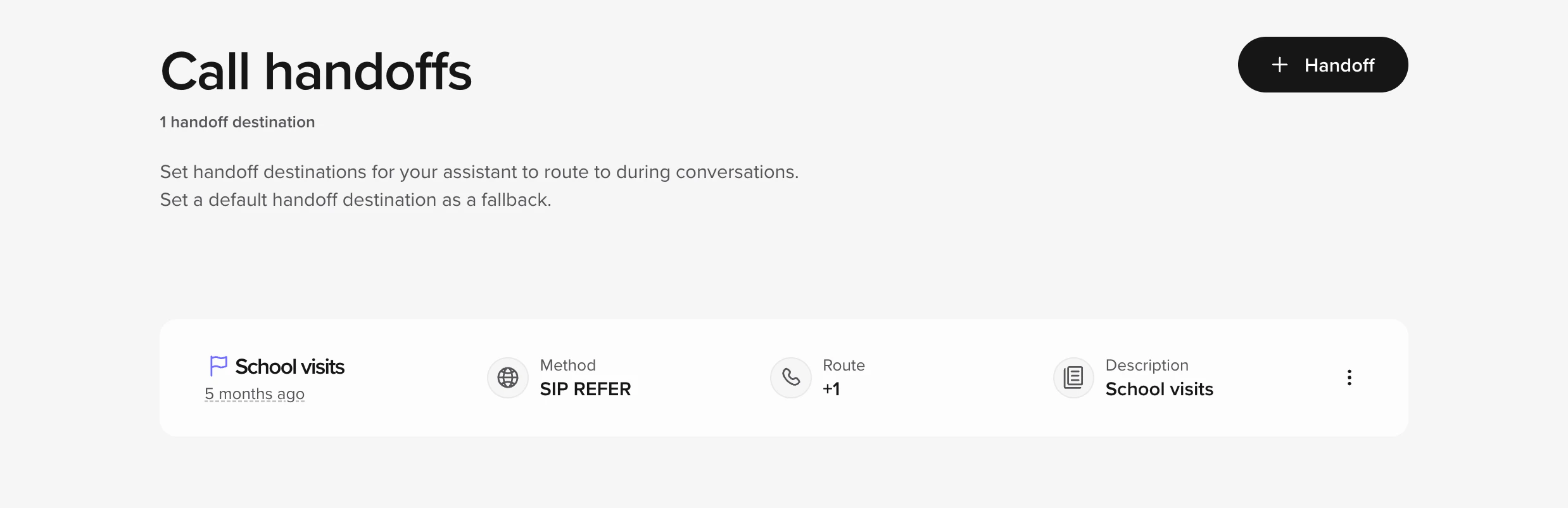 1. In the sidebar, select **Call handoffs**.
2. Hover over the destination you want and click **Edit**.
3. Change the **Number / SIP URI** or **Description**.
4. **Save**.
5. Make a quick test call in *Sandbox* and confirm the transfer works, then [promote your version](/environments-and-versions/introduction).
Common use cases:
| Reason | What to update |
| ----------------------- | ---------------------------------------------------------------------------- |
| Front-desk line changed | Replace the number in **Route** |
| Routing after-hours | Add a note in **Description** so team mates know when to switch destinations |
## Add a new handoff destination
1. Click **Add handoff**.
2. Fill in:
* **Name** – e.g. "VIP host desk".
* **Method** – leave **SIP REFER** unless your telephony team says otherwise.
* **Route / Number** – `+1XXXXXXXXXX` or a SIP URI.
* *(Optional)* **SIP headers** if your PBX needs extra context (see next section).
3. **Add** → test → promote.
## Add SIP headers (optional)
SIP headers let you pass metadata – account ID, language, VIP flag, etc.
1. While creating or editing a destination, click **Add SIP header**.
2. Enter a header name (custom headers start with `X-`).
3. Enter a value, or use a variable such as `$caller_id`.
4. Save.
## Using your own Twilio number
If you bring your own Twilio DID:
1. **Connect Twilio** under **Voice > Numbers > Twilio** (enter Account SID + Auth Token).
2. In Twilio, point the number's **Voice webhook** at your agent URL.
3. Back in **Call handoffs**, use that number as the **Route** field.
US numbers need [A2P 10DLC registration](https://www.twilio.com/docs/messaging/compliance/a2p-10dlc) for SMS.
## Test before you ship
1. Call the *Sandbox* number.
2. Trigger the scenario that should transfer.
3. Confirm the call operates how you are expecting.
4. Promote the new version to *Live*.
If the transfer fails, double-check:
* Number format (**+** and country code)
* Firewalls or other rules on the destination side
* SIP header spelling
## Common workflows
### Updating after-hours routing
1. Identify which handoff destination handles after-hours
2. Update the phone number or SIP URI
3. Test in Sandbox during and after business hours
4. Publish and promote to Live
**Time:** 10-15 minutes
### Adding a new department handoff
1. Get the phone number or SIP URI from the department
2. Add new handoff destination with clear name
3. Update FAQs to reference the new handoff
4. Test the full flow in Sandbox
5. Publish and promote
**Time:** 20-30 minutes
## Related pages
* [Call handoff overview](/voice-channel/handoffs) - Complete handoff documentation
* [Twilio integration](/voice-channel/numbers/twilio/introduction) - Twilio setup guide
* [Function-based transfers](/tools/introduction) - Code-level transfer control
* [Version management](/learn/maintain/version-management) - Safe deployment practices
## When to escalate
* You need more conditional logic than the UI can express
* The destination uses a non-standard SIP method
* You are seeing [4XX/5XX SIP errors](https://datatracker.ietf.org/doc/html/rfc3261#section-13.2.2.3)
1. In the sidebar, select **Call handoffs**.
2. Hover over the destination you want and click **Edit**.
3. Change the **Number / SIP URI** or **Description**.
4. **Save**.
5. Make a quick test call in *Sandbox* and confirm the transfer works, then [promote your version](/environments-and-versions/introduction).
Common use cases:
| Reason | What to update |
| ----------------------- | ---------------------------------------------------------------------------- |
| Front-desk line changed | Replace the number in **Route** |
| Routing after-hours | Add a note in **Description** so team mates know when to switch destinations |
## Add a new handoff destination
1. Click **Add handoff**.
2. Fill in:
* **Name** – e.g. "VIP host desk".
* **Method** – leave **SIP REFER** unless your telephony team says otherwise.
* **Route / Number** – `+1XXXXXXXXXX` or a SIP URI.
* *(Optional)* **SIP headers** if your PBX needs extra context (see next section).
3. **Add** → test → promote.
## Add SIP headers (optional)
SIP headers let you pass metadata – account ID, language, VIP flag, etc.
1. While creating or editing a destination, click **Add SIP header**.
2. Enter a header name (custom headers start with `X-`).
3. Enter a value, or use a variable such as `$caller_id`.
4. Save.
## Using your own Twilio number
If you bring your own Twilio DID:
1. **Connect Twilio** under **Voice > Numbers > Twilio** (enter Account SID + Auth Token).
2. In Twilio, point the number's **Voice webhook** at your agent URL.
3. Back in **Call handoffs**, use that number as the **Route** field.
US numbers need [A2P 10DLC registration](https://www.twilio.com/docs/messaging/compliance/a2p-10dlc) for SMS.
## Test before you ship
1. Call the *Sandbox* number.
2. Trigger the scenario that should transfer.
3. Confirm the call operates how you are expecting.
4. Promote the new version to *Live*.
If the transfer fails, double-check:
* Number format (**+** and country code)
* Firewalls or other rules on the destination side
* SIP header spelling
## Common workflows
### Updating after-hours routing
1. Identify which handoff destination handles after-hours
2. Update the phone number or SIP URI
3. Test in Sandbox during and after business hours
4. Publish and promote to Live
**Time:** 10-15 minutes
### Adding a new department handoff
1. Get the phone number or SIP URI from the department
2. Add new handoff destination with clear name
3. Update FAQs to reference the new handoff
4. Test the full flow in Sandbox
5. Publish and promote
**Time:** 20-30 minutes
## Related pages
* [Call handoff overview](/voice-channel/handoffs) - Complete handoff documentation
* [Twilio integration](/voice-channel/numbers/twilio/introduction) - Twilio setup guide
* [Function-based transfers](/tools/introduction) - Code-level transfer control
* [Version management](/learn/maintain/version-management) - Safe deployment practices
## When to escalate
* You need more conditional logic than the UI can express
* The destination uses a non-standard SIP method
* You are seeing [4XX/5XX SIP errors](https://datatracker.ietf.org/doc/html/rfc3261#section-13.2.2.3)