> ## Documentation Index
> Fetch the complete documentation index at: https://docs.poly.ai/llms.txt
> Use this file to discover all available pages before exploring further.

# Tutorial: Create a project

> PolyAcademy Level 1 – Set up your first Agent Studio project with the correct name, language, and voice.

export const LessonMeta = ({level, difficulty, time}) => {
  const levelConfig = {
    1: {
      badge: 'bg-green-100 text-green-800 dark:bg-green-900 dark:text-green-200',
      label: 'Level 1'
    },
    2: {
      badge: 'bg-amber-100 text-amber-800 dark:bg-amber-900 dark:text-amber-200',
      label: 'Level 2'
    },
    3: {
      badge: 'bg-red-100 text-red-800 dark:bg-red-900 dark:text-red-200',
      label: 'Level 3'
    }
  };
  const difficultyConfig = {
    Beginner: 'bg-green-100 text-green-800 dark:bg-green-900 dark:text-green-200',
    Intermediate: 'bg-amber-100 text-amber-800 dark:bg-amber-900 dark:text-amber-200',
    Advanced: 'bg-red-100 text-red-800 dark:bg-red-900 dark:text-red-200'
  };
  const lvl = levelConfig[level] || levelConfig[1];
  const diffColor = difficultyConfig[difficulty] || difficultyConfig['Beginner'];
  return <div className="flex flex-wrap items-center gap-2 my-4 not-prose">
      <span className={`inline-flex items-center rounded-full px-2.5 py-0.5 text-xs font-semibold ${lvl.badge}`}>
        {lvl.label}
      </span>
      <span className={`inline-flex items-center rounded-full px-2.5 py-0.5 text-xs font-semibold ${diffColor}`}>
        {difficulty}
      </span>
      {time && <span className="inline-flex items-center gap-1 text-xs text-gray-500 dark:text-gray-400">
          <svg className="w-3.5 h-3.5" fill="none" viewBox="0 0 24 24" stroke="currentColor" strokeWidth={2}>
            <path strokeLinecap="round" strokeLinejoin="round" d="M12 6v6h4.5m4.5 0a9 9 0 11-18 0 9 9 0 0118 0z" />
          </svg>
          {time}
        </span>}
    </div>;
};

export const FillBlank = ({prompt, answer, hint, explanation}) => {
  const [value, setValue] = useState('');
  const [submitted, setSubmitted] = useState(false);
  const normalize = s => s.trim().toLowerCase().replace(/[^a-z0-9_]/g, '');
  const answers = Array.isArray(answer) ? answer : [answer];
  const isCorrect = answers.some(a => normalize(value) === normalize(a));
  const handleSubmit = e => {
    e.preventDefault();
    if (value.trim()) setSubmitted(true);
  };
  const handleReset = () => {
    setValue('');
    setSubmitted(false);
  };
  return <div className="my-6">
      <p className="mt-0 mb-3 text-sm font-semibold leading-relaxed text-gray-900 dark:text-gray-100">
        {prompt}
      </p>
      <form onSubmit={handleSubmit} className="flex flex-col gap-2.5">
        <div className="flex gap-2">
          <input type="text" value={value} onChange={e => {
    setValue(e.target.value);
    setSubmitted(false);
  }} placeholder={hint || "Type your answer…"} className="flex-1 rounded-xl border py-2.5 px-4 text-sm font-mono border-gray-200 bg-white text-gray-900 placeholder-gray-400 outline-none focus:border-gray-400 focus:ring-2 focus:ring-gray-200 transition-all duration-150 dark:border-gray-700 dark:bg-gray-900 dark:text-gray-100 dark:placeholder-gray-600 dark:focus:border-gray-500 dark:focus:ring-gray-700" />
          <button type="submit" className="rounded-xl border py-2.5 px-5 text-sm font-medium transition-all duration-150 border-gray-800 bg-gray-800 text-white hover:bg-gray-700 hover:border-gray-700 dark:border-gray-200 dark:bg-gray-200 dark:text-gray-900 dark:hover:bg-white">
            Check
          </button>
        </div>
        {submitted ? <div className={`py-3 pl-4 pr-3.5 rounded-r-xl text-sm leading-relaxed border-l-4 ${isCorrect ? 'border-green-500 bg-green-50 dark:bg-green-900 dark:border-green-500' : 'border-red-500 bg-red-50 dark:bg-red-900 dark:border-red-500'}`}>
            {isCorrect ? <>
                <span className={`font-semibold !text-green-800 dark:!text-green-200`}>Correct.</span>{' '}
                <span className="!text-gray-700 dark:!text-gray-300">{explanation}</span>
              </> : <>
                <span className="font-semibold !text-red-800 dark:!text-red-200">Not quite.</span>{' '}
                <span className="!text-gray-700 dark:!text-gray-300">The answer is <code className="!text-gray-800 dark:!text-gray-200">{answers[0]}</code>. {explanation}</span>
              </>}
          </div> : null}
      </form>
      {submitted ? <button type="button" onClick={handleReset} className="mt-2 text-xs text-gray-400 hover:text-gray-600 dark:hover:text-gray-300 underline underline-offset-2 cursor-pointer transition-colors duration-150">
          Try again
        </button> : null}
    </div>;
};

export const Quiz = ({questions = []}) => {
  const [selected, setSelected] = useState({});
  const [resetCount, setResetCount] = useState(0);
  const letters = ['A', 'B', 'C', 'D'];
  const handleSelect = (qIdx, optIdx) => {
    if (selected[qIdx] !== undefined) return;
    setSelected(prev => ({
      ...prev,
      [qIdx]: optIdx
    }));
  };
  const handleReset = () => {
    setSelected({});
    setResetCount(c => c + 1);
  };
  if (!questions?.length) return null;
  const getOptionClasses = ({hasAnswered, isThisCorrect, isThisSelected}) => {
    if (!hasAnswered) {
      return {
        btn: 'flex w-full items-center gap-3 py-2.5 px-4 rounded-xl text-sm leading-normal transition-all duration-150 text-left border cursor-pointer border-gray-200 bg-white text-gray-700 hover:border-gray-300 hover:bg-gray-50 hover:shadow-sm dark:border-gray-600 dark:bg-gray-800 dark:text-gray-200 dark:hover:border-gray-500 dark:hover:bg-gray-700',
        badge: 'w-6 h-6 rounded-full text-xs font-bold flex items-center justify-center shrink-0 leading-none transition-all duration-150 bg-gray-100 text-gray-500 dark:bg-gray-700 dark:text-gray-300',
        icon: null
      };
    }
    if (isThisCorrect) {
      return {
        btn: 'flex w-full items-center gap-3 py-2.5 px-4 rounded-xl text-sm leading-normal transition-all duration-150 text-left border cursor-default border-green-400 bg-green-50 text-green-900 font-medium dark:border-green-500 dark:bg-green-950 dark:text-green-100',
        badge: 'w-6 h-6 rounded-full text-xs font-bold flex items-center justify-center shrink-0 leading-none transition-all duration-150 bg-green-500 text-white dark:bg-green-500',
        icon: <svg className="shrink-0 w-4 h-4 text-green-500 dark:text-green-400 ml-auto" fill="none" viewBox="0 0 24 24" stroke="currentColor" strokeWidth={2.5}>
            <path strokeLinecap="round" strokeLinejoin="round" d="M4.5 12.75l6 6 9-13.5" />
          </svg>
      };
    }
    if (isThisSelected) {
      return {
        btn: 'flex w-full items-center gap-3 py-2.5 px-4 rounded-xl text-sm leading-normal transition-all duration-150 text-left border cursor-default border-red-400 bg-red-50 text-red-900 dark:border-red-500 dark:bg-red-950 dark:text-red-100',
        badge: 'w-6 h-6 rounded-full text-xs font-bold flex items-center justify-center shrink-0 leading-none transition-all duration-150 bg-red-500 text-white dark:bg-red-500',
        icon: <svg className="shrink-0 w-4 h-4 text-red-400 dark:text-red-400 ml-auto" fill="none" viewBox="0 0 24 24" stroke="currentColor" strokeWidth={2.5}>
            <path strokeLinecap="round" strokeLinejoin="round" d="M6 18L18 6M6 6l12 12" />
          </svg>
      };
    }
    return {
      btn: 'flex w-full items-center gap-3 py-2.5 px-4 rounded-xl text-sm leading-normal transition-all duration-150 text-left border cursor-default border-gray-100 bg-white text-gray-400 dark:border-gray-700 dark:bg-gray-800 dark:text-gray-500',
      badge: 'w-6 h-6 rounded-full text-xs font-bold flex items-center justify-center shrink-0 leading-none transition-all duration-150 bg-gray-100 text-gray-500 dark:bg-gray-700 dark:text-gray-500',
      icon: null
    };
  };
  return <div key={resetCount} className="my-6">
      {questions.map((q, qIdx) => {
    const answer = selected[qIdx];
    const hasAnswered = answer !== undefined;
    const isCorrect = answer === q.correct;
    return <div key={String(qIdx)} className="mb-8">
            <p className="flex items-start gap-2.5 font-semibold text-sm mb-3 mt-0 leading-relaxed text-gray-900 dark:text-gray-100">
              <span className="inline-flex items-center justify-center w-5 h-5 rounded-full bg-gray-800 dark:bg-gray-200 text-white dark:text-gray-900 text-xs font-bold shrink-0 mt-px leading-none">
                {qIdx + 1}
              </span>
              {q.q}
            </p>

            <div className="flex flex-col gap-2">
              {q.options.map((opt, i) => {
      const isThisCorrect = i === q.correct;
      const isThisSelected = i === answer;
      const {btn, badge, icon} = getOptionClasses({
        hasAnswered,
        isThisCorrect,
        isThisSelected
      });
      return <button key={String(i)} type="button" onClick={() => handleSelect(qIdx, i)} className={btn}>
                    <span className={badge}>{letters[i]}</span>
                    <span className="flex-1">{opt}</span>
                    {icon}
                  </button>;
    })}
            </div>

            {hasAnswered ? <div className={`mt-3 py-3 pl-4 pr-3.5 rounded-r-xl text-sm leading-relaxed border-l-4 ${isCorrect ? 'border-green-500 bg-green-50 dark:bg-green-950 dark:border-green-500' : 'border-red-500 bg-red-50 dark:bg-red-950 dark:border-red-500'}`}>
                <span className={`font-semibold ${isCorrect ? '!text-green-800 dark:!text-green-200' : '!text-red-800 dark:!text-red-200'}`}>
                  {isCorrect ? 'Correct.' : 'Not quite.'}
                </span>{' '}
                <span className="!text-gray-700 dark:!text-gray-300">{q.explanation}</span>
              </div> : null}
          </div>;
  })}

      <button type="button" onClick={handleReset} className="mt-1 text-xs text-gray-400 hover:text-gray-600 dark:hover:text-gray-300 underline underline-offset-2 cursor-pointer transition-colors duration-150">
        Reset quiz
      </button>
    </div>;
};

export const ProgressTracker = ({lessonNum, totalLessons, level}) => {
  const [checked, setChecked] = useState(false);
  return <div onClick={() => setChecked(prev => !prev)} className={checked ? 'flex items-center gap-3 p-4 rounded-lg border-2 border-green-600 bg-green-50 dark:bg-green-950 cursor-pointer select-none transition-all' : 'flex items-center gap-3 p-4 rounded-lg border-2 border-gray-200 dark:border-gray-600 bg-gray-50 dark:bg-gray-800 cursor-pointer select-none transition-all'}>
      <div className={checked ? 'w-5 h-5 rounded border-2 border-green-600 bg-green-600 flex items-center justify-center shrink-0 transition-all' : 'w-5 h-5 rounded border-2 border-gray-400 dark:border-gray-500 bg-white dark:bg-gray-800 flex items-center justify-center shrink-0 transition-all'}>
        {checked ? <svg width="10" height="8" viewBox="0 0 10 8" fill="none">
            <path d="M1 4L3.5 6.5L9 1" stroke="white" strokeWidth="2" strokeLinecap="round" strokeLinejoin="round" />
          </svg> : null}
      </div>
      <div>
        <div className={checked ? 'font-semibold text-sm text-green-700 dark:text-green-300' : 'font-semibold text-sm text-gray-700 dark:text-gray-200'}>
          {checked ? 'Lesson complete' : 'Mark lesson complete'}
        </div>
        {lessonNum && totalLessons ? <div className="text-xs text-gray-500 dark:text-gray-400 mt-0.5">
            {level ? level + ' - ' : ''}Lesson {lessonNum} of {totalLessons}
          </div> : null}
      </div>
    </div>;
};

<Info>
  **Lesson 1 of 6** – Create your first project in Agent Studio. This takes about 5 minutes, and the name you choose matters more than you'd think.
</Info>

<LessonMeta level={1} difficulty="Beginner" time="5 min" />

<img src="https://mintcdn.com/polyai/5TqB0Il1JYn5J7QH/images/academy/setup.png?fit=max&auto=format&n=5TqB0Il1JYn5J7QH&q=85&s=b5e21814058f235dd1032aadf97f867b" alt="set-up-project" width="2792" height="1610" data-path="images/academy/setup.png" />

## Create the agent

<Steps>
  <Step title="Open the agent creation dialog">
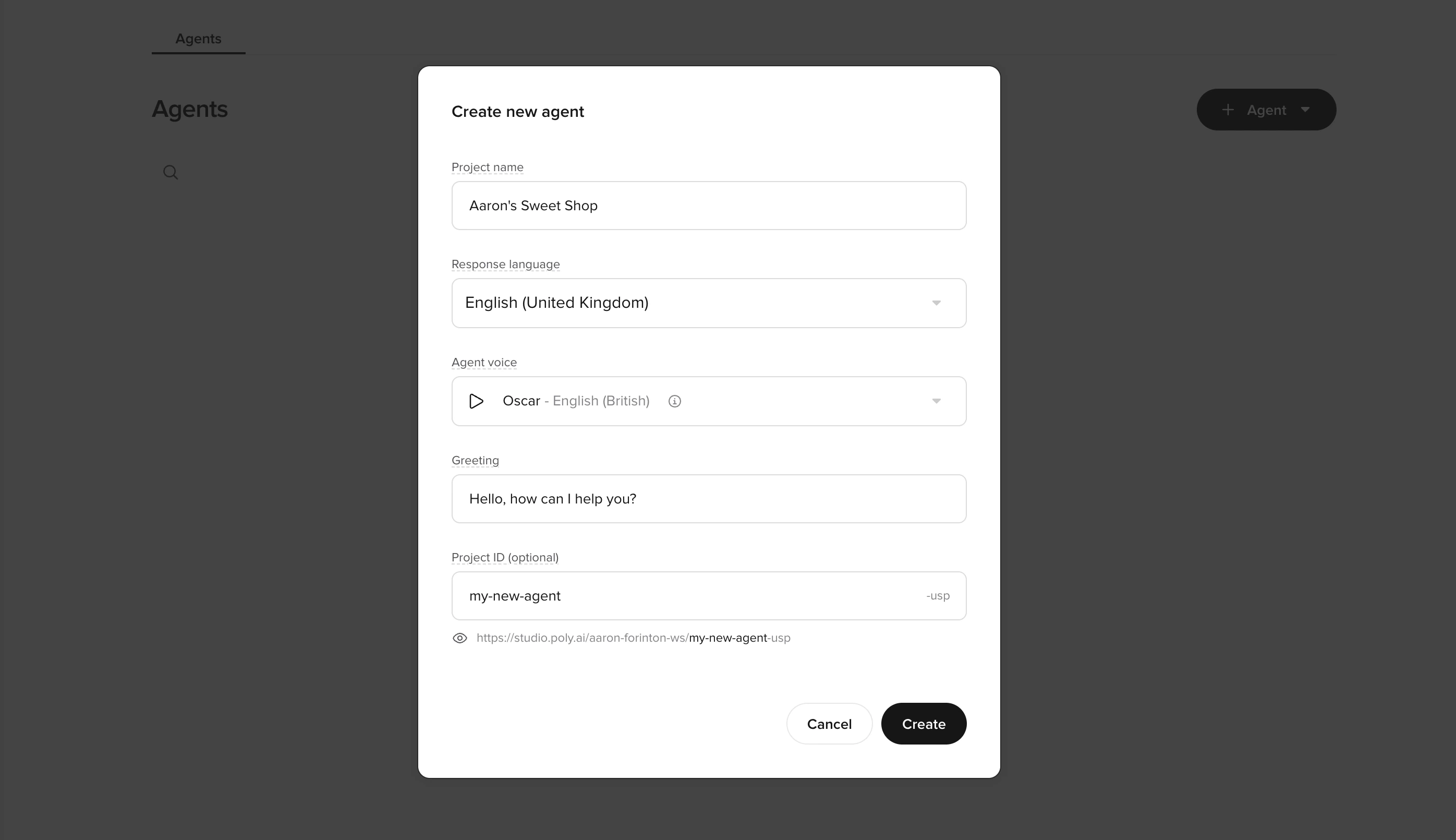
    Select **+ Agent** to open **Create new agent**.
  </Step>

  <Step title="Configure your agent settings">
    Fill out the fields carefully (these become your default baseline for all later testing):

    <AccordionGroup>
      <Accordion title="Project name" icon="tag">
        Use a clear, descriptive name that won't become misleading later.

        **Good examples:**

        * `Acme Support Agent`
        * `Webchat L1 Triage`
        * `Hotel Concierge (US)`

        **Avoid:**

        * `Test`
        * `New agent`
        * Names that explicitly reference an environment (`Sandbox`, `Prod`, `Live`)
      </Accordion>

      <Accordion title="Response language" icon="language">
        Select the primary language/locale your users will interact in.
      </Accordion>

      <Accordion title="Agent Voice" icon="microphone">
        Pick a reasonable starter voice. You can always change this later.
      </Accordion>

      <Accordion title="Greeting" icon="message">
        Keep it short and broadly reusable.

        * Aim for one sentence that works for both chat and voice
        * **Example:** `Hi–how can I help today?`
        * Avoid over-specific or wordy greetings
      </Accordion>

      <Accordion title="Project ID (optional)" icon="fingerprint">
        Treat this like a stable identifier. It appears in the project URL inside Agent Studio, with an environment suffix appended automatically. If you leave it blank, Agent Studio generates one for you.

        <Warning>
          Once set, the **Project ID cannot be changed**. Choose carefully – every bookmarked URL and API call will include this ID forever.
        </Warning>

        **Allowed characters:** alphanumerics and dashes only (`a-z`, `A-Z`, `0-9`, `-`).

        **Examples:**

        * `my-shop-support-l1`
        * `hotel-concierge-us`

        <Tip>If you expect multiple similar agents, build a predictable pattern now.</Tip>
      </Accordion>
    </AccordionGroup>
  </Step>

  <Step title="Create the agent">
    Select **Create**.
  </Step>
</Steps>

## Check your understanding

<Quiz
  questions={[
{
q: "Why should you avoid naming a project 'Test' or 'New agent'?",
options: [
  "The name appears in the live greeting, so a vague name sounds unprofessional to callers",
  "Generic names cause confusion as you add environments and variants",
  "The name is permanent and cannot be changed after the first publish",
  "Agent Studio assigns the Project ID from the name, so a generic name creates a confusing URL",
],
correct: 1,
explanation: "Generic names like 'Test' or 'New agent' become confusing when you have multiple agents in your account. Use a clear, descriptive name from the start – something like 'Hotel Concierge (US)' stays meaningful as you scale.",
}
]}
/>

## Confirm the baseline workspace

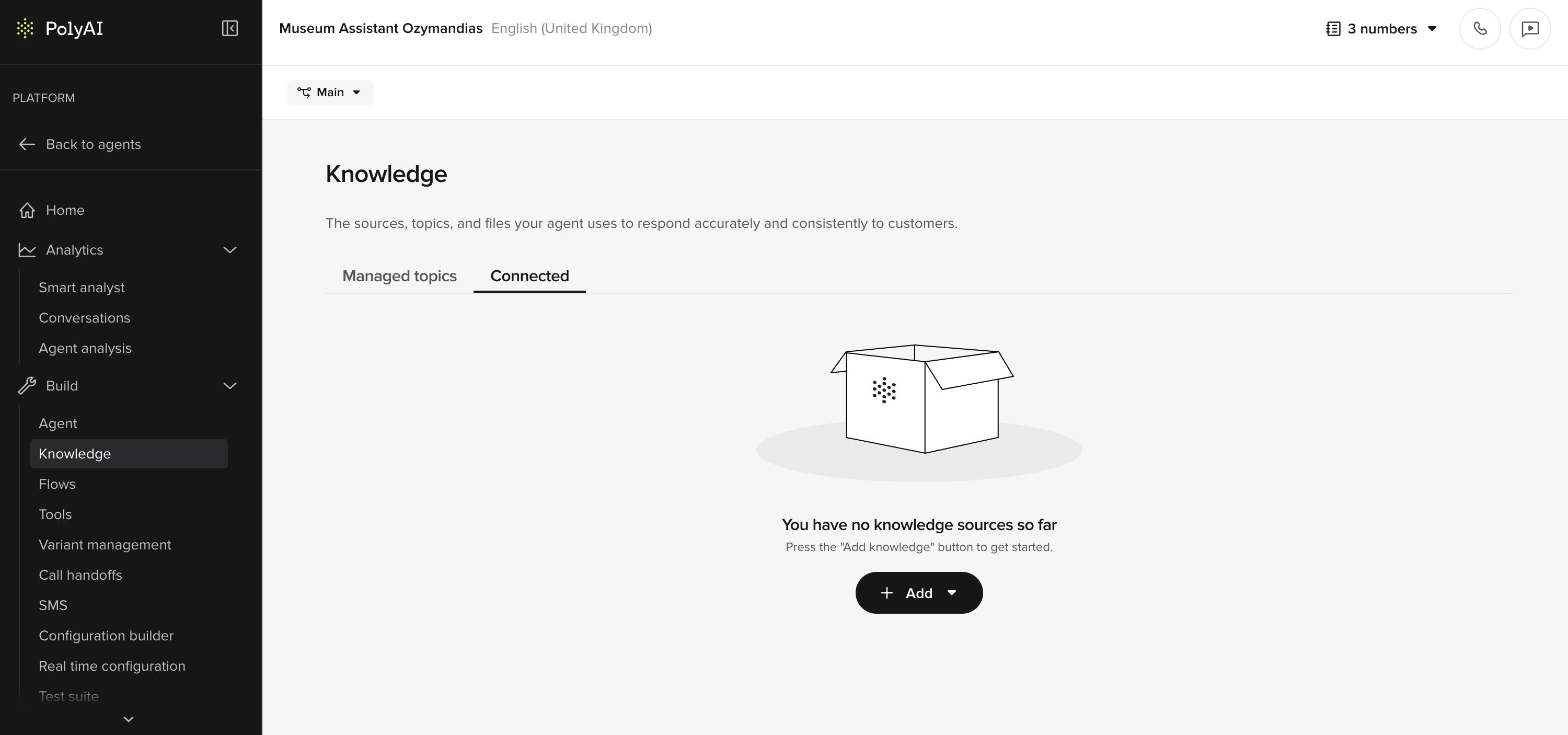
After creation, you land in the **Knowledge** area – empty state with an **Add topic** button.

### Agent Studio interface

<CardGroup cols={3}>
  <Card title="Left sidebar" icon="sidebar">
    Navigation for all agent configuration areas (Manage, Build, Channels, Configure, Analytics)
  </Card>

  <Card title="Center canvas" icon="window">
    Main workspace where you edit topics, functions, flows, and view analytics
  </Card>

  <Card title="Right sidebar" icon="panel-right">
    Context-sensitive tools like chat testing, call testing, and version history
  </Card>
</CardGroup>

The right sidebar toggles open/closed for quick access to testing tools.

<AccordionGroup>
  <Accordion title="Confirm agent identity" icon="circle-check">
    * The header shows the agent name and language.
    * The agent is in **Draft** state.
  </Accordion>

  <Accordion title="Verify navigation access" icon="bars">
    Use the left navigation to check you can access:

    **Behavior**

    * **General**: personality, role, and Behavior rules.

    **Knowledge**

    * Later, you'll learn to create simple FAQ, SMS/handoff topics, and multiturn topics here (using the **FAQs** and **Sources** tabs).
    * **Variants**: where you'll configure variants later (even if you ignore it for now, confirm it opens).

    **Voice**

    * **Agent** (voice/disclaimer selection) and **Advanced > Call settings** (greeting, disclaimer text, and channel-specific settings).

    **Deployments**

    * Where you'll test and promote changes safely (**Sandbox → Pre-release → Live**, depending on your setup).
    * You may also see other areas (Numbers under Voice, Account, Real-time config, Custom Dashboards). You won't need to configure them for Level 1, but you may return to them later.
  </Accordion>
</AccordionGroup>

## Verify

<img src="https://mintcdn.com/polyai/5TqB0Il1JYn5J7QH/images/academy/setup-done.png?fit=max&auto=format&n=5TqB0Il1JYn5J7QH&q=85&s=34bb5123deca5c1853371c54200f8b12" alt="set-up-project-complete" width="3000" height="1406" data-path="images/academy/setup-done.png" />

<Check>
  **Success criteria:**

  * The project loads without errors and stays stable across page changes.
  * You can access (at minimum):
    * **Behavior > General** (personality, role, Behavior)
    * **Knowledge**
    * **Knowledge > Variants**
    * **Voice > Agent**
    * **Deployments**
  * The Knowledge page shows an empty state with a clear call to action (for example, **Add topic**), indicating you're ready for the next steps in the checklist.
</Check>

## Check your understanding

<Quiz
  questions={[
{
q: "You're naming a new Agent Studio project. Which of these is a bad choice?",
options: [
  "Acme Support Agent",
  "Linden Hotel Concierge",
  "Hotel Concierge (US) – Live",
  "Webchat L1 Triage",
],
correct: 2,
explanation: "Including an environment name like 'Live' in the project name is a problem – the same project runs across Sandbox, Pre-release, and Live. A name tied to one environment becomes misleading in the others.",
}
]}
/>

## Try it yourself

<Steps>
  <Step title="Challenge: Name your agent">
    You're building a hotel concierge agent for "The Linden Hotel". Write out:

    1. A project name
    2. A project ID
    3. A one-sentence greeting

    <Accordion title="Hint">
      The project name should be descriptive but not reference an environment. The project ID should be stable and URL-friendly (lowercase, hyphens). The greeting should work for both chat and voice.
    </Accordion>

    <Accordion title="Example solution">
      **Project name:** `Linden Hotel Concierge`

      **Project ID:** `linden-hotel-concierge`

      **Greeting:** `Hi, welcome to The Linden Hotel – how can I help you today?`
    </Accordion>
  </Step>
</Steps>

## Check your understanding

<Quiz
  questions={[
{
q: "You named your Project ID 'test-1' six months ago. Now your team has multiple agents and everyone bookmarks Agent Studio URLs. What problem will you hit?",
options: [
  "The agent will stop working because 'test-1' is a reserved name",
  "The Project ID is embedded in the URL – a vague ID like 'test-1' makes it hard to tell which agent a URL points to",
  "You'll need to re-authenticate every time you open the project",
  "The ID will conflict with the environment name and block promotions",
],
correct: 1,
explanation: "The Project ID determines the project's URL inside Agent Studio and cannot be changed once set. A vague ID like 'test-1' becomes confusing when you have multiple agents – every bookmarked URL looks meaningless and you can't rename it later. Choose a descriptive, stable ID from the start (e.g., 'linden-hotel-concierge').",
}
]}
/>

<FillBlank prompt="Project IDs must be URL-friendly. In an ID like &#x22;linden-hotel-concierge&#x22;, words are separated by _____." answer={["hyphens", "hyphen", "-"]} hint="Think about how URLs handle spaces — they can't, so we use a punctuation character instead." explanation="Project IDs use hyphens to separate words (e.g., linden-hotel-concierge). Spaces aren't URL-safe, and underscores are less readable in URLs. A consistent hyphenated pattern makes bookmarks and shared links easy to scan." />

## Go deeper

Want more detail on any of the concepts in this lesson? These reference pages cover the same features in depth:

<CardGroup cols={2}>
  <Card title="Agent Studio overview" icon="window" href="/get-started/introduction">
    Capabilities overview and UI walkthrough
  </Card>

  <Card title="Quickstart" icon="rocket" href="/get-started/quickstart">
    The shortest path from account creation to a deployed agent
  </Card>
</CardGroup>

***

<CardGroup cols={2}>
  <Card title="← Back to Level 1" icon="arrow-left" href="/learn/guides/get-started">
    Level overview
  </Card>

  <Card title="Next: Edit agent behavior →" icon="arrow-right" href="/learn/guides/get-started/edit-agent-behavior">
    Lesson 2 – give your agent a personality
  </Card>
</CardGroup>

<ProgressTracker lessonKey="l1-1-create-project" lessonNum={1} totalLessons={6} level="Level 1" />