> ## Documentation Index
> Fetch the complete documentation index at: https://docs.poly.ai/llms.txt
> Use this file to discover all available pages before exploring further.
# Twilio
> Connect your PolyAI agent to Twilio for voice automation and handoffs.
For basic Twilio number and SMS setup, see [Voice > Numbers > Twilio](/voice-channel/numbers/twilio/introduction).
Connect Twilio to your PolyAI project from Agent Studio. PolyAI uses your Twilio API credentials to automatically provision the SIP trunk(s) needed to route calls to your agent — you just bring your API keys and your own phone numbers.
## Quick setup
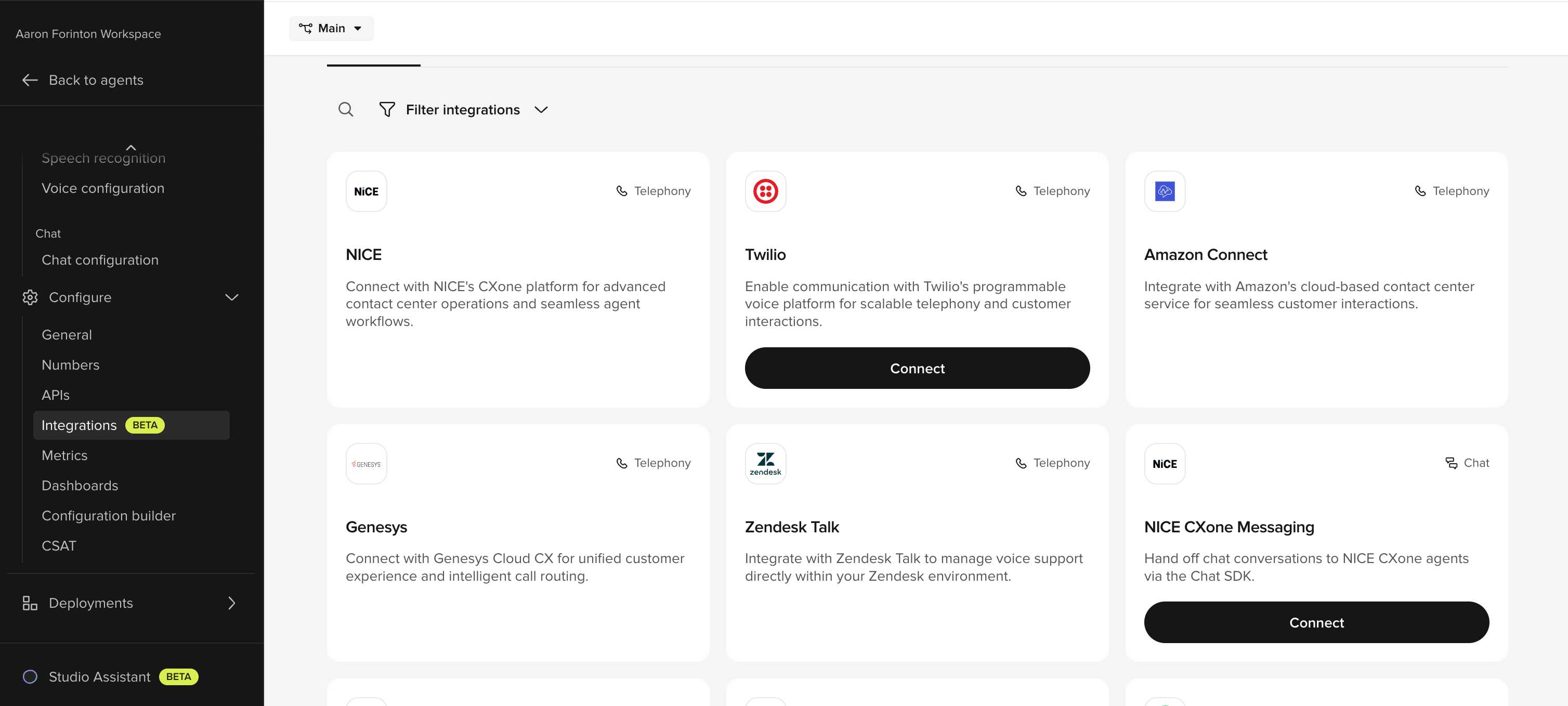
In Agent Studio, go to **Integrations** and click **Connect** on the Twilio card.
 In the **Step 1: Twilio account credentials** panel, paste:
* **API Key**
* **API Secret**
* **Account SID**
In the **Step 1: Twilio account credentials** panel, paste:
* **API Key**
* **API Secret**
* **Account SID**
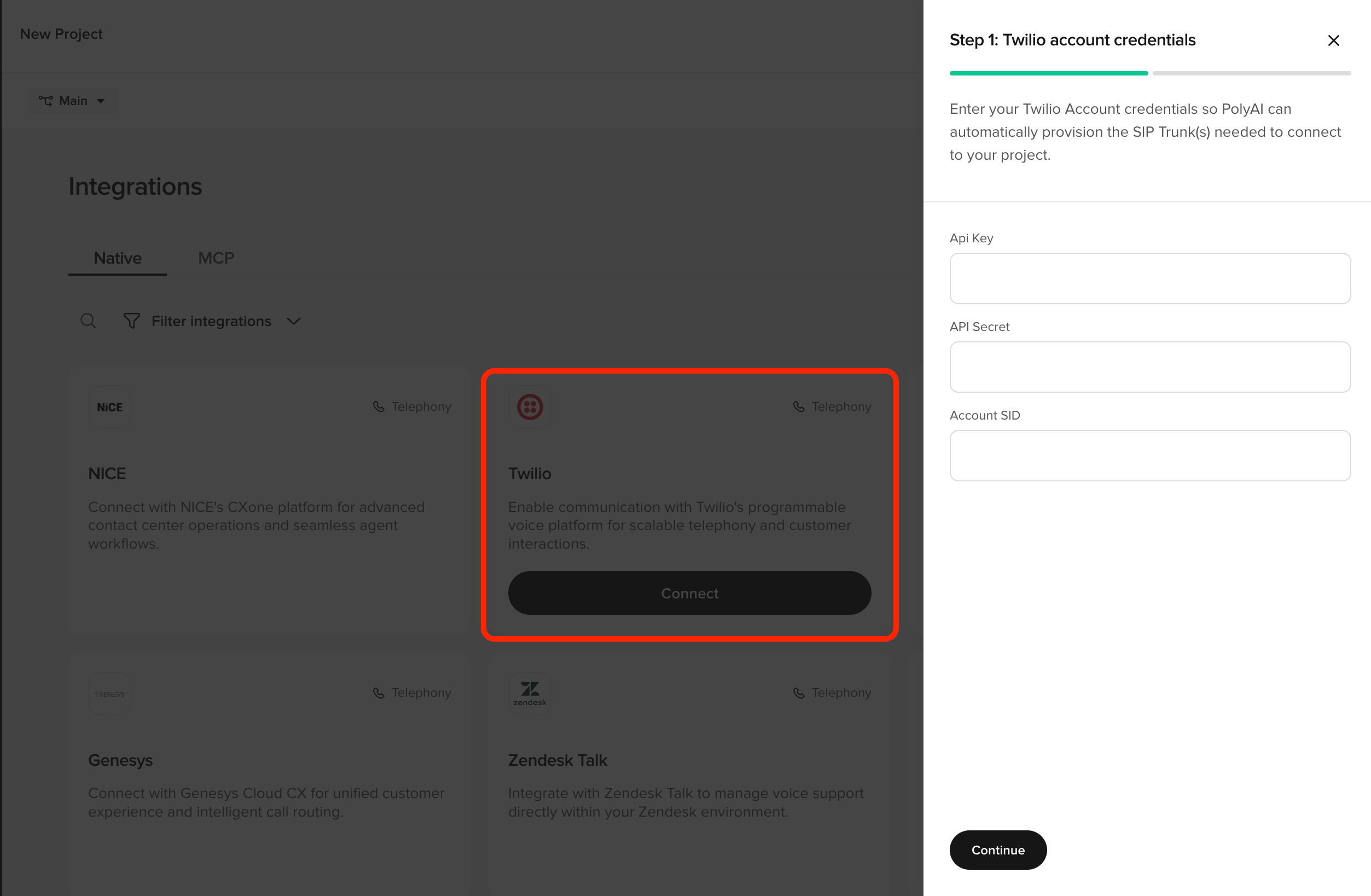 PolyAI uses these to provision the SIP trunk(s) on your Twilio account. Click **Continue**.
Add the Twilio numbers you want to route to PolyAI for **Sandbox**, **Pre-release**, and **Live**. Numbers must be in E.164 format with a country code (e.g. `+441234567890`).
PolyAI provisions the SIP trunk on your Twilio account and wires up routing per environment. You're then taken to **Voice > Handoffs** to configure transfers back to a human agent.
That's it — no manual TwiML, no PolyAI ticket, no shared SIP trunk to negotiate.
## Where to find your Twilio credentials
In the [Twilio Console](https://console.twilio.com/):
* **Account SID** — top of the **Account Info** panel on the dashboard.
* **API Key + API Secret** — **Account > API keys & tokens > Create API key**. The secret is shown once at creation; copy it before closing the dialog.
Use a Standard API key with permissions to manage SIP trunks on the account.
## Editing or removing the integration
* **Update routing** — re-open the Twilio card in **Integrations** to add or remove numbers per environment.
* **Disconnect** — use the **Disconnect** action on the integration. PolyAI removes the routing on its side and tears down the SIP trunk it provisioned.
## Configuring handoffs
After the integration is connected, configure how calls transfer back to human agents in **Voice > Handoffs**. See [Call handoffs](/voice-channel/handoffs) for the full reference.
## Related pages
* [Voice > Numbers > Twilio](/voice-channel/numbers/twilio/introduction) — basic Twilio number and SMS setup
* [Call handoffs](/voice-channel/handoffs) — configure transfer destinations
* [Voice integrations](/integrations/voice/introduction) — other voice platforms
PolyAI uses these to provision the SIP trunk(s) on your Twilio account. Click **Continue**.
Add the Twilio numbers you want to route to PolyAI for **Sandbox**, **Pre-release**, and **Live**. Numbers must be in E.164 format with a country code (e.g. `+441234567890`).
PolyAI provisions the SIP trunk on your Twilio account and wires up routing per environment. You're then taken to **Voice > Handoffs** to configure transfers back to a human agent.
That's it — no manual TwiML, no PolyAI ticket, no shared SIP trunk to negotiate.
## Where to find your Twilio credentials
In the [Twilio Console](https://console.twilio.com/):
* **Account SID** — top of the **Account Info** panel on the dashboard.
* **API Key + API Secret** — **Account > API keys & tokens > Create API key**. The secret is shown once at creation; copy it before closing the dialog.
Use a Standard API key with permissions to manage SIP trunks on the account.
## Editing or removing the integration
* **Update routing** — re-open the Twilio card in **Integrations** to add or remove numbers per environment.
* **Disconnect** — use the **Disconnect** action on the integration. PolyAI removes the routing on its side and tears down the SIP trunk it provisioned.
## Configuring handoffs
After the integration is connected, configure how calls transfer back to human agents in **Voice > Handoffs**. See [Call handoffs](/voice-channel/handoffs) for the full reference.
## Related pages
* [Voice > Numbers > Twilio](/voice-channel/numbers/twilio/introduction) — basic Twilio number and SMS setup
* [Call handoffs](/voice-channel/handoffs) — configure transfer destinations
* [Voice integrations](/integrations/voice/introduction) — other voice platforms