> ## Documentation Index
> Fetch the complete documentation index at: https://docs.poly.ai/llms.txt
> Use this file to discover all available pages before exploring further.
# Amazon Connect
> Connect your PolyAI agent to Amazon Connect for voice automation and AWS integration.
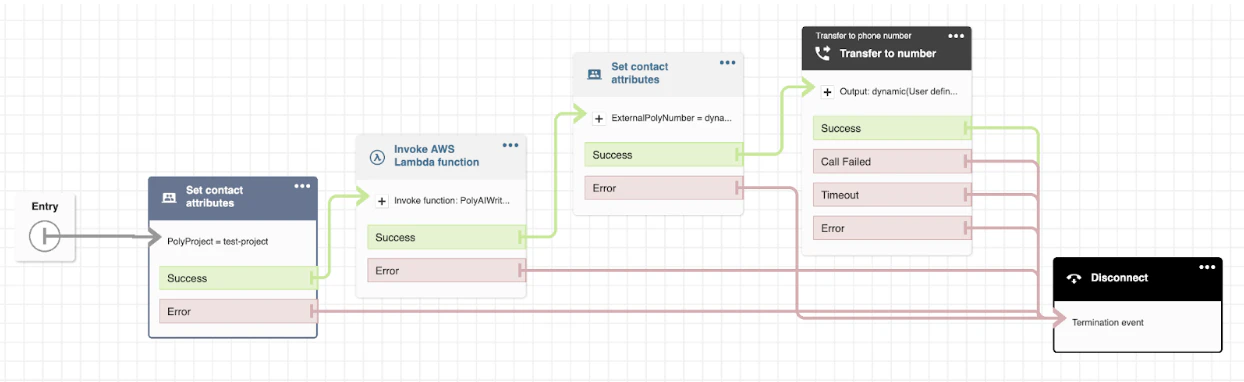 Use the [Amazon Connect integration](https://aws.amazon.com/marketplace/pp/prodview-rwoh2vu3mruba?sr=0-1\&ref_=beagle\&applicationId=AWSMPContessa) to connect PolyAI voice agents to your AWS ecosystem. Use [Amazon Connect contact flows](https://docs.aws.amazon.com/connect/latest/adminguide/contact-initiation-methods.html) for dynamic call routing and [DynamoDB](https://aws.amazon.com/dynamodb/) and [Lambda](https://docs.aws.amazon.com/lambda/latest/dg/welcome.html) for real-time data processing.
## Capabilities
### Call handling and analytics
PolyAI voice agents manage inbound calls routed using [Amazon Connect](https://aws.amazon.com/connect/). Agents handle inbound queries and can resolve them or hand off to live agents. Call performance, customer satisfaction, and agent efficiency are tracked using Amazon Connect analytics, integrated with PolyAI's conversation data.
### Live agent handoff
Calls requiring human assistance are routed to Amazon Connect agents with full contextual data for continuity and personalized support.
### Secure data access
PolyAI securely retrieves and updates customer data using [AWS STS](https://docs.aws.amazon.com/STS/latest/APIReference/welcome.html) and [Amazon DynamoDB](https://aws.amazon.com/dynamodb/).
## How the integration works
Use the [Amazon Connect integration](https://aws.amazon.com/marketplace/pp/prodview-rwoh2vu3mruba?sr=0-1\&ref_=beagle\&applicationId=AWSMPContessa) to connect PolyAI voice agents to your AWS ecosystem. Use [Amazon Connect contact flows](https://docs.aws.amazon.com/connect/latest/adminguide/contact-initiation-methods.html) for dynamic call routing and [DynamoDB](https://aws.amazon.com/dynamodb/) and [Lambda](https://docs.aws.amazon.com/lambda/latest/dg/welcome.html) for real-time data processing.
## Capabilities
### Call handling and analytics
PolyAI voice agents manage inbound calls routed using [Amazon Connect](https://aws.amazon.com/connect/). Agents handle inbound queries and can resolve them or hand off to live agents. Call performance, customer satisfaction, and agent efficiency are tracked using Amazon Connect analytics, integrated with PolyAI's conversation data.
### Live agent handoff
Calls requiring human assistance are routed to Amazon Connect agents with full contextual data for continuity and personalized support.
### Secure data access
PolyAI securely retrieves and updates customer data using [AWS STS](https://docs.aws.amazon.com/STS/latest/APIReference/welcome.html) and [Amazon DynamoDB](https://aws.amazon.com/dynamodb/).
## How the integration works
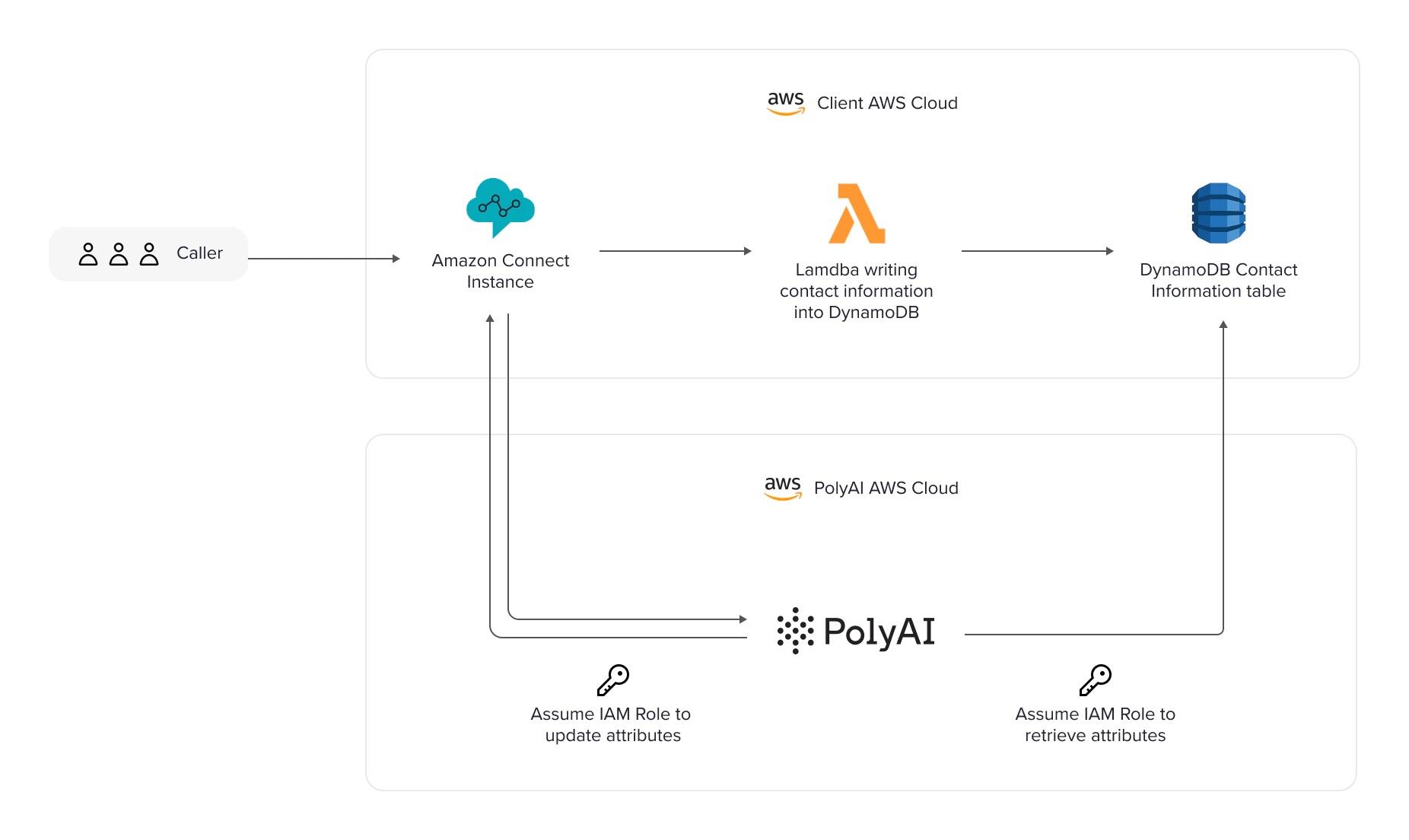 1. Inbound call handling: Amazon Connect selects a number from a pool of PolyAI-provisioned phone numbers for incoming calls.
2. Routing to PolyAI: Calls are transferred to the PolyAI conversational agent, which retrieves contact attributes from DynamoDB using an AWS IAM role with appropriate permissions.
3. Guided conversational flows: The PolyAI agent greets the caller and executes customized conversational flows, such as identity verification or information collection.
4. Handoff or resolution: If the query is resolved, the call is terminated. Unresolved queries are routed back to Amazon Connect for queue-based agent handling.
5. Data management: Data from the interaction (e.g., transcripts, query status) is sent to Amazon Connect and stored in S3 buckets using the same AWS IAM role.
## Setup guide
### Prerequisites
* **Amazon Connect instance**: Ensure an active Amazon Connect instance with administrative access.
* **PolyAI project**: Set up a PolyAI agent aligned with your Amazon Connect workflows.
* **AWS services**:
* DynamoDB: For securely storing call attributes.
* Lambda: For processing event data.
* STS: For secure role-based data access.
* **Integration credentials**:
* IAM role: Create an IAM role with policies for DynamoDB and Lambda access, allowing PolyAI to interact with AWS resources.
### 1: Configure Amazon Connect
1. Log in to the AWS Management Console and open Amazon Connect.
2. Use the Flow Designer to:
* Create or edit a contact flow.
* Add:
* A PolyAI handoff node to route calls to the voice agent.
* A Lambda function node to retrieve and process call data.
3. Save and publish the contact flow.
### 2: Set up DynamoDB for call attributes
1. Create a DynamoDB table:
* Define a primary key, such as CallID or CustomerID.
* Add attributes like `customer_name` or `reservation_number`.
2. Link the table to the Lambda function for real-time updates.
**Correlating Amazon Connect `ContactId` with PolyAI conversation `id`**
Amazon Connect's `ContactId` (from `event['Details']['ContactData']['ContactId']`) and PolyAI's conversation `id` (returned by the [Conversations API](/api-reference/conversations/introduction)) are **separate identifiers** issued by each platform. They are not automatically mapped.
To correlate them, write the `ContactId` to a PolyAI variable at call start (for example via a start function or SIP header) so it appears alongside the PolyAI `id` in the Conversations API response. You can then join Amazon Connect CTRs and PolyAI conversation data on this shared field.
### 3: Configure AWS Lambda function
1. Create a Lambda function in the AWS Management Console:
* Use a provided or custom script to process call events.
2. Assign an IAM role with:
* Permissions for DynamoDB and STS.
3. Deploy the function and link it to the Amazon Connect contact flow.
Example Lambda function template:
```python theme={"theme":{"light":"github-light","dark":"github-dark"}}
import boto3
def lambda_handler(event, context):
dynamodb = boto3.resource('dynamodb')
table = dynamodb.Table('YourDynamoDBTable')
# Extract call attributes
call_id = event['Details']['ContactData']['ContactId']
caller_number = event['Details']['ContactData']['CustomerEndpoint']['Address']
# Update or retrieve data
response = table.update_item(
Key={'CallID': call_id},
UpdateExpression="SET caller_number =:val",
ExpressionAttributeValues={':val': caller_number}
)
return {
'statusCode': 200,
'body': 'Call attributes updated successfully'
}
```
### 4: Integrate PolyAI agent
1. Provide PolyAI with:
* Your [12-digit AWS Account ID](https://docs.aws.amazon.com/accounts/latest/reference/manage-acct-identifiers.html).
* Your [Amazon Connect region](https://aws.amazon.com/about-aws/global-infrastructure/regions_az/).
2. Set up the integration using [AWS CloudFormation](https://docs.aws.amazon.com/AWSCloudFormation/latest/UserGuide/Welcome.html):
* PolyAI will share an AWS CloudFormation template using [Amazon S3](https://aws.amazon.com/s3/).
* Create a service role in your AWS account with the following policy, with `` replaced by your actual 12-digit AWS Account ID:
```json theme={"theme":{"light":"github-light","dark":"github-dark"}}
{
"Version": "2012-10-17",
"Statement": [
{
"Sid": "VisualEditor0",
"Effect": "Allow",
"Action": [
"cloudformation:*"
],
"Resource": "*"
},
{
"Sid": "VisualEditor1",
"Effect": "Allow",
"Action": "s3:*",
"Resource": "arn:aws:s3:::amazon-connect-integration-sample-code//*"
},
{
"Sid": "VisualEditor2",
"Effect": "Allow",
"Action": "lambda:*",
"Resource": "arn:aws:lambda:*::function:PolyAI*"
},
{
"Sid": "VisualEditor3",
"Effect": "Allow",
"Action": "iam:*",
"Resource": [
"arn:aws:iam:::policy/PolyAI*",
"arn:aws:iam:::role/PolyAI*"
]
},
{
"Sid": "VisualEditor4",
"Effect": "Allow",
"Action": "dynamodb:*",
"Resource": "arn:aws:dynamodb:*::table/PolyAI*"
}
]
}
```
3. Deploy the PolyAI CloudFormation stack, which will automatically create:
* A DynamoDB table.
* A Lambda function.
* The required IAM roles.
4. Update your Amazon Connect flow to route calls to PolyAI voice agents.
### 5: Test and deploy
1. Test integration:
* Verify everything works, like:
* Try routing a call to various PolyAI agents.
* Make dummy data retrieval and status updates to test DynamoDB.
* Simulate a live-agent handoff processes to make sure there are no problems.
2. Monitor analytics:
* Use the Amazon Connect analytics dashboard to track call volume, routing efficiency, and agent handoffs.
## Chat and messaging handoff
For webchat and SMS conversations, PolyAI escalates to a live agent through the Amazon Connect [Chat API](https://docs.aws.amazon.com/connect/latest/APIReference/API_StartChatContact.html) instead of SIP. Configure this under **Integrations > Amazon Connect** in Agent Studio.
| Field | Required | Description |
| ----------------- | -------- | -------------------------------------------------------------------------------------------------------- |
| `instance_id` | Yes | The Amazon Connect instance ID. |
| `contact_flow_id` | Yes | The contact flow that routes the chat to a queue. |
| `role_arn` | Yes | IAM role PolyAI assumes to call `StartChatContact`. |
| `aws_region` | No | Region of the Connect instance (for example, `eu-west-2`). Overrides the PolyAI worker's default region. |
| `api_url` | No | Override for the Connect API endpoint. |
| `headers` | No | Static headers to include on API calls. |
### When to set `aws_region`
PolyAI's messaging handoff worker uses a default AWS region. If your Amazon Connect instance is in a different region — for example, your worker defaults to `us-east-1` but your Connect instance lives in `eu-west-2` — set `aws_region` on the integration so `StartChatContact` targets the right region. Without this override, the handoff fails with a `ResourceNotFoundException`.
Use the [region code](https://docs.aws.amazon.com/general/latest/gr/connect_region.html) shown in the Amazon Connect console URL (for example, `eu-west-2`, `us-west-2`, `ap-southeast-2`).
```json theme={"theme":{"light":"github-light","dark":"github-dark"}}
{
"instance_id": "12345678-aaaa-bbbb-cccc-1234567890ab",
"contact_flow_id": "abcdef12-3456-7890-abcd-ef1234567890",
"role_arn": "arn:aws:iam::123456789012:role/PolyAIAccessConnect",
"aws_region": "eu-west-2"
}
```
### IAM trust policy requirements
PolyAI's handoff worker runs on EKS with [IRSA](https://docs.aws.amazon.com/eks/latest/userguide/iam-roles-for-service-accounts.html), which adds session tags to its credentials when chain-assuming your IAM role. Your `PolyAIAccessConnect` role's trust policy must therefore allow both `sts:AssumeRole` **and** `sts:TagSession` from the PolyAI worker account. If `sts:TagSession` is missing, the assume-role step fails before any Connect API call is made.
## Useful links
* [Amazon Connect Documentation](https://aws.amazon.com/connect/)
* [AWS Lambda Documentation](https://docs.aws.amazon.com/lambda/latest/dg/welcome.html)
* [Amazon DynamoDB Documentation](https://docs.aws.amazon.com/dynamodb/latest/developerguide/Introduction.html)
* [PolyAI API Reference](/api-reference)
1. Inbound call handling: Amazon Connect selects a number from a pool of PolyAI-provisioned phone numbers for incoming calls.
2. Routing to PolyAI: Calls are transferred to the PolyAI conversational agent, which retrieves contact attributes from DynamoDB using an AWS IAM role with appropriate permissions.
3. Guided conversational flows: The PolyAI agent greets the caller and executes customized conversational flows, such as identity verification or information collection.
4. Handoff or resolution: If the query is resolved, the call is terminated. Unresolved queries are routed back to Amazon Connect for queue-based agent handling.
5. Data management: Data from the interaction (e.g., transcripts, query status) is sent to Amazon Connect and stored in S3 buckets using the same AWS IAM role.
## Setup guide
### Prerequisites
* **Amazon Connect instance**: Ensure an active Amazon Connect instance with administrative access.
* **PolyAI project**: Set up a PolyAI agent aligned with your Amazon Connect workflows.
* **AWS services**:
* DynamoDB: For securely storing call attributes.
* Lambda: For processing event data.
* STS: For secure role-based data access.
* **Integration credentials**:
* IAM role: Create an IAM role with policies for DynamoDB and Lambda access, allowing PolyAI to interact with AWS resources.
### 1: Configure Amazon Connect
1. Log in to the AWS Management Console and open Amazon Connect.
2. Use the Flow Designer to:
* Create or edit a contact flow.
* Add:
* A PolyAI handoff node to route calls to the voice agent.
* A Lambda function node to retrieve and process call data.
3. Save and publish the contact flow.
### 2: Set up DynamoDB for call attributes
1. Create a DynamoDB table:
* Define a primary key, such as CallID or CustomerID.
* Add attributes like `customer_name` or `reservation_number`.
2. Link the table to the Lambda function for real-time updates.
**Correlating Amazon Connect `ContactId` with PolyAI conversation `id`**
Amazon Connect's `ContactId` (from `event['Details']['ContactData']['ContactId']`) and PolyAI's conversation `id` (returned by the [Conversations API](/api-reference/conversations/introduction)) are **separate identifiers** issued by each platform. They are not automatically mapped.
To correlate them, write the `ContactId` to a PolyAI variable at call start (for example via a start function or SIP header) so it appears alongside the PolyAI `id` in the Conversations API response. You can then join Amazon Connect CTRs and PolyAI conversation data on this shared field.
### 3: Configure AWS Lambda function
1. Create a Lambda function in the AWS Management Console:
* Use a provided or custom script to process call events.
2. Assign an IAM role with:
* Permissions for DynamoDB and STS.
3. Deploy the function and link it to the Amazon Connect contact flow.
Example Lambda function template:
```python theme={"theme":{"light":"github-light","dark":"github-dark"}}
import boto3
def lambda_handler(event, context):
dynamodb = boto3.resource('dynamodb')
table = dynamodb.Table('YourDynamoDBTable')
# Extract call attributes
call_id = event['Details']['ContactData']['ContactId']
caller_number = event['Details']['ContactData']['CustomerEndpoint']['Address']
# Update or retrieve data
response = table.update_item(
Key={'CallID': call_id},
UpdateExpression="SET caller_number =:val",
ExpressionAttributeValues={':val': caller_number}
)
return {
'statusCode': 200,
'body': 'Call attributes updated successfully'
}
```
### 4: Integrate PolyAI agent
1. Provide PolyAI with:
* Your [12-digit AWS Account ID](https://docs.aws.amazon.com/accounts/latest/reference/manage-acct-identifiers.html).
* Your [Amazon Connect region](https://aws.amazon.com/about-aws/global-infrastructure/regions_az/).
2. Set up the integration using [AWS CloudFormation](https://docs.aws.amazon.com/AWSCloudFormation/latest/UserGuide/Welcome.html):
* PolyAI will share an AWS CloudFormation template using [Amazon S3](https://aws.amazon.com/s3/).
* Create a service role in your AWS account with the following policy, with `` replaced by your actual 12-digit AWS Account ID:
```json theme={"theme":{"light":"github-light","dark":"github-dark"}}
{
"Version": "2012-10-17",
"Statement": [
{
"Sid": "VisualEditor0",
"Effect": "Allow",
"Action": [
"cloudformation:*"
],
"Resource": "*"
},
{
"Sid": "VisualEditor1",
"Effect": "Allow",
"Action": "s3:*",
"Resource": "arn:aws:s3:::amazon-connect-integration-sample-code//*"
},
{
"Sid": "VisualEditor2",
"Effect": "Allow",
"Action": "lambda:*",
"Resource": "arn:aws:lambda:*::function:PolyAI*"
},
{
"Sid": "VisualEditor3",
"Effect": "Allow",
"Action": "iam:*",
"Resource": [
"arn:aws:iam:::policy/PolyAI*",
"arn:aws:iam:::role/PolyAI*"
]
},
{
"Sid": "VisualEditor4",
"Effect": "Allow",
"Action": "dynamodb:*",
"Resource": "arn:aws:dynamodb:*::table/PolyAI*"
}
]
}
```
3. Deploy the PolyAI CloudFormation stack, which will automatically create:
* A DynamoDB table.
* A Lambda function.
* The required IAM roles.
4. Update your Amazon Connect flow to route calls to PolyAI voice agents.
### 5: Test and deploy
1. Test integration:
* Verify everything works, like:
* Try routing a call to various PolyAI agents.
* Make dummy data retrieval and status updates to test DynamoDB.
* Simulate a live-agent handoff processes to make sure there are no problems.
2. Monitor analytics:
* Use the Amazon Connect analytics dashboard to track call volume, routing efficiency, and agent handoffs.
## Chat and messaging handoff
For webchat and SMS conversations, PolyAI escalates to a live agent through the Amazon Connect [Chat API](https://docs.aws.amazon.com/connect/latest/APIReference/API_StartChatContact.html) instead of SIP. Configure this under **Integrations > Amazon Connect** in Agent Studio.
| Field | Required | Description |
| ----------------- | -------- | -------------------------------------------------------------------------------------------------------- |
| `instance_id` | Yes | The Amazon Connect instance ID. |
| `contact_flow_id` | Yes | The contact flow that routes the chat to a queue. |
| `role_arn` | Yes | IAM role PolyAI assumes to call `StartChatContact`. |
| `aws_region` | No | Region of the Connect instance (for example, `eu-west-2`). Overrides the PolyAI worker's default region. |
| `api_url` | No | Override for the Connect API endpoint. |
| `headers` | No | Static headers to include on API calls. |
### When to set `aws_region`
PolyAI's messaging handoff worker uses a default AWS region. If your Amazon Connect instance is in a different region — for example, your worker defaults to `us-east-1` but your Connect instance lives in `eu-west-2` — set `aws_region` on the integration so `StartChatContact` targets the right region. Without this override, the handoff fails with a `ResourceNotFoundException`.
Use the [region code](https://docs.aws.amazon.com/general/latest/gr/connect_region.html) shown in the Amazon Connect console URL (for example, `eu-west-2`, `us-west-2`, `ap-southeast-2`).
```json theme={"theme":{"light":"github-light","dark":"github-dark"}}
{
"instance_id": "12345678-aaaa-bbbb-cccc-1234567890ab",
"contact_flow_id": "abcdef12-3456-7890-abcd-ef1234567890",
"role_arn": "arn:aws:iam::123456789012:role/PolyAIAccessConnect",
"aws_region": "eu-west-2"
}
```
### IAM trust policy requirements
PolyAI's handoff worker runs on EKS with [IRSA](https://docs.aws.amazon.com/eks/latest/userguide/iam-roles-for-service-accounts.html), which adds session tags to its credentials when chain-assuming your IAM role. Your `PolyAIAccessConnect` role's trust policy must therefore allow both `sts:AssumeRole` **and** `sts:TagSession` from the PolyAI worker account. If `sts:TagSession` is missing, the assume-role step fails before any Connect API call is made.
## Useful links
* [Amazon Connect Documentation](https://aws.amazon.com/connect/)
* [AWS Lambda Documentation](https://docs.aws.amazon.com/lambda/latest/dg/welcome.html)
* [Amazon DynamoDB Documentation](https://docs.aws.amazon.com/dynamodb/latest/developerguide/Introduction.html)
* [PolyAI API Reference](/api-reference)