> ## Documentation Index
> Fetch the complete documentation index at: https://docs.poly.ai/llms.txt
> Use this file to discover all available pages before exploring further.
# Flows
> Use flows to guide callers through structured, multi-step processes with validation and branching logic.
Flows guide callers through structured, multi-step processes: collecting a booking reference, routing by account type, or verifying identity before transferring.
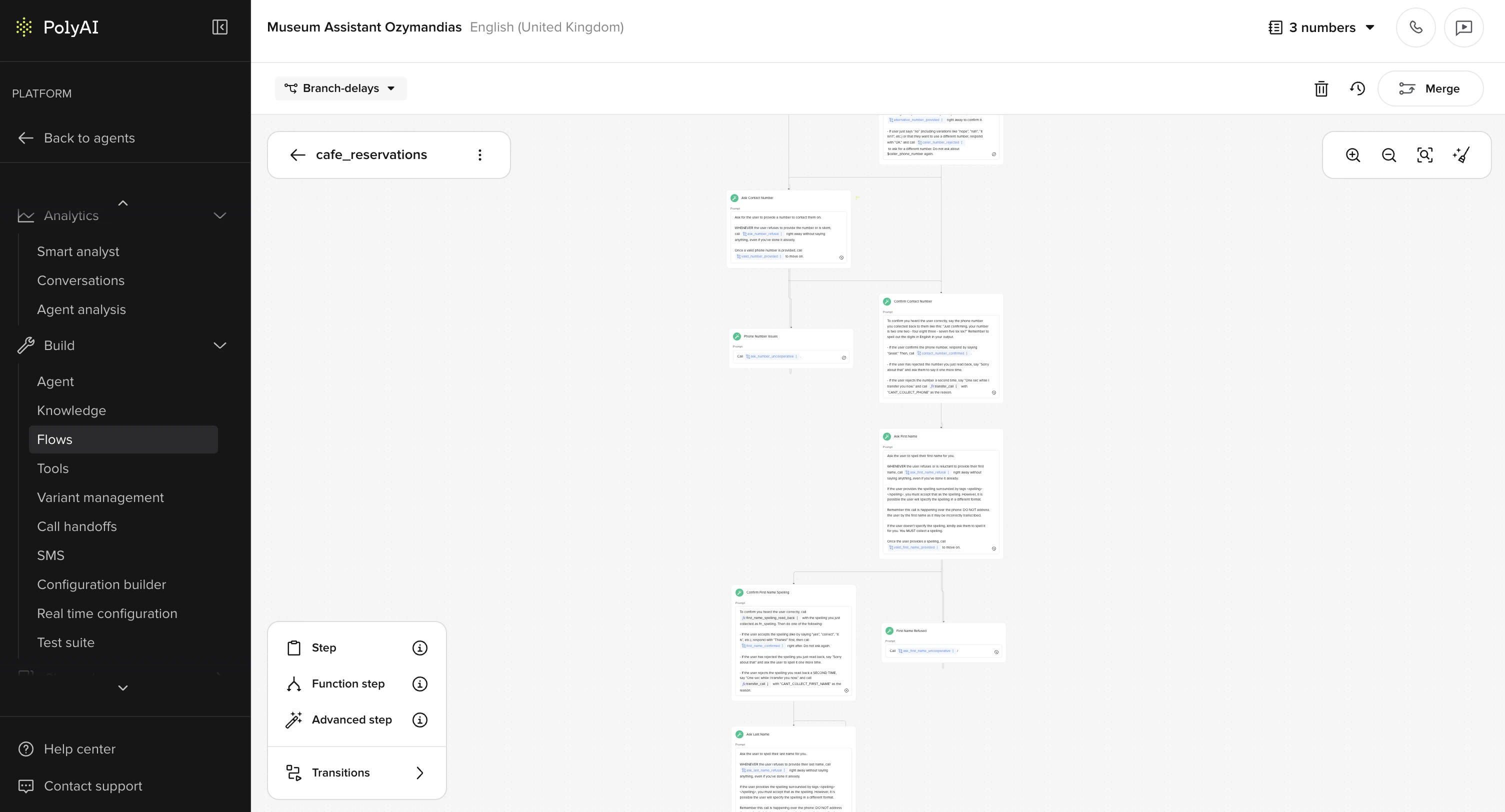 Flows are found under **Flows** in Agent Studio.
Use [FAQs](/knowledge/faqs/introduction) for simple question-and-answer interactions. Use flows when the conversation requires a specific sequence of steps, input validation, or branching logic.
Most flows can be built visually using **Default steps** and entity extraction, without Python. See the [no-code flows guide](/flows/no-code/introduction).
**Use [Studio Assistant](/studio-assistant/introduction) to scaffold a flow from a description** — *"build a booking flow that collects party size, date, time, and name, then confirms"*. Open **Flows** to review, or keep asking Studio Assistant to refine (*"add a confirmation step"*, *"skip the email field if it's already on file"*). Every change lands on a branch.
## How flows work
Each flow is made up of **steps**: self-contained conversation states that ask for something, validate input, and route the conversation forward. Steps are connected by labeled edges that describe when each path should be taken.
There are two ways to build flow logic:
Write natural-language prompts, extract entities, and route by labeled conditions. Best for booking, verification, and data-collection flows.
Use Python to call APIs, apply strict business rules, or perform numeric comparisons. Best when routing depends on custom logic.
## How to trigger a flow
Three ways to start a flow:
1. **From a Managed Topic**, type `/Flow` in the Actions field
2. **From another flow**, use a transition step in the flow editor
3. **From code**, call `conv.goto_flow("Reservation flow")` in a function
See [triggering flows](/flows/triggering-flows) for detailed instructions and examples.
APIs do not trigger flows directly. Flows orchestrate steps, and Function steps can call APIs.
## Connecting steps
In the Flow Editor:
* Use `/Steps` in the prompt to connect to the next step
* Add labeled conditions on the edges between steps to describe when each path should be taken
* Use the Flow Functions modal to see all transitions in one place
Always include an exit step in your flow. Un-exited flows can cause hallucinations.
Use descriptive step and condition names like `check_reservation_match`, not vague ones like `step_two`, this helps the LLM reason correctly.
## Standard entity types
Define the kind of input your agent collects (Alphanumeric, Number, Date, Time, Phone number, Name, Address, Free text, Multiple choice). See [entity types](/flows/no-code/entities) for configuration.
Flows are found under **Flows** in Agent Studio.
Use [FAQs](/knowledge/faqs/introduction) for simple question-and-answer interactions. Use flows when the conversation requires a specific sequence of steps, input validation, or branching logic.
Most flows can be built visually using **Default steps** and entity extraction, without Python. See the [no-code flows guide](/flows/no-code/introduction).
**Use [Studio Assistant](/studio-assistant/introduction) to scaffold a flow from a description** — *"build a booking flow that collects party size, date, time, and name, then confirms"*. Open **Flows** to review, or keep asking Studio Assistant to refine (*"add a confirmation step"*, *"skip the email field if it's already on file"*). Every change lands on a branch.
## How flows work
Each flow is made up of **steps**: self-contained conversation states that ask for something, validate input, and route the conversation forward. Steps are connected by labeled edges that describe when each path should be taken.
There are two ways to build flow logic:
Write natural-language prompts, extract entities, and route by labeled conditions. Best for booking, verification, and data-collection flows.
Use Python to call APIs, apply strict business rules, or perform numeric comparisons. Best when routing depends on custom logic.
## How to trigger a flow
Three ways to start a flow:
1. **From a Managed Topic**, type `/Flow` in the Actions field
2. **From another flow**, use a transition step in the flow editor
3. **From code**, call `conv.goto_flow("Reservation flow")` in a function
See [triggering flows](/flows/triggering-flows) for detailed instructions and examples.
APIs do not trigger flows directly. Flows orchestrate steps, and Function steps can call APIs.
## Connecting steps
In the Flow Editor:
* Use `/Steps` in the prompt to connect to the next step
* Add labeled conditions on the edges between steps to describe when each path should be taken
* Use the Flow Functions modal to see all transitions in one place
Always include an exit step in your flow. Un-exited flows can cause hallucinations.
Use descriptive step and condition names like `check_reservation_match`, not vague ones like `step_two`, this helps the LLM reason correctly.
## Standard entity types
Define the kind of input your agent collects (Alphanumeric, Number, Date, Time, Phone number, Name, Address, Free text, Multiple choice). See [entity types](/flows/no-code/entities) for configuration.
## Developer details
The following sections cover the Python execution model and code-driven techniques. If you are building flows without code, you can skip these.
### LLM interaction model
When the agent is inside a flow step, this is the input order:
1. System prompt (includes [Behavior](/behavior/general/rules) and [Agent](/behavior/general/agent) agent configuration).
2. Any relevant [Knowledge](/knowledge/faqs/introduction) topics (if applicable).
3. The current step's text prompt.
4. A list of available functions with names, descriptions, and arguments.
What the LLM doesn't see:
* Previous step prompts.
* Any system context, unless it's surfaced in the prompt or state.
**Previous steps are not visible to the LLM.** Each prompt must be self-contained.
### Knowledge function visibility in flows
To make global Knowledge functions available while a flow is running, enable this in your agent's **Voice** or **Messaging** advanced settings (under the model configuration section). Contact your PolyAI representative if you need help enabling this setting.
### Code-driven techniques
These techniques require Python. See **Code-driven flows** in the sidebar.
* [Transition functions](/flows/transition-functions) control the flow's routing logic.
* Use [few-shot prompting](/flows/few-shot-prompting) to clarify expected inputs or edge cases.
* Set [ASR biasing](/flows/asr-biasing) to improve voice transcription for structured or ambiguous values like confirmation codes or personal names. Learn more about [ASR (automatic speech recognition)](https://en.wikipedia.org/wiki/Speech_recognition).
* Use [variables](/tools/variables) to store and reference data across steps.
## Next steps
Build flows visually with prompts and entity extraction, no Python required.
Build your first no-code flow step by step.
Configure entity types, validation, and collection in your flows.
ASR biasing, DTMF, and rich text references in advanced steps.
A complete reservation confirmation flow with step-by-step walkthrough.
Write Python logic to control how your agent moves between steps.