> ## Documentation Index
> Fetch the complete documentation index at: https://docs.poly.ai/llms.txt
> Use this file to discover all available pages before exploring further.
# Example flow
> A complete reservation confirmation flow showing prompts, transitions, and ASR biasing patterns.
**This example includes Python code.** For all code-driven flow guides in one place, visit the **Developer** tab.
You can copy full or partial flows between projects using `Cmd/Ctrl + C` and `Cmd/Ctrl + V` in the Flow Editor.
 This flow handles a real-world reservation confirmation scenario. It highlights:
* Step-specific prompts and function references
* ASR biasing for input accuracy
* Clean state transitions between flow steps
## Start step
To help identify some of the key parts of a flow step, the start step is annotated. Click a lettered heading to go to the relevant section.
This flow handles a real-world reservation confirmation scenario. It highlights:
* Step-specific prompts and function references
* ASR biasing for input accuracy
* Clean state transitions between flow steps
## Start step
To help identify some of the key parts of a flow step, the start step is annotated. Click a lettered heading to go to the relevant section.
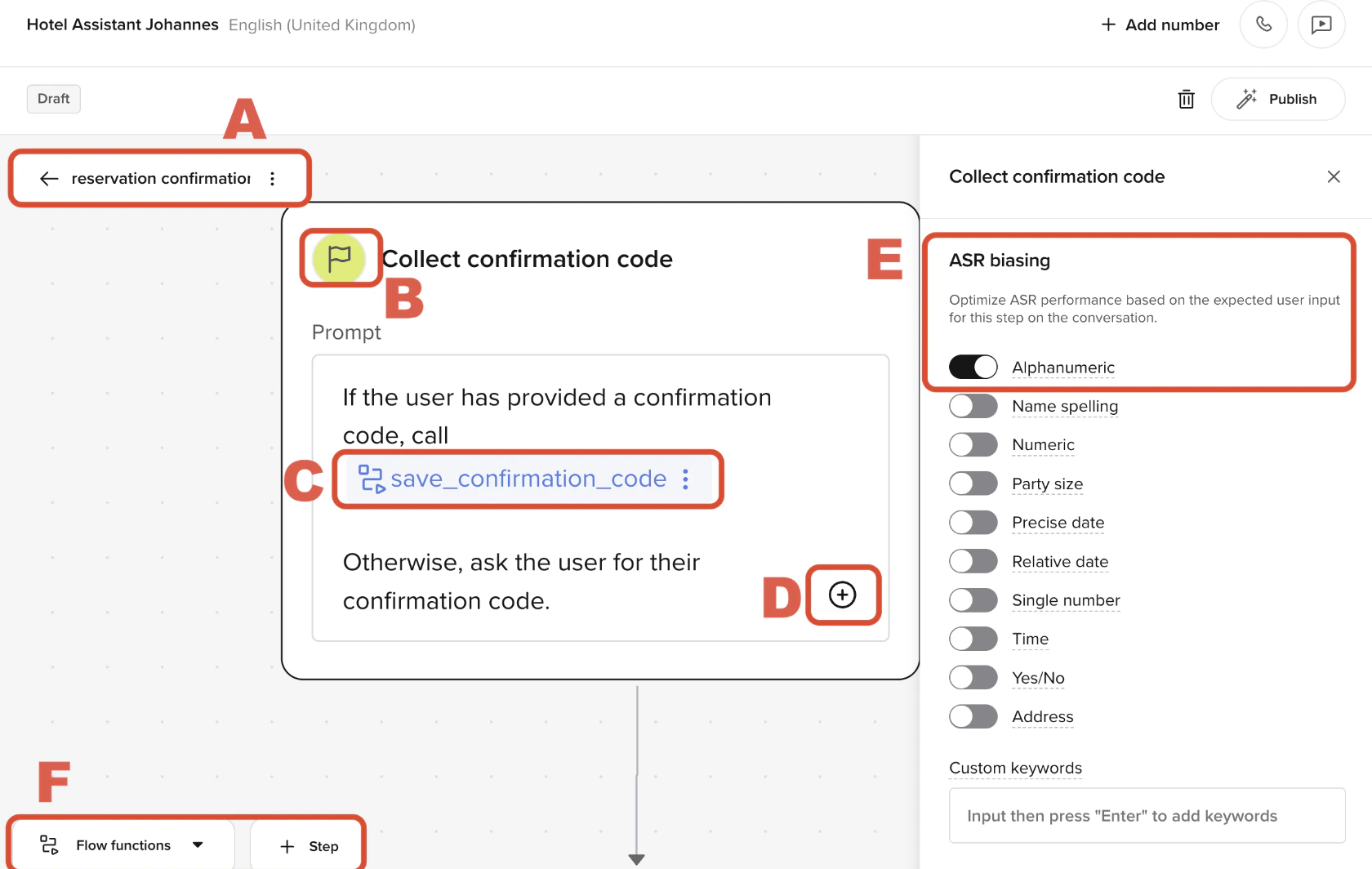 ### A. Flow name (breadcrumb)
The flow name appears at the top of the editor and identifies the current flow – in this case, `reservation confirmation`.
It also acts as a **breadcrumb** for returning to the list of all flows.
### B. Step name and icon
This shows the **current step**: `Collect confirmation code`. The icon indicates it's the **start step** of the flow.
Each step contains:
* A prompt shown to the user
* Transition logic to guide conversation flow
* A set of visible functions the LLM can use.
### C. Transition function reference
Inside the step prompt, the LLM is told to call `save_confirmation_code` if the user provides a valid input.
This example uses both the [conversation](/tools/classes/conv-object) and [flow](./object) objects:
```python theme={"theme":{"light":"github-light","dark":"github-dark"}}
def save_confirmation_code(conv: Conversation, flow: Flow, confirmation: str):
conv.state.confirmation_code = confirmation
flow.goto_step("Collect first name")
return
```
Transition functions are inserted using `/` and appear as underlined blocks in the prompt editor.
See the [transition function](./transition-functions) page for more details.
### D. Add another reference
Clicking the . icon below the prompt lets you:
* Add another function reference
* Insert a transition to another step
* Reference rules or Knowledge topics
Useful for branching logic, but avoid chaining multiple `goto_step()` calls inside a single function. Always `return` after calling `goto_step`.
### E. ASR biasing
This step has [ASR biasing](./asr-biasing) set to **Alphanumeric**, improving recognition of spoken confirmation codes like "B–4–Z–Q–9".
You can enable other biasing types as needed, including:
* Name spelling
* Time and date
* Numbers
* Addresses
See the [ASR biasing](./asr-biasing) page for more details.
### F. Flow toolbar (bottom panel)
At the bottom of the Flow Editor:
* **Flow functions** opens a modal to manage logic used in the flow
* **+ Step** adds a new node to the flow canvas
Transition functions created here are scoped to the flow unless declared globally.
## Middle steps
### A. Flow name (breadcrumb)
The flow name appears at the top of the editor and identifies the current flow – in this case, `reservation confirmation`.
It also acts as a **breadcrumb** for returning to the list of all flows.
### B. Step name and icon
This shows the **current step**: `Collect confirmation code`. The icon indicates it's the **start step** of the flow.
Each step contains:
* A prompt shown to the user
* Transition logic to guide conversation flow
* A set of visible functions the LLM can use.
### C. Transition function reference
Inside the step prompt, the LLM is told to call `save_confirmation_code` if the user provides a valid input.
This example uses both the [conversation](/tools/classes/conv-object) and [flow](./object) objects:
```python theme={"theme":{"light":"github-light","dark":"github-dark"}}
def save_confirmation_code(conv: Conversation, flow: Flow, confirmation: str):
conv.state.confirmation_code = confirmation
flow.goto_step("Collect first name")
return
```
Transition functions are inserted using `/` and appear as underlined blocks in the prompt editor.
See the [transition function](./transition-functions) page for more details.
### D. Add another reference
Clicking the . icon below the prompt lets you:
* Add another function reference
* Insert a transition to another step
* Reference rules or Knowledge topics
Useful for branching logic, but avoid chaining multiple `goto_step()` calls inside a single function. Always `return` after calling `goto_step`.
### E. ASR biasing
This step has [ASR biasing](./asr-biasing) set to **Alphanumeric**, improving recognition of spoken confirmation codes like "B–4–Z–Q–9".
You can enable other biasing types as needed, including:
* Name spelling
* Time and date
* Numbers
* Addresses
See the [ASR biasing](./asr-biasing) page for more details.
### F. Flow toolbar (bottom panel)
At the bottom of the Flow Editor:
* **Flow functions** opens a modal to manage logic used in the flow
* **+ Step** adds a new node to the flow canvas
Transition functions created here are scoped to the flow unless declared globally.
## Middle steps
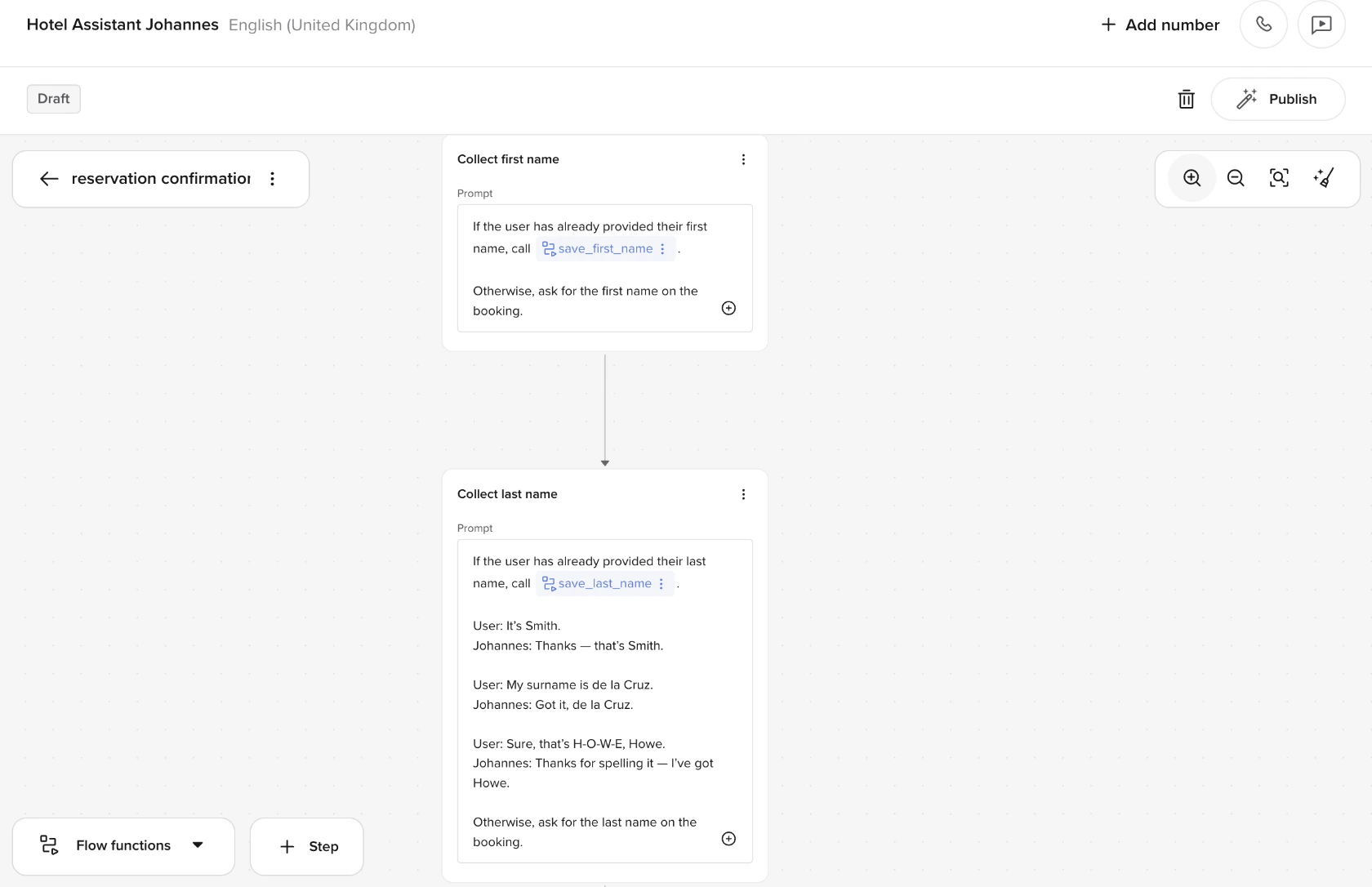 The agent collects the user's **first** and **last** name using separate steps, each with its own prompt and transition logic.
* If the user has already provided the name, the agent calls the relevant function (e.g. `save_first_name`, `save_last_name`) and proceeds.
* If not, the agent asks for it directly.
Each step uses **few-shot prompting** to improve recognition of non-standard formats:
```plaintext theme={"theme":{"light":"github-light","dark":"github-dark"}}
User: It's Smith.
Johannes: Thanks – that's Smith.
User: My surname is de la Cruz.
Johannes: Got it, de la Cruz.
User: Sure, that's H-O-W-E. Howe.
Johannes: Thanks for spelling it – I've got Howe.
```
[ASR biasing](./asr-biasing) is set to **Name spelling** in the "Collect last name" step to improve recognition of spelled-out inputs.
## End step
The agent collects the user's **first** and **last** name using separate steps, each with its own prompt and transition logic.
* If the user has already provided the name, the agent calls the relevant function (e.g. `save_first_name`, `save_last_name`) and proceeds.
* If not, the agent asks for it directly.
Each step uses **few-shot prompting** to improve recognition of non-standard formats:
```plaintext theme={"theme":{"light":"github-light","dark":"github-dark"}}
User: It's Smith.
Johannes: Thanks – that's Smith.
User: My surname is de la Cruz.
Johannes: Got it, de la Cruz.
User: Sure, that's H-O-W-E. Howe.
Johannes: Thanks for spelling it – I've got Howe.
```
[ASR biasing](./asr-biasing) is set to **Name spelling** in the "Collect last name" step to improve recognition of spelled-out inputs.
## End step
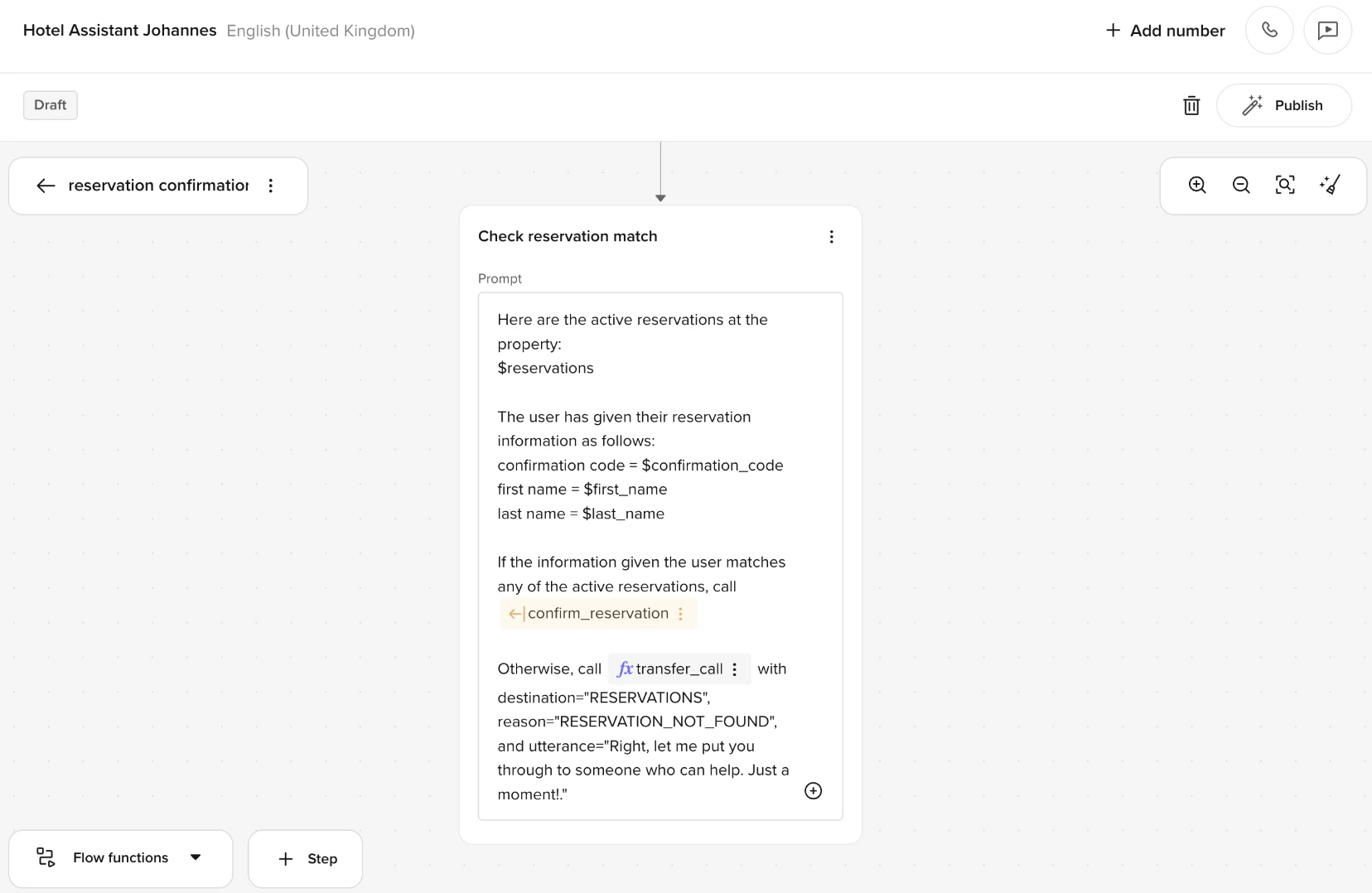 The agent attempts to match the user's provided details against active reservations.
* It compares the `confirmation code`, `first name`, and `last name` against entries in the `$reservations` list.
* If a match is found, it calls the `confirm_reservation` function and moves forward.
* If no match is found, it calls `transfer_call` with the following parameters:
* `destination="RESERVATIONS"`
* `reason="RESERVATION_NOT_FOUND"`
* `utterance="Right, let me put you through to someone who can help. Just a moment."`
This is a standard validation step using dynamic values and conditional logic.
## Reminders
* LLMs only see the **current step's prompt and function list** – not previous steps
* Always use `return` after `flow.goto_step()` to prevent silent overrides
* Avoid naming transitions by position (`goto_step_4`) – use intent-based names like `match_reservation` or `retry_lookup`
### Improving date accuracy from speech
Voice transcription (ASR) often produces **unstructured date strings** like `twenty seventh of june twenty twenty five`, which can be hard to parse – especially if you're enforcing a strict format like `DD/MM/YYYY`.
Instead of checking the date format in the step prompt or rejecting invalid inputs immediately:
* Move format enforcement into the **LLM context field** of the parameter.
* Let the LLM interpret and convert the input to the required format.
* Then validate it in the function.
This avoids issues where STT fails to cleanly separate day, month, and year – especially in multi-lingual or noisy environments.
**Example context (LLM parameter):**
> The user will say a date. You must extract the intended date and convert it to DD MM YYYY format. If they use a different format, rewrite it before returning.
```python theme={"theme":{"light":"github-light","dark":"github-dark"}}
try:
day, month, year = value.split(" ")
except ValueError:
return {
"utterance": "Hmm, I didn't catch a full date. Could you say it again?"
}
```
This code uses Python's [try statement](https://docs.python.org/3/tutorial/errors.html#handling-exceptions) to attempt splitting the date into day, month, and year. If the input isn't in the expected format, it prompts the user to try again.
The agent attempts to match the user's provided details against active reservations.
* It compares the `confirmation code`, `first name`, and `last name` against entries in the `$reservations` list.
* If a match is found, it calls the `confirm_reservation` function and moves forward.
* If no match is found, it calls `transfer_call` with the following parameters:
* `destination="RESERVATIONS"`
* `reason="RESERVATION_NOT_FOUND"`
* `utterance="Right, let me put you through to someone who can help. Just a moment."`
This is a standard validation step using dynamic values and conditional logic.
## Reminders
* LLMs only see the **current step's prompt and function list** – not previous steps
* Always use `return` after `flow.goto_step()` to prevent silent overrides
* Avoid naming transitions by position (`goto_step_4`) – use intent-based names like `match_reservation` or `retry_lookup`
### Improving date accuracy from speech
Voice transcription (ASR) often produces **unstructured date strings** like `twenty seventh of june twenty twenty five`, which can be hard to parse – especially if you're enforcing a strict format like `DD/MM/YYYY`.
Instead of checking the date format in the step prompt or rejecting invalid inputs immediately:
* Move format enforcement into the **LLM context field** of the parameter.
* Let the LLM interpret and convert the input to the required format.
* Then validate it in the function.
This avoids issues where STT fails to cleanly separate day, month, and year – especially in multi-lingual or noisy environments.
**Example context (LLM parameter):**
> The user will say a date. You must extract the intended date and convert it to DD MM YYYY format. If they use a different format, rewrite it before returning.
```python theme={"theme":{"light":"github-light","dark":"github-dark"}}
try:
day, month, year = value.split(" ")
except ValueError:
return {
"utterance": "Hmm, I didn't catch a full date. Could you say it again?"
}
```
This code uses Python's [try statement](https://docs.python.org/3/tutorial/errors.html#handling-exceptions) to attempt splitting the date into day, month, and year. If the input isn't in the expected format, it prompts the user to try again.