> ## Documentation Index
> Fetch the complete documentation index at: https://docs.poly.ai/llms.txt
> Use this file to discover all available pages before exploring further.
# Conversation flow
> How PolyAI agents process conversations.
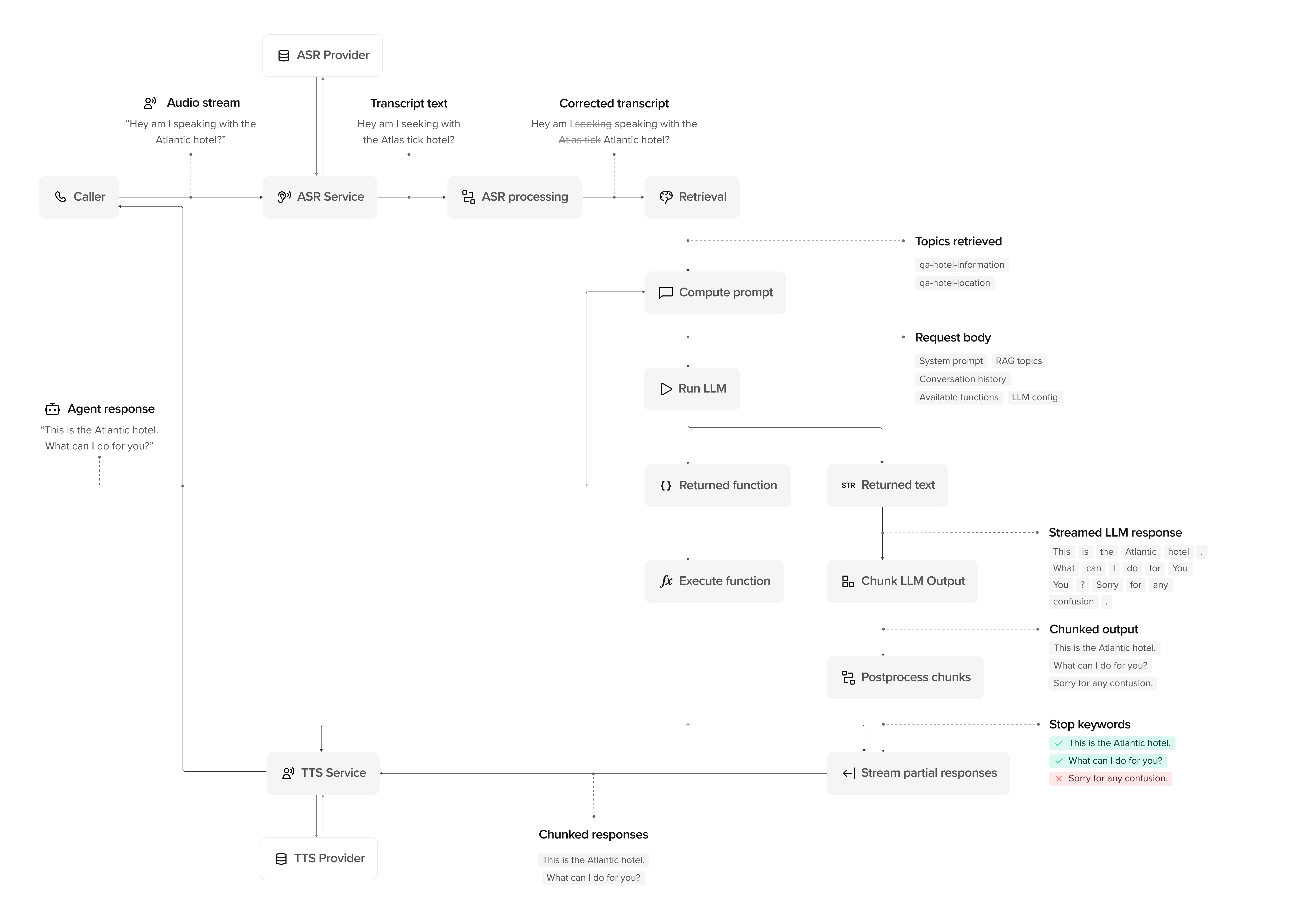
How a PolyAI agent processes conversations from input to response.
The agent's greeting is sent directly to the user without LLM processing or behavioral rules. For voice, the greeting text is converted to speech; for webchat, it's displayed as text. Make sure to write the greeting in the language your users expect. Behavioral rules and agent logic only apply starting from the second turn of the conversation.
## Processing stages
A conversation moves through the following stages:
* **User**: The user provides input–speech (voice) or text (webchat/SMS).
* **Input capture**: For voice, the audio stream is captured and sent for transcription. For webchat/SMS, text is received directly.
* **ASR Provider** (voice only): The system receives the raw audio.
* **[ASR Service](/voice-channel/advanced/speech-recognition)** (voice only): Converts the audio into text using [automatic speech recognition](https://en.wikipedia.org/wiki/Speech_recognition).
* **ASR Processing** (voice only): Searches for transcription issues and applies any relevant corrections.
* **Transcript/Text → Processed Input**: The processed input is passed to [Retrieval](/knowledge/faqs/RAG/introduction).
* **Retrieval**: Pulls relevant **topics retrieved** from the [Knowledge area](/knowledge/faqs/introduction) using [RAG (retrieval-augmented generation)](https://en.wikipedia.org/wiki/Retrieval-augmented_generation) to provide context for the response.
* **Compute Prompt**: The system builds an [LLM](https://en.wikipedia.org/wiki/Large_language_model) prompt using retrieved topics, system knowledge, and conversation history.
* **Run LLM**: The LLM processes the request and determines whether to return:
* **Returned Text**: A direct text response.
* **Returned Function**: A tool call (if applicable).
* **Execute Function (if applicable)**: Runs the function and passes the result back to the LLM.
* **LLM Refinement**: If a function result is returned, the LLM updates its response before proceeding.
* **Chunk LLM Output**: The response is broken into chunks for delivery.
* **Postprocess Chunks**: Applies rules such as [stop keywords](/voice-channel/advanced/stop-keywords) to remove unnecessary phrases.
* **Stream Partial Responses**: The system sends chunks as soon as they are ready, rather than waiting for the full response.
* **TTS Service** (voice only): Converts text chunks into speech using [text-to-speech synthesis](https://en.wikipedia.org/wiki/Speech_synthesis). Configure voices in [voice settings](/voice-channel/introduction).
* **Response delivery**: For voice, synthesized speech is streamed to the user. For webchat/SMS, text responses are sent directly.
* **Live Handoff (if applicable)**: If escalation is needed, the agent triggers a [live handoff](/voice-channel/handoffs). For voice, this transfers the call; for webchat, this can route to a live chat agent.
* **Conversation Logs**: The system stores conversation history and logs for [analytics](/analytics/conversations/introduction).
* **Final Response**: The user receives the completed response as it streams, without waiting for the entire message.
## Advanced: How response streaming works
PolyAI agents don't wait for the full response before speaking. Instead, responses are processed and streamed **in real time**:
* **LLM Streaming**: Words are generated and sent continuously.
* **Chunking**: Responses are broken into chunks for controlled delivery.
* **Postprocessing**: [Stop keywords](/voice-channel/advanced/stop-keywords) remove unnecessary phrases before delivery.
* **Response Streaming**: For voice, users hear speech as soon as it's processed via TTS. For webchat, text appears progressively as it's generated.
### Watch it in action
This video visualizes the conversation flow, showing how responses are processed, chunked, and streamed:
## Next steps
Understand system components and data flow
Configure your agent's personality and behavior
Add FAQs and knowledge sources
Tune ASR and input processing