> ## Documentation Index
> Fetch the complete documentation index at: https://docs.poly.ai/llms.txt
> Use this file to discover all available pages before exploring further.
# Dialog-RSN-1 overview
> How Dialog-RSN-1 fuses transcription into generation, reasons only when a turn needs it, and where turn-taking and an agent harness fit in.
Callers feel most of a turn's delay before the model even starts generating a reply. A conventional pipeline spends that time first deciding the caller has stopped talking, then handing a transcript across to the language model as a separate step. Comparing providers on model speed alone measures only the smallest part of that delay.
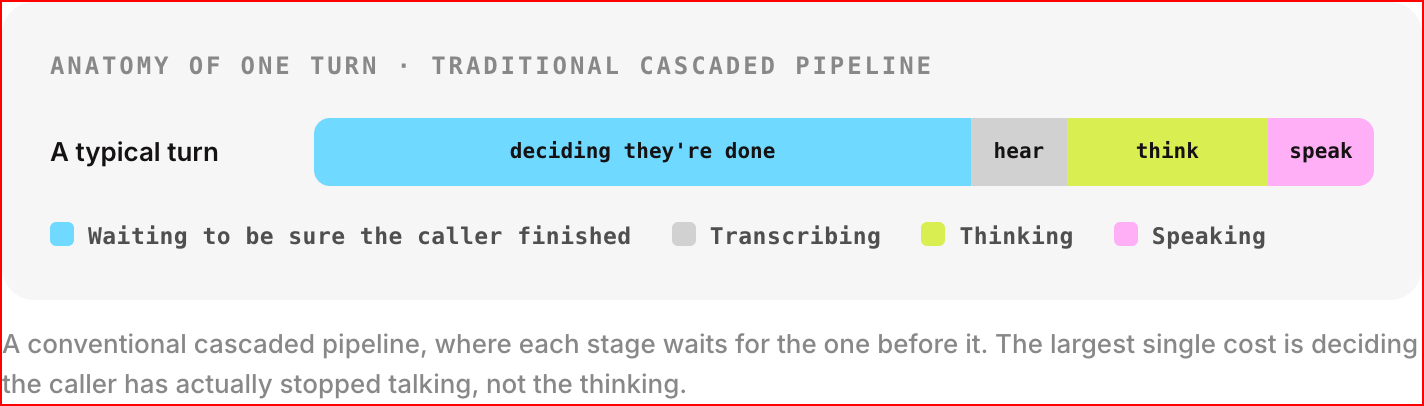 A realtime API makes that call as the audio arrives, holding one open stream of audio and events instead of answering one request at a time. It tracks when the caller has finished talking, and handles what happens if they start again mid-answer.
For the wire format, see the [reference](/dialog-rsn-1/reference). For a runnable example, start with the [quickstart](/dialog-rsn-1/quickstart).
## Why it's built this way
A conventional voice pipeline runs speech recognition, then a language model, then speech synthesis, each stage waiting for the one before it to finish.
Each stage adds delay, and each transcript handoff drops what the audio carried beyond the words: tone, and the sound of someone still deciding what to say.
Dialog-RSN-1 collapses the first two stages into one model. It hears the call and answers it in one pass, with no transcript handoff in between. It also spends thinking time per turn rather than on a fixed schedule, so a simple question stays fast.
By default the API speaks the reply. Dialog-RSN-1 writes it, the server voices it, and you get the audio back with a transcript of what it says. Because the reply is written before it's spoken, you can also take it as text with `output_modalities: ["text"]`. Do that when you want your own voice or text-to-speech vendor, control over playback, or a place to log the reply and run your own guardrails over it before a caller hears anything.
## The core split
Inside a turn, two mechanisms do separate jobs:
Deciding *when* a turn ends: whether the caller has stopped talking or paused mid-thought. Voice activity detection proposes the boundary; Dialog-RSN-1 confirms it as the first thing it emits in the generation that becomes the reply.
Deciding *what* happens once a turn starts: the reply itself, streamed token by token, with transcription and tool calls folded into the same stream.
The detector is infrastructure; Dialog-RSN-1 makes the judgment, confirming what the detector proposes. Your `instructions` and `tools` shape what happens after a turn is confirmed, and leave the confirmation alone.
## Setup by what you're building
| You are building... | Use |
| - | - |
| A phone-style agent with barge-in | Server VAD (`turn_detection: {"type": "server_vad"}`), and let `speech_started`/`speech_stopped` drive turns |
| A push-to-talk or chat-like text UI | Manual responses: `create_response: false`, then `input_audio_buffer.commit` or `conversation.item.create` followed by an explicit `response.create`. The model no longer confirms turns, and the detector still commits the audio at each pause it hears, so one press can become several caller items. Nothing answers them until your `response.create`. |
| A tool-using agent | Declare `tools` in `session.update`; answer a call with `function_call_output`, then a fresh `response.create` |
| A task with real thinking to do (dates, ambiguous requests, multi-step logic) | Nothing to configure. Reasoning is automatic, and Dialog-RSN-1 decides per turn whether a turn earns it |
| An agent you voice with your own text-to-speech | Report playback with `poly.output_audio.*`, so barge-in confirmation covers the reply the caller is still hearing. See the [streaming to TTS guide](/dialog-rsn-1/guides/streaming-text-to-speech) for the rest of that wiring |
| An agent answering from your own knowledge base | Pass retrieved passages as `poly_knowledge`, and read `poly_cited_topics` back off `response.done` |
| A spoken reply | Nothing to configure. The default `["audio"]` speaks the reply, with the text as its transcript. Pick a voice with `audio.output.voice` |
| A reply in your own voice or TTS vendor | `output_modalities: ["text"]`, then speak the streamed text yourself |
## How the pieces fit together
### Turn-taking
Turn-taking runs server-side over whatever audio you stream in. Voice activity detection proposes a boundary; Dialog-RSN-1 confirms where a turn ends.
`speech_stopped` always reports Dialog-RSN-1's judgment rather than the detector's raw signal. `speech_started` is the detector's onset, except while a reply is audible, when Dialog-RSN-1 confirms it first. A sound it later judges to be noise is dropped, so a `speech_started` can arrive with no `speech_stopped` after it. A pause mid-sentence that the detector reads as silence won't end the turn if Dialog-RSN-1 says the caller has more to say, and the turn's audio joins conversation history once Dialog-RSN-1 confirms the boundary.
The turn-status check that decides a caller has finished talking accounts for most of a turn's latency: it processes the whole turn's audio before a single token of the reply comes out. Generation needs that audio prefill anyway, so the check adds no separate cost. The text around it, your instructions, your tools, and the conversation so far, is warmed into cache while the caller is still speaking, so the turn itself only pays for the audio.
**Barge-in cancels the in-flight response.** When the caller starts talking again while a reply is audible, Dialog-RSN-1 checks that the sound is the caller and not its own reply echoing back, then cancels the response.
How far "audible" reaches depends on what you tell the server. Left alone, it estimates how long the reply takes to say at a typical speaking rate and treats it as audible for that long. Report playback with [`poly.output_audio.started` / `.delta` / `.stopped`](/dialog-rsn-1/reference#playback-reports) and the check follows your real playback instead, so a backchannel partway through gets confirmed instead of cutting the agent off.
Those reports are also how the server learns what the caller actually heard. After a barge-in, conversation history keeps the reply as the words your text-to-speech reached, taken from `spoken_text` on `poly.output_audio.stopped`, so the next turn is generated from what was said rather than what was sent. When the API speaks the reply itself, it tracks playback for you.
### Generation and transcription
When a turn's last item is audio, Dialog-RSN-1 transcribes it and answers it in the same completion. The transcript falls out of generating the reply rather than running as a separate async job alongside it.
The protocol doesn't guarantee the transcript finishes streaming before the response text starts, so a client that assumes it will break.
### Automatic reasoning
Most turns don't need a distinct thinking step. A request for store hours doesn't call for the same treatment as "move my Tuesday appointment to whichever Friday is a week after the one after next." Dialog-RSN-1 decides per turn whether reasoning earns its time, and skips it when the answer is ready without it.
There's no client-side knob for this. The decision is the model's, per turn, and the operating point is set on the service rather than per session: simple turns stay fast, and the ones that need thinking time take it.
**Setting `reasoning` on the session is refused.** The realtime schema carries a `reasoning` field, but this service rejects it with `unsupported_parameter`, and the rest of that `session.update` is dropped with it. Leave the field out. See the [session object](/dialog-rsn-1/reference#the-session-object).
### Tool calling
Tool calling is the same add-then-respond shape used everywhere else on this API, applied to results instead of messages. A tool call arrives as streamed arguments, the same way text does. You run the tool, add a `function_call_output` item to the conversation, then send a fresh `response.create`.
### Knowledge and scope
Dialog-RSN-1 does no retrieval of its own; your harness owns the search. What the API adds is somewhere to put what you found, and an account of what the model did with it.
Retrieved passages go in as `poly_knowledge`, either on the session as a fixed brief that's present from the first turn, or attached to a `function_call_output`, which is what a knowledge base search actually looks like in practice. Both arrive as one numbered list for the model to cite into.
Coming back, `response.done` carries `poly_cited_topics` when the model answered from those passages, naming the topics rather than the internal indices a client could never resolve. Alongside it, `poly_out_of_domain` says whether the model judged the request outside what this deployment handles. That one is asked on every generation and can't be switched off, so it's comparable across every turn of every call.
## Prompting and agent harnesses
`instructions` is a system prompt. It goes into the model's prompt word for word, alongside your tools, knowledge and the conversation so far, with no rewriting and no separate persona layer.
This API gives you a conversation and a model, and leaves the conversational logic a real business needs to you. A harness in front of the protocol owns the rest:
* Capturing and encoding audio
* Deciding what instructions to send, and when to update them
* Running tools and feeding results back
* Branching dialogue flows and guardrails
* Searching your knowledge base, and passing what it finds in as `poly_knowledge`
* Choosing a voice, or turning the streamed text into audio yourself
Write that harness yourself or bring one you already use. The [Guides](/dialog-rsn-1/guides/introduction) section covers both paths.
## Common mistakes
**A speaking session sends no text deltas.**
```json wrong: no output_modalities, then reading response.output_text.delta theme={"theme":{"light":"github-light","dark":"github-dark"}}
{
"type": "session.update",
"session": { "instructions": "You are a helpful, concise assistant." }
}
```
```json right: text out, when you bring your own text-to-speech theme={"theme":{"light":"github-light","dark":"github-dark"}}
{
"type": "session.update",
"session": {
"instructions": "You are a helpful, concise assistant.",
"output_modalities": ["text"]
}
}
```
A new session starts in `["audio"]`. Its replies arrive as `response.output_audio.delta` with the text on `response.output_audio_transcript.delta`, and no `response.output_text.delta` is ever sent. A client that reads only text deltas sees an empty reply and no error. Either read the transcript deltas and play the audio, or ask for text.
**A tool result never answers on its own.**
```json wrong: expecting the tool result alone to answer theme={"theme":{"light":"github-light","dark":"github-dark"}}
{
"type": "conversation.item.create",
"item": { "type": "function_call_output", "call_id": "call_abc123", "output": "{...}" }
}
// nothing else sent, and nothing happens
```
```json right: a tool result is followed by a fresh response.create theme={"theme":{"light":"github-light","dark":"github-dark"}}
{
"type": "conversation.item.create",
"item": { "type": "function_call_output", "call_id": "call_abc123", "output": "{...}" }
}
{ "type": "response.create" }
```
Adding an item, any item, never implies a reply. That holds for user messages and tool results alike.
## Next steps
A walkthrough of the connection, session, and a turn of conversation, ending in a runnable example.
Every event, the session object, function calling, and error codes.
Build a voice agent from scratch, or on top of a framework you already use.
The platform-wide error reference.
A realtime API makes that call as the audio arrives, holding one open stream of audio and events instead of answering one request at a time. It tracks when the caller has finished talking, and handles what happens if they start again mid-answer.
For the wire format, see the [reference](/dialog-rsn-1/reference). For a runnable example, start with the [quickstart](/dialog-rsn-1/quickstart).
## Why it's built this way
A conventional voice pipeline runs speech recognition, then a language model, then speech synthesis, each stage waiting for the one before it to finish.
Each stage adds delay, and each transcript handoff drops what the audio carried beyond the words: tone, and the sound of someone still deciding what to say.
Dialog-RSN-1 collapses the first two stages into one model. It hears the call and answers it in one pass, with no transcript handoff in between. It also spends thinking time per turn rather than on a fixed schedule, so a simple question stays fast.
By default the API speaks the reply. Dialog-RSN-1 writes it, the server voices it, and you get the audio back with a transcript of what it says. Because the reply is written before it's spoken, you can also take it as text with `output_modalities: ["text"]`. Do that when you want your own voice or text-to-speech vendor, control over playback, or a place to log the reply and run your own guardrails over it before a caller hears anything.
## The core split
Inside a turn, two mechanisms do separate jobs:
Deciding *when* a turn ends: whether the caller has stopped talking or paused mid-thought. Voice activity detection proposes the boundary; Dialog-RSN-1 confirms it as the first thing it emits in the generation that becomes the reply.
Deciding *what* happens once a turn starts: the reply itself, streamed token by token, with transcription and tool calls folded into the same stream.
The detector is infrastructure; Dialog-RSN-1 makes the judgment, confirming what the detector proposes. Your `instructions` and `tools` shape what happens after a turn is confirmed, and leave the confirmation alone.
## Setup by what you're building
| You are building... | Use |
| - | - |
| A phone-style agent with barge-in | Server VAD (`turn_detection: {"type": "server_vad"}`), and let `speech_started`/`speech_stopped` drive turns |
| A push-to-talk or chat-like text UI | Manual responses: `create_response: false`, then `input_audio_buffer.commit` or `conversation.item.create` followed by an explicit `response.create`. The model no longer confirms turns, and the detector still commits the audio at each pause it hears, so one press can become several caller items. Nothing answers them until your `response.create`. |
| A tool-using agent | Declare `tools` in `session.update`; answer a call with `function_call_output`, then a fresh `response.create` |
| A task with real thinking to do (dates, ambiguous requests, multi-step logic) | Nothing to configure. Reasoning is automatic, and Dialog-RSN-1 decides per turn whether a turn earns it |
| An agent you voice with your own text-to-speech | Report playback with `poly.output_audio.*`, so barge-in confirmation covers the reply the caller is still hearing. See the [streaming to TTS guide](/dialog-rsn-1/guides/streaming-text-to-speech) for the rest of that wiring |
| An agent answering from your own knowledge base | Pass retrieved passages as `poly_knowledge`, and read `poly_cited_topics` back off `response.done` |
| A spoken reply | Nothing to configure. The default `["audio"]` speaks the reply, with the text as its transcript. Pick a voice with `audio.output.voice` |
| A reply in your own voice or TTS vendor | `output_modalities: ["text"]`, then speak the streamed text yourself |
## How the pieces fit together
### Turn-taking
Turn-taking runs server-side over whatever audio you stream in. Voice activity detection proposes a boundary; Dialog-RSN-1 confirms where a turn ends.
`speech_stopped` always reports Dialog-RSN-1's judgment rather than the detector's raw signal. `speech_started` is the detector's onset, except while a reply is audible, when Dialog-RSN-1 confirms it first. A sound it later judges to be noise is dropped, so a `speech_started` can arrive with no `speech_stopped` after it. A pause mid-sentence that the detector reads as silence won't end the turn if Dialog-RSN-1 says the caller has more to say, and the turn's audio joins conversation history once Dialog-RSN-1 confirms the boundary.
The turn-status check that decides a caller has finished talking accounts for most of a turn's latency: it processes the whole turn's audio before a single token of the reply comes out. Generation needs that audio prefill anyway, so the check adds no separate cost. The text around it, your instructions, your tools, and the conversation so far, is warmed into cache while the caller is still speaking, so the turn itself only pays for the audio.
**Barge-in cancels the in-flight response.** When the caller starts talking again while a reply is audible, Dialog-RSN-1 checks that the sound is the caller and not its own reply echoing back, then cancels the response.
How far "audible" reaches depends on what you tell the server. Left alone, it estimates how long the reply takes to say at a typical speaking rate and treats it as audible for that long. Report playback with [`poly.output_audio.started` / `.delta` / `.stopped`](/dialog-rsn-1/reference#playback-reports) and the check follows your real playback instead, so a backchannel partway through gets confirmed instead of cutting the agent off.
Those reports are also how the server learns what the caller actually heard. After a barge-in, conversation history keeps the reply as the words your text-to-speech reached, taken from `spoken_text` on `poly.output_audio.stopped`, so the next turn is generated from what was said rather than what was sent. When the API speaks the reply itself, it tracks playback for you.
### Generation and transcription
When a turn's last item is audio, Dialog-RSN-1 transcribes it and answers it in the same completion. The transcript falls out of generating the reply rather than running as a separate async job alongside it.
The protocol doesn't guarantee the transcript finishes streaming before the response text starts, so a client that assumes it will break.
### Automatic reasoning
Most turns don't need a distinct thinking step. A request for store hours doesn't call for the same treatment as "move my Tuesday appointment to whichever Friday is a week after the one after next." Dialog-RSN-1 decides per turn whether reasoning earns its time, and skips it when the answer is ready without it.
There's no client-side knob for this. The decision is the model's, per turn, and the operating point is set on the service rather than per session: simple turns stay fast, and the ones that need thinking time take it.
**Setting `reasoning` on the session is refused.** The realtime schema carries a `reasoning` field, but this service rejects it with `unsupported_parameter`, and the rest of that `session.update` is dropped with it. Leave the field out. See the [session object](/dialog-rsn-1/reference#the-session-object).
### Tool calling
Tool calling is the same add-then-respond shape used everywhere else on this API, applied to results instead of messages. A tool call arrives as streamed arguments, the same way text does. You run the tool, add a `function_call_output` item to the conversation, then send a fresh `response.create`.
### Knowledge and scope
Dialog-RSN-1 does no retrieval of its own; your harness owns the search. What the API adds is somewhere to put what you found, and an account of what the model did with it.
Retrieved passages go in as `poly_knowledge`, either on the session as a fixed brief that's present from the first turn, or attached to a `function_call_output`, which is what a knowledge base search actually looks like in practice. Both arrive as one numbered list for the model to cite into.
Coming back, `response.done` carries `poly_cited_topics` when the model answered from those passages, naming the topics rather than the internal indices a client could never resolve. Alongside it, `poly_out_of_domain` says whether the model judged the request outside what this deployment handles. That one is asked on every generation and can't be switched off, so it's comparable across every turn of every call.
## Prompting and agent harnesses
`instructions` is a system prompt. It goes into the model's prompt word for word, alongside your tools, knowledge and the conversation so far, with no rewriting and no separate persona layer.
This API gives you a conversation and a model, and leaves the conversational logic a real business needs to you. A harness in front of the protocol owns the rest:
* Capturing and encoding audio
* Deciding what instructions to send, and when to update them
* Running tools and feeding results back
* Branching dialogue flows and guardrails
* Searching your knowledge base, and passing what it finds in as `poly_knowledge`
* Choosing a voice, or turning the streamed text into audio yourself
Write that harness yourself or bring one you already use. The [Guides](/dialog-rsn-1/guides/introduction) section covers both paths.
## Common mistakes
**A speaking session sends no text deltas.**
```json wrong: no output_modalities, then reading response.output_text.delta theme={"theme":{"light":"github-light","dark":"github-dark"}}
{
"type": "session.update",
"session": { "instructions": "You are a helpful, concise assistant." }
}
```
```json right: text out, when you bring your own text-to-speech theme={"theme":{"light":"github-light","dark":"github-dark"}}
{
"type": "session.update",
"session": {
"instructions": "You are a helpful, concise assistant.",
"output_modalities": ["text"]
}
}
```
A new session starts in `["audio"]`. Its replies arrive as `response.output_audio.delta` with the text on `response.output_audio_transcript.delta`, and no `response.output_text.delta` is ever sent. A client that reads only text deltas sees an empty reply and no error. Either read the transcript deltas and play the audio, or ask for text.
**A tool result never answers on its own.**
```json wrong: expecting the tool result alone to answer theme={"theme":{"light":"github-light","dark":"github-dark"}}
{
"type": "conversation.item.create",
"item": { "type": "function_call_output", "call_id": "call_abc123", "output": "{...}" }
}
// nothing else sent, and nothing happens
```
```json right: a tool result is followed by a fresh response.create theme={"theme":{"light":"github-light","dark":"github-dark"}}
{
"type": "conversation.item.create",
"item": { "type": "function_call_output", "call_id": "call_abc123", "output": "{...}" }
}
{ "type": "response.create" }
```
Adding an item, any item, never implies a reply. That holds for user messages and tool results alike.
## Next steps
A walkthrough of the connection, session, and a turn of conversation, ending in a runnable example.
Every event, the session object, function calling, and error codes.
Build a voice agent from scratch, or on top of a framework you already use.
The platform-wide error reference.