> ## Documentation Index
> Fetch the complete documentation index at: https://docs.poly.ai/llms.txt
> Use this file to discover all available pages before exploring further.
# Multi-language
> Configure your agent to handle conversations in multiple languages from a single project.
Use multi-language support when your agent serves callers who speak different languages. A multilingual agent detects the caller's language, switches mid-conversation if needed, and uses language-appropriate voices and content – all inside a single project.
 Languages are now managed directly in Agent Studio. This replaces the older `start_function` approach and one-project-per-language setups.
## Setting up multi-language support
Languages are now managed directly in Agent Studio. This replaces the older `start_function` approach and one-project-per-language setups.
## Setting up multi-language support
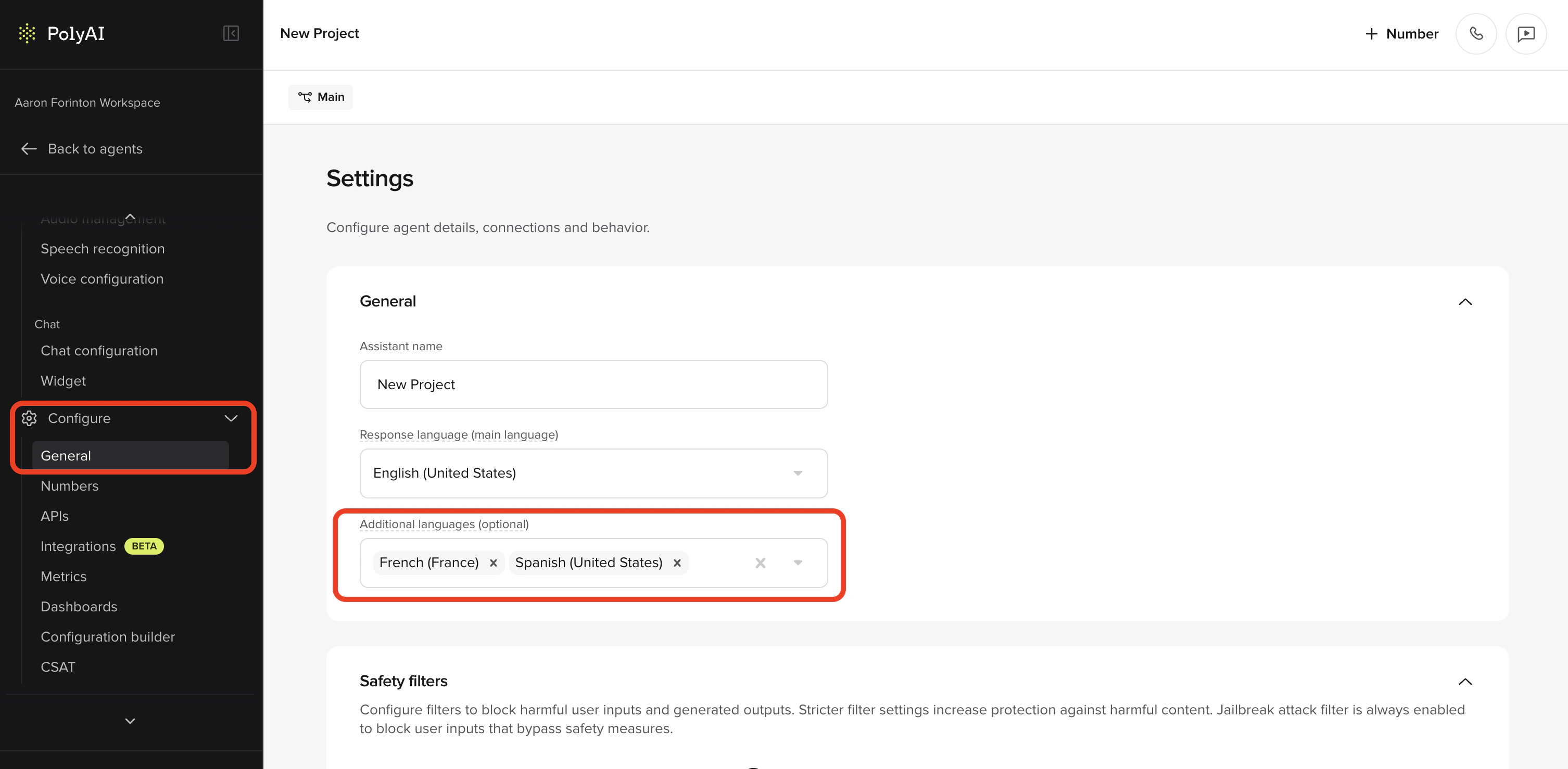
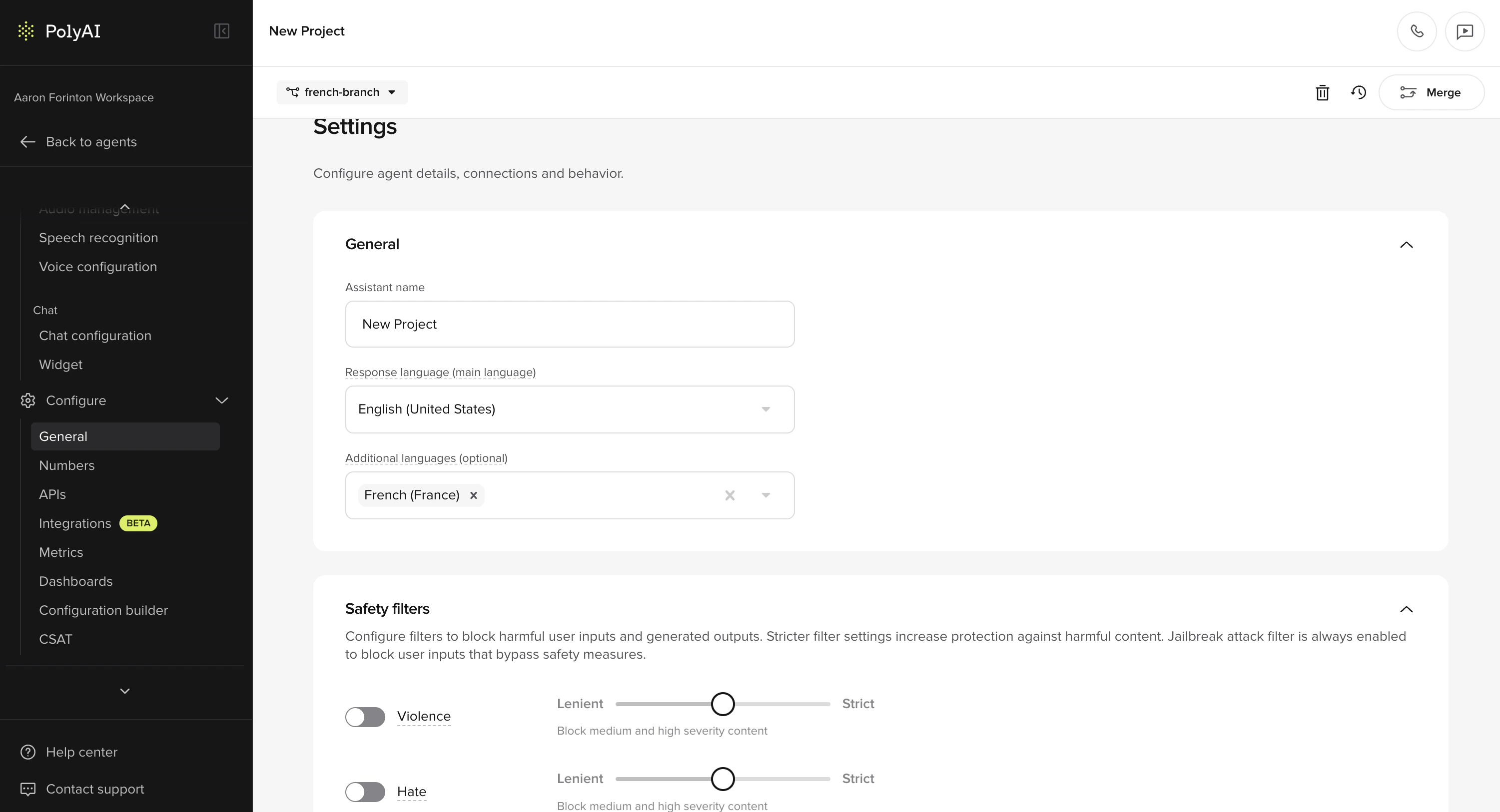 Go to **Behavior** and find the **Additional languages** field. Select up to 10 additional languages from the dropdown. The **Response language** set during project creation becomes the **main language**.
Each language has its own voice configuration. Go to **Voice > Agent** where you'll see a voice card for each configured language. The main language card is tagged as "Main language".
* Select a voice for each language from the [Voice Library](/voice-channel/voice-library)
* You can configure separate voices for **Agent voice** and **Disclaimer** per language
* Multi-voice is supported per language, so you can assign multiple voices to a single language
If you need manual translation overrides for specific content, use the [Translations](/behavior/language/translations) page under **Behavior > Language**.
Use the **language dropdown** in Agent Chat to select a language and test your agent's behavior in each configured language.
### Supported languages
PolyAI supports **73 response languages** for multilingual agents, covering the full union of languages officially supported by the underlying LLM providers. Pass the BCP 47 code (e.g. `es-ES`) when setting the language in the UI or via [`conv.set_language()`](/tools/classes/conv-object#set_language).
| Language | Code |
| --------------------- | ------------- |
| Albanian | `sq-AL` |
| Amharic | `am-ET` |
| Arabic | `ar` |
| Armenian | `hy-AM` |
| Bengali | `bn-BD` |
| Bosnian | `bs-BA` |
| Bulgarian | `bg-BG` |
| Burmese | `my-MM` |
| Cantonese | `yue-Hant-HK` |
| Catalan | `ca-ES` |
| Chinese (China) | `zh-CN` |
| Chinese (Taiwan) | `zh-TW` |
| Croatian | `hr-HR` |
| Czech | `cs-CZ` |
| Danish | `da-DK` |
| Dutch (Belgium) | `nl-BE` |
| Dutch (Netherlands) | `nl-NL` |
| English (Australia) | `en-AU` |
| English (Canada) | `en-CA` |
| English (New Zealand) | `en-NZ` |
| English (Singapore) | `en-SG` |
| English (UK) | `en-GB` |
| English (US) | `en-US` |
| Estonian | `et-EE` |
| Finnish | `fi-FI` |
| French (Belgium) | `fr-BE` |
| French (Canada) | `fr-CA` |
| French (France) | `fr-FR` |
| Georgian | `ka-GE` |
| German (Germany) | `de-DE` |
| Greek | `el-GR` |
| Gujarati | `gu-IN` |
| Hebrew | `he-IL` |
| Hindi | `hi` |
| Hungarian | `hu-HU` |
| Icelandic | `is-IS` |
| Indonesian | `id-ID` |
| Italian (Italy) | `it-IT` |
| Japanese | `ja-JP` |
| Kannada | `kn-IN` |
| Kazakh | `kk-KZ` |
| Korean | `ko-KR` |
| Latvian | `lv-LV` |
| Lithuanian | `lt-LT` |
| Macedonian | `mk-MK` |
| Malay | `ms-MY` |
| Malayalam | `ml-IN` |
| Marathi | `mr-IN` |
| Mongolian | `mn-MN` |
| Norwegian | `nb-NO` |
| Persian (Farsi) | `fa-IR` |
| Polish | `pl-PL` |
| Portuguese (Brazil) | `pt-BR` |
| Portuguese (Portugal) | `pt-PT` |
| Punjabi | `pa-IN` |
| Romanian | `ro-RO` |
| Russian | `ru-RU` |
| Serbian | `sr-RS` |
| Slovak | `sk-SK` |
| Slovenian | `sl-SI` |
| Somali | `so-SO` |
| Spanish (Spain) | `es-ES` |
| Spanish (US) | `es-US` |
| Swahili | `sw-KE` |
| Swedish | `sv-SE` |
| Tagalog (Filipino) | `tl-PH` |
| Tamil | `ta-IN` |
| Telugu | `te-IN` |
| Thai | `th-TH` |
| Turkish | `tr-TR` |
| Ukrainian | `uk-UA` |
| Urdu | `ur-PK` |
| Vietnamese | `vi-VN` |
Serbian uses `sr-RS` (Republic of Serbia). If you were previously using the non-standard `sr-SP` code, update your project configuration to `sr-RS`.
Voice (TTS) coverage depends on the provider you select for each language. Some languages support fewer voices – see the [Voice Library](/voice-channel/voice-library) for what's available per language.
## How multilingual agents work
Multilingual agents can:
* **Detect the caller's language** automatically with ASR
* **Switch languages mid-conversation** if the caller changes language
* **Automatically switch voices** when the language changes, if a voice is configured for that language
* **Maintain language-specific knowledge** using language variants on FAQs
* **Filter content by language** using `` tags in prompts
* **Handle mixed-language queries** (code-switching)
Auto voice switching only works for the main language and configured additional languages. If the conversation changes to an unsupported language, the voice stays the same.
## Forcing a language by dialled number (DNIS routing)
If you serve different markets on different phone numbers and want to bypass auto-detection, set the language explicitly in `start_function` based on `conv.callee_number` (the number the caller dialled).
The language you pass to `conv.set_language()` must already be added under **Behavior > Additional languages** (or be the main language). If the code is not configured on the project, the agent falls back to the default language.
```python theme={"theme":{"light":"github-light","dark":"github-dark"}}
def start_function(conv: Conversation):
spanish_dnis = {"+34911234567", "+34931234567"}
if conv.callee_number in spanish_dnis:
conv.set_language("es-ES")
else:
conv.set_language("en-US")
return str()
```
Use the full IETF locale code (e.g. `"es-ES"`, `"en-US"`, `"fr-FR"`), not the short form (`"es"`, `"en"`). See [`conv.set_language`](/tools/classes/conv-object#set_language) and [`conv.callee_number`](/tools/classes/conv-object#callee_number) for the full reference.
## Configuring voices per language
When multilingual support is enabled, the **Agent Voice** page shows separate voice sections organized by language.
Go to **Behavior** and find the **Additional languages** field. Select up to 10 additional languages from the dropdown. The **Response language** set during project creation becomes the **main language**.
Each language has its own voice configuration. Go to **Voice > Agent** where you'll see a voice card for each configured language. The main language card is tagged as "Main language".
* Select a voice for each language from the [Voice Library](/voice-channel/voice-library)
* You can configure separate voices for **Agent voice** and **Disclaimer** per language
* Multi-voice is supported per language, so you can assign multiple voices to a single language
If you need manual translation overrides for specific content, use the [Translations](/behavior/language/translations) page under **Behavior > Language**.
Use the **language dropdown** in Agent Chat to select a language and test your agent's behavior in each configured language.
### Supported languages
PolyAI supports **73 response languages** for multilingual agents, covering the full union of languages officially supported by the underlying LLM providers. Pass the BCP 47 code (e.g. `es-ES`) when setting the language in the UI or via [`conv.set_language()`](/tools/classes/conv-object#set_language).
| Language | Code |
| --------------------- | ------------- |
| Albanian | `sq-AL` |
| Amharic | `am-ET` |
| Arabic | `ar` |
| Armenian | `hy-AM` |
| Bengali | `bn-BD` |
| Bosnian | `bs-BA` |
| Bulgarian | `bg-BG` |
| Burmese | `my-MM` |
| Cantonese | `yue-Hant-HK` |
| Catalan | `ca-ES` |
| Chinese (China) | `zh-CN` |
| Chinese (Taiwan) | `zh-TW` |
| Croatian | `hr-HR` |
| Czech | `cs-CZ` |
| Danish | `da-DK` |
| Dutch (Belgium) | `nl-BE` |
| Dutch (Netherlands) | `nl-NL` |
| English (Australia) | `en-AU` |
| English (Canada) | `en-CA` |
| English (New Zealand) | `en-NZ` |
| English (Singapore) | `en-SG` |
| English (UK) | `en-GB` |
| English (US) | `en-US` |
| Estonian | `et-EE` |
| Finnish | `fi-FI` |
| French (Belgium) | `fr-BE` |
| French (Canada) | `fr-CA` |
| French (France) | `fr-FR` |
| Georgian | `ka-GE` |
| German (Germany) | `de-DE` |
| Greek | `el-GR` |
| Gujarati | `gu-IN` |
| Hebrew | `he-IL` |
| Hindi | `hi` |
| Hungarian | `hu-HU` |
| Icelandic | `is-IS` |
| Indonesian | `id-ID` |
| Italian (Italy) | `it-IT` |
| Japanese | `ja-JP` |
| Kannada | `kn-IN` |
| Kazakh | `kk-KZ` |
| Korean | `ko-KR` |
| Latvian | `lv-LV` |
| Lithuanian | `lt-LT` |
| Macedonian | `mk-MK` |
| Malay | `ms-MY` |
| Malayalam | `ml-IN` |
| Marathi | `mr-IN` |
| Mongolian | `mn-MN` |
| Norwegian | `nb-NO` |
| Persian (Farsi) | `fa-IR` |
| Polish | `pl-PL` |
| Portuguese (Brazil) | `pt-BR` |
| Portuguese (Portugal) | `pt-PT` |
| Punjabi | `pa-IN` |
| Romanian | `ro-RO` |
| Russian | `ru-RU` |
| Serbian | `sr-RS` |
| Slovak | `sk-SK` |
| Slovenian | `sl-SI` |
| Somali | `so-SO` |
| Spanish (Spain) | `es-ES` |
| Spanish (US) | `es-US` |
| Swahili | `sw-KE` |
| Swedish | `sv-SE` |
| Tagalog (Filipino) | `tl-PH` |
| Tamil | `ta-IN` |
| Telugu | `te-IN` |
| Thai | `th-TH` |
| Turkish | `tr-TR` |
| Ukrainian | `uk-UA` |
| Urdu | `ur-PK` |
| Vietnamese | `vi-VN` |
Serbian uses `sr-RS` (Republic of Serbia). If you were previously using the non-standard `sr-SP` code, update your project configuration to `sr-RS`.
Voice (TTS) coverage depends on the provider you select for each language. Some languages support fewer voices – see the [Voice Library](/voice-channel/voice-library) for what's available per language.
## How multilingual agents work
Multilingual agents can:
* **Detect the caller's language** automatically with ASR
* **Switch languages mid-conversation** if the caller changes language
* **Automatically switch voices** when the language changes, if a voice is configured for that language
* **Maintain language-specific knowledge** using language variants on FAQs
* **Filter content by language** using `` tags in prompts
* **Handle mixed-language queries** (code-switching)
Auto voice switching only works for the main language and configured additional languages. If the conversation changes to an unsupported language, the voice stays the same.
## Forcing a language by dialled number (DNIS routing)
If you serve different markets on different phone numbers and want to bypass auto-detection, set the language explicitly in `start_function` based on `conv.callee_number` (the number the caller dialled).
The language you pass to `conv.set_language()` must already be added under **Behavior > Additional languages** (or be the main language). If the code is not configured on the project, the agent falls back to the default language.
```python theme={"theme":{"light":"github-light","dark":"github-dark"}}
def start_function(conv: Conversation):
spanish_dnis = {"+34911234567", "+34931234567"}
if conv.callee_number in spanish_dnis:
conv.set_language("es-ES")
else:
conv.set_language("en-US")
return str()
```
Use the full IETF locale code (e.g. `"es-ES"`, `"en-US"`, `"fr-FR"`), not the short form (`"es"`, `"en"`). See [`conv.set_language`](/tools/classes/conv-object#set_language) and [`conv.callee_number`](/tools/classes/conv-object#callee_number) for the full reference.
## Configuring voices per language
When multilingual support is enabled, the **Agent Voice** page shows separate voice sections organized by language.
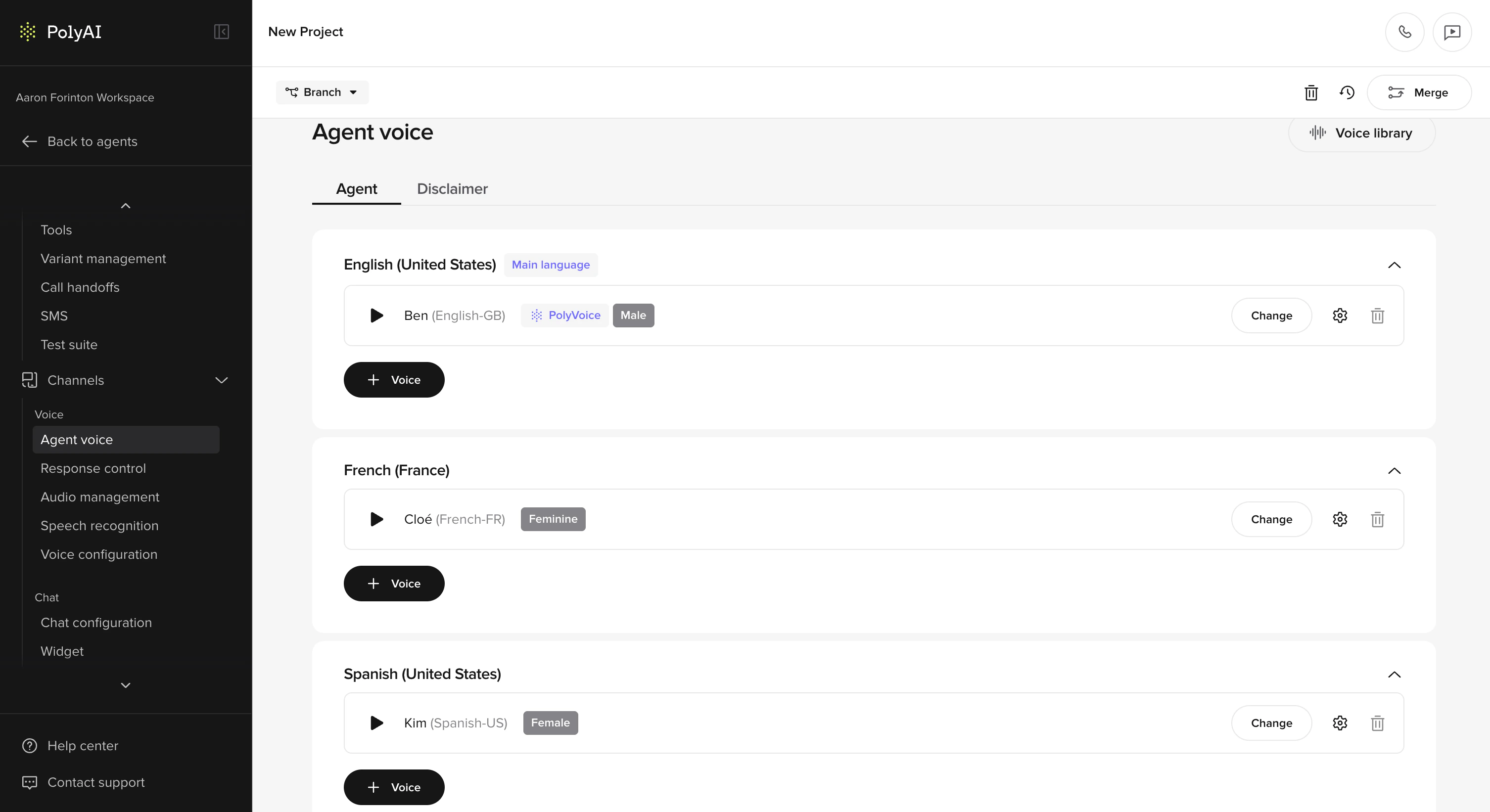 1. Go to **Voice > Agent**
2. You'll see an **Agent** tab and a **Disclaimer** tab
3. On the **Agent** tab, each language has its own voice card
4. Click into a language card to select or change the voice
5. To assign multiple voices to a language, add them from the voice card – multi-voice is supported per language
**Voice quality tips:**
* Use native voices – don't use an English voice for Spanish
* Match regional accents – use Mexican Spanish for Mexico, Castilian for Spain
* Test pronunciation for language-specific characters
* Multilingual TTS models are convenient but may have slightly lower quality than language-specific models
You can also configure voices programmatically. See [Voice classes](/tools/classes/voice) for available providers including ElevenLabs, Cartesia, Hume, Rime, Minimax, PlayHT, and Google TTS.
## Conditional content filtering
Use `` tags to serve language-specific content within a single prompt, without needing separate variants:
```
Please hold while I check your account.
Por favor espere mientras reviso su cuenta.
```
Closing tags are always plain `` (or ``) – never ``. The closing tag matches the most recently opened tag.
This works in:
* [Behavior rules](/behavior/general/rules)
* [FAQs](/knowledge/faqs/introduction) content
* [Flow steps](/flows/introduction)
* [Function](/tools/introduction) descriptions
## Language variants on FAQs
FAQs support **language variants** so you can manage multilingual knowledge base content within a single agent. Each topic can have language-specific versions of its content and sample questions.
1. Go to **Knowledge > FAQs**
2. Create or edit a topic
3. Add **language variants** for each supported language
4. Translate sample questions and content for each variant
Sample questions must be in the same language as caller inputs – they are compared with user inputs during the retrieval process.
## Language-specific pronunciation rules
Pronunciation rules in [Response Control](/voice-channel/advanced/pronunciations) are organized by language. Each language has its own set of rules, displayed as separate collapsible cards. Rules within a language card only apply to responses in that language. Rules with no language specified apply globally.
## What to translate
Some project content needs translation, and some does not:
| Area | Element | Translate? | Notes |
| --------------- | ------------------------------------ | :--------------------------------------------------------------: | ---------------------------------------------------------------------- |
| **Knowledge** | Sample questions | | Must match user input language for retrieval |
| | Content | | Translate for brand accuracy and better output |
| | Topic names and actions | | Keep in English (used internally, not user-facing) |
| **SMS** | SMS content | | Translate anything user-facing |
| **ASR & Voice** | ASR keywords and corrections | | Leave in native language – these may differ significantly from English |
| | Response control and pronunciations | | Leave in native language – these may differ significantly from English |
| **Functions** | Python code | | Leave in English |
| | Function names and descriptions | | Leave in English |
| | Hard-coded responses and LLM prompts | | Translate only user-facing content (e.g., utterances) |
## General rules
* Keep **instructions** in English (e.g., "Ask for the user's phone number")
* Translate **example utterances** or scripted responses
* If it's directed at the **agent**, keep it in English. If it's going to be spoken aloud directly to the customer, translate it.
> `Ask the user for their number by saying "¿Me puedes dar tu número de teléfono?"`
### Function examples
If you're using a function with a hard-coded response, translate the user-facing string:
```python theme={"theme":{"light":"github-light","dark":"github-dark"}}
return {
"utterance": "Respuesta fija en español aquí"
}
```
If you're re-prompting the LLM, you only need to translate example responses:
```python theme={"theme":{"light":"github-light","dark":"github-dark"}}
return {
"content": "Inject prompt here"
}
```
### Accessing the current language in functions
You can access the caller's detected language in functions:
```python theme={"theme":{"light":"github-light","dark":"github-dark"}}
def dynamic_response():
current_language = conv.language
if current_language == "es":
return {"utterance": "Respuesta en español"}
else:
return {"utterance": "Response in English"}
```
### Accessing translations in functions
For hard-coded utterances that need language-specific versions, use the translations object:
```python theme={"theme":{"light":"github-light","dark":"github-dark"}}
conv.translations.tn_name
```
Or for translation keys with special characters:
```python theme={"theme":{"light":"github-light","dark":"github-dark"}}
getattr(conv.translations, "name with special chars!!!!")
```
## Testing multilingual agents
The Agent Chat panel includes a **language dropdown** that lets you select a language to test with – similar to how you select variants.
1. Open Agent Chat
2. Select a language from the dropdown (defaults to the main language on the first turn)
3. Interact with your agent and verify it responds correctly
4. Switch languages mid-conversation to test detection and voice switching
## Reviewing multilingual conversations
Language information surfaces across Agent Studio so you can review and filter multilingual traffic:
* **Conversations table** – add the **Language** column from the **Column** menu to see which language was used in each conversation, then sort or scan for patterns.
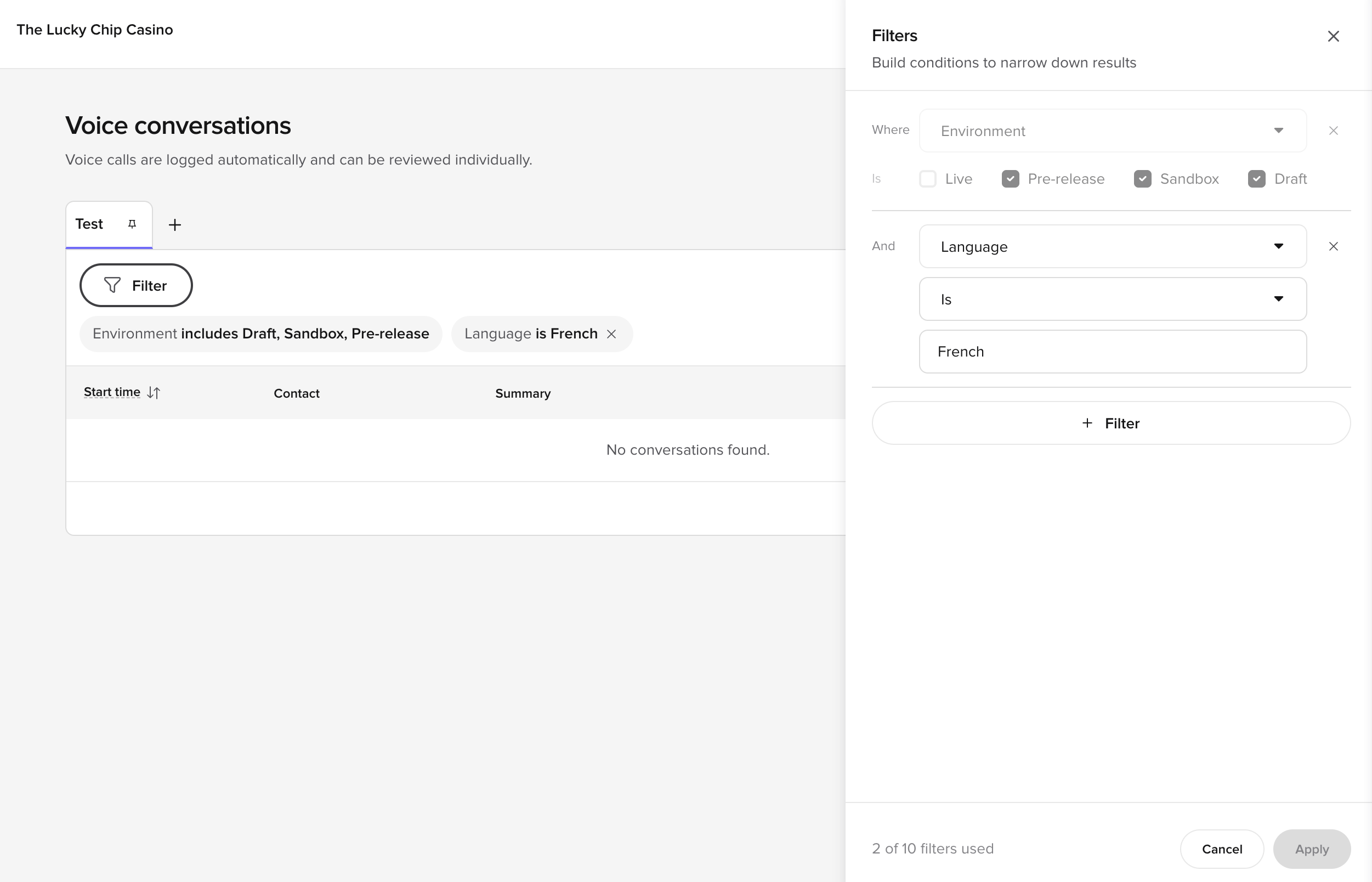
* **Filter by language** – open **Filter** and add a `Language is …` condition to narrow the table to a specific language. The condition shows as a chip above the table and can be saved into a [Custom View](/analytics/conversations/views).
1. Go to **Voice > Agent**
2. You'll see an **Agent** tab and a **Disclaimer** tab
3. On the **Agent** tab, each language has its own voice card
4. Click into a language card to select or change the voice
5. To assign multiple voices to a language, add them from the voice card – multi-voice is supported per language
**Voice quality tips:**
* Use native voices – don't use an English voice for Spanish
* Match regional accents – use Mexican Spanish for Mexico, Castilian for Spain
* Test pronunciation for language-specific characters
* Multilingual TTS models are convenient but may have slightly lower quality than language-specific models
You can also configure voices programmatically. See [Voice classes](/tools/classes/voice) for available providers including ElevenLabs, Cartesia, Hume, Rime, Minimax, PlayHT, and Google TTS.
## Conditional content filtering
Use `` tags to serve language-specific content within a single prompt, without needing separate variants:
```
Please hold while I check your account.
Por favor espere mientras reviso su cuenta.
```
Closing tags are always plain `` (or ``) – never ``. The closing tag matches the most recently opened tag.
This works in:
* [Behavior rules](/behavior/general/rules)
* [FAQs](/knowledge/faqs/introduction) content
* [Flow steps](/flows/introduction)
* [Function](/tools/introduction) descriptions
## Language variants on FAQs
FAQs support **language variants** so you can manage multilingual knowledge base content within a single agent. Each topic can have language-specific versions of its content and sample questions.
1. Go to **Knowledge > FAQs**
2. Create or edit a topic
3. Add **language variants** for each supported language
4. Translate sample questions and content for each variant
Sample questions must be in the same language as caller inputs – they are compared with user inputs during the retrieval process.
## Language-specific pronunciation rules
Pronunciation rules in [Response Control](/voice-channel/advanced/pronunciations) are organized by language. Each language has its own set of rules, displayed as separate collapsible cards. Rules within a language card only apply to responses in that language. Rules with no language specified apply globally.
## What to translate
Some project content needs translation, and some does not:
| Area | Element | Translate? | Notes |
| --------------- | ------------------------------------ | :--------------------------------------------------------------: | ---------------------------------------------------------------------- |
| **Knowledge** | Sample questions | | Must match user input language for retrieval |
| | Content | | Translate for brand accuracy and better output |
| | Topic names and actions | | Keep in English (used internally, not user-facing) |
| **SMS** | SMS content | | Translate anything user-facing |
| **ASR & Voice** | ASR keywords and corrections | | Leave in native language – these may differ significantly from English |
| | Response control and pronunciations | | Leave in native language – these may differ significantly from English |
| **Functions** | Python code | | Leave in English |
| | Function names and descriptions | | Leave in English |
| | Hard-coded responses and LLM prompts | | Translate only user-facing content (e.g., utterances) |
## General rules
* Keep **instructions** in English (e.g., "Ask for the user's phone number")
* Translate **example utterances** or scripted responses
* If it's directed at the **agent**, keep it in English. If it's going to be spoken aloud directly to the customer, translate it.
> `Ask the user for their number by saying "¿Me puedes dar tu número de teléfono?"`
### Function examples
If you're using a function with a hard-coded response, translate the user-facing string:
```python theme={"theme":{"light":"github-light","dark":"github-dark"}}
return {
"utterance": "Respuesta fija en español aquí"
}
```
If you're re-prompting the LLM, you only need to translate example responses:
```python theme={"theme":{"light":"github-light","dark":"github-dark"}}
return {
"content": "Inject prompt here"
}
```
### Accessing the current language in functions
You can access the caller's detected language in functions:
```python theme={"theme":{"light":"github-light","dark":"github-dark"}}
def dynamic_response():
current_language = conv.language
if current_language == "es":
return {"utterance": "Respuesta en español"}
else:
return {"utterance": "Response in English"}
```
### Accessing translations in functions
For hard-coded utterances that need language-specific versions, use the translations object:
```python theme={"theme":{"light":"github-light","dark":"github-dark"}}
conv.translations.tn_name
```
Or for translation keys with special characters:
```python theme={"theme":{"light":"github-light","dark":"github-dark"}}
getattr(conv.translations, "name with special chars!!!!")
```
## Testing multilingual agents
The Agent Chat panel includes a **language dropdown** that lets you select a language to test with – similar to how you select variants.
1. Open Agent Chat
2. Select a language from the dropdown (defaults to the main language on the first turn)
3. Interact with your agent and verify it responds correctly
4. Switch languages mid-conversation to test detection and voice switching
## Reviewing multilingual conversations
Language information surfaces across Agent Studio so you can review and filter multilingual traffic:
* **Conversations table** – add the **Language** column from the **Column** menu to see which language was used in each conversation, then sort or scan for patterns.
* **Filter by language** – open **Filter** and add a `Language is …` condition to narrow the table to a specific language. The condition shows as a chip above the table and can be saved into a [Custom View](/analytics/conversations/views).
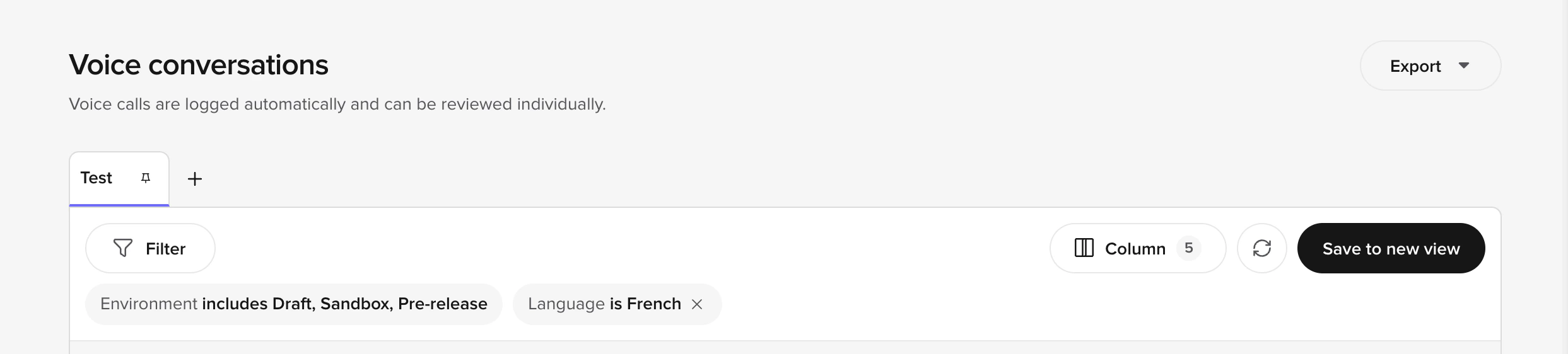 The filter builder supports combining language with other conditions (for example, **Environment includes Draft, Sandbox, Pre-release** AND **Language is French**) so you can carve out a per-language QA queue.
 * **Review side panel** – the panel header shows the detected language for the conversation, and per-turn language information appears alongside the transcript when the agent switched languages mid-call.
* **Audio management** – cached audio files include language metadata so you can identify and manage TTS audio per language.
## Related pages
Manually override auto-translations for specific content in your agent's responses.
Maintain and optimize your multilingual agent over time.
Browse and select voices per language for your agent.
Configure language-specific pronunciation rules for natural speech.
* **Review side panel** – the panel header shows the detected language for the conversation, and per-turn language information appears alongside the transcript when the agent switched languages mid-call.
* **Audio management** – cached audio files include language metadata so you can identify and manage TTS audio per language.
## Related pages
Manually override auto-translations for specific content in your agent's responses.
Maintain and optimize your multilingual agent over time.
Browse and select voices per language for your agent.
Configure language-specific pronunciation rules for natural speech.