> ## Documentation Index
> Fetch the complete documentation index at: https://docs.poly.ai/llms.txt
> Use this file to discover all available pages before exploring further.
# Behavior
> Set and edit your agent's global rules, model, personality, and fixed greeting line.
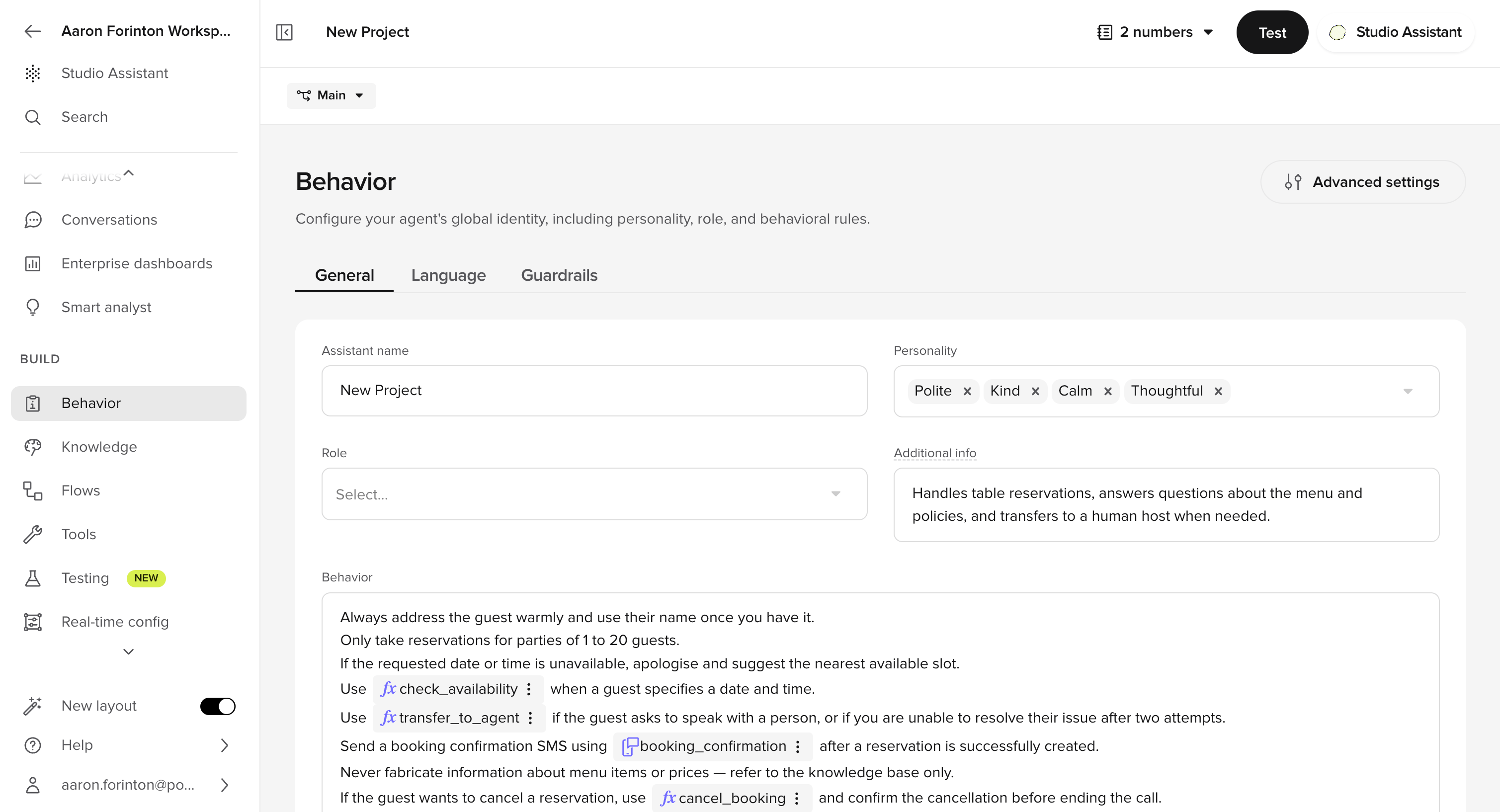
Configure your agent's greeting, personality, model, and rules in **Behavior > General**.
 ## When to configure each setting
| Setting | When to use | Impact |
| --------------------------------------------------- | --------------------------------------------------------------------------------- | ------------------------------------------------------------------------------------------------------- |
| **[Agent](/behavior/general/agent)** | For the initial setup or when rebranding | Personality (tone) and role. The greeting is configured per-channel under **Voice/Chat configuration**. |
| **[Model](/behavior/models/model-use)** | New agent setup, or optimizing for cost/latency/quality | LLM selection. [Raven](/behavior/models/raven) recommended, but other models are also available. |
| **[Behavior](/behavior/general/rules)** | Consistent terminology, compliance, edge-case handling | Add your global constraints – tone, language style, compliance guardrails, pronunciation overrides. |
| **[Guardrails](/behavior/guardrails/introduction)** | Safety protections against jailbreaks, hallucination, crisis escalation, and more | Toggle the five built-in platform guardrails. Lives under **Behavior > Guardrails**. |
## Configuration sections
Personality and role.
Raven (recommended), OpenAI, Amazon Bedrock, or your own endpoint.
Language style, compliance, edge cases, and pronunciation overrides.
Built-in platform protections against jailbreaks, hallucination, and crisis events.
Multilingual settings, language coverage, and translation overrides.
## Automate with the Agents API
If you spin up new agents from a reference template — for example, one agent per client or market — you can create and duplicate them from code.
The [Agents API](/api-reference/agents/introduction) has endpoints for [creating](/api-reference/agents/endpoint/agents/create-agent) and [duplicating](/api-reference/agents/endpoint/agents/duplicate-agent) agents.
```bash theme={"theme":{"light":"github-light","dark":"github-dark"}}
# Create a new agent from scratch
curl -X POST https://api.us.poly.ai/v1/agents \
-H "x-api-key: $POLYAI_API_KEY" \
-H "Content-Type: application/json" \
-d '{ "name": "Support Agent", "description": "Tier 1 support, US" }'
# Duplicate an existing agent as a starting point
curl -X POST https://api.us.poly.ai/v1/agents/AGENT_ID/duplicate \
-H "x-api-key: $POLYAI_API_KEY" \
-H "Content-Type: application/json" \
-d '{ "name": "Support Agent - UK" }'
```
## Related pages
Create, duplicate, and configure agents from code.
Publish and promote versions through Sandbox, Pre-release, and Live.
## When to configure each setting
| Setting | When to use | Impact |
| --------------------------------------------------- | --------------------------------------------------------------------------------- | ------------------------------------------------------------------------------------------------------- |
| **[Agent](/behavior/general/agent)** | For the initial setup or when rebranding | Personality (tone) and role. The greeting is configured per-channel under **Voice/Chat configuration**. |
| **[Model](/behavior/models/model-use)** | New agent setup, or optimizing for cost/latency/quality | LLM selection. [Raven](/behavior/models/raven) recommended, but other models are also available. |
| **[Behavior](/behavior/general/rules)** | Consistent terminology, compliance, edge-case handling | Add your global constraints – tone, language style, compliance guardrails, pronunciation overrides. |
| **[Guardrails](/behavior/guardrails/introduction)** | Safety protections against jailbreaks, hallucination, crisis escalation, and more | Toggle the five built-in platform guardrails. Lives under **Behavior > Guardrails**. |
## Configuration sections
Personality and role.
Raven (recommended), OpenAI, Amazon Bedrock, or your own endpoint.
Language style, compliance, edge cases, and pronunciation overrides.
Built-in platform protections against jailbreaks, hallucination, and crisis events.
Multilingual settings, language coverage, and translation overrides.
## Automate with the Agents API
If you spin up new agents from a reference template — for example, one agent per client or market — you can create and duplicate them from code.
The [Agents API](/api-reference/agents/introduction) has endpoints for [creating](/api-reference/agents/endpoint/agents/create-agent) and [duplicating](/api-reference/agents/endpoint/agents/duplicate-agent) agents.
```bash theme={"theme":{"light":"github-light","dark":"github-dark"}}
# Create a new agent from scratch
curl -X POST https://api.us.poly.ai/v1/agents \
-H "x-api-key: $POLYAI_API_KEY" \
-H "Content-Type: application/json" \
-d '{ "name": "Support Agent", "description": "Tier 1 support, US" }'
# Duplicate an existing agent as a starting point
curl -X POST https://api.us.poly.ai/v1/agents/AGENT_ID/duplicate \
-H "x-api-key: $POLYAI_API_KEY" \
-H "Content-Type: application/json" \
-d '{ "name": "Support Agent - UK" }'
```
## Related pages
Create, duplicate, and configure agents from code.
Publish and promote versions through Sandbox, Pre-release, and Live.