> ## Documentation Index
> Fetch the complete documentation index at: https://docs.poly.ai/llms.txt
> Use this file to discover all available pages before exploring further.
# Conversations API
> Retrieve conversation transcripts, metadata, and performance metrics for analytics, compliance, and integration.
The Conversations API provides programmatic access to conversation records generated by your PolyAI agents. Query transcripts, turn-by-turn metadata, handoff information, and performance metrics in a structured format–ideal for analytics pipelines, compliance reporting, and downstream integrations.
**New integrations should use the [Data API](/api-reference/data/introduction).** The Data API (`https://api.{region}.poly.ai/v1/agents/{agent_id}/conversations`) is the official, supported offering going forward. The Conversations API documented on this page (`https://api.{region}.platform.polyai.app/v3/{account_id}/{project_id}/conversations`) is the legacy endpoint — existing integrations continue to work, but new work should target the Data API.
If you are starting a new integration, jump to the [Data API – List conversations](/api-reference/data/endpoint/list-conversations) endpoint instead. The rest of this page documents the legacy Conversations API for existing integrations.
## API versions
Only the Conversations API is versioned. Other APIs are currently unversioned.
### v3 – current and recommended
v3 is the fully supported release of the Conversations API.
It runs on PolyAI's event-sourced data platform and improves on v1 by offering:
* reliable, scalable ingestion and querying
* consistent ISO8601 timestamps
* empty strings ("") instead of `null` for empty text fields
* additional turn-level metadata such as `latency`, `translated_user_input`, and `english_agent_response`
Authentication for v3 is managed by PolyAI.
Customers must request v3 access through their PolyAI representative.
Example base path:
`https://api.{region}.platform.polyai.app/v3/{account_id}/{project_id}/conversations`
### v2
v2 uses the same schema and event-sourced backend as v3, but retains the legacy authentication model. Existing customers can continue using v2, but new customers should use v3
### v1 – legacy
v1 uses an earlier data pipeline and the legacy authentication system.
**Deprecation timeline**
* From **2 March 2026**, v1 moves to best-effort support (no SLA).
* From **31 August 2026**, v1 remains available but is no longer supported.
Customers on v1 should migrate to v3 before support ends. Contact your PolyAI representative for migration assistance.
## Regional base URLs
The Conversations API uses **`api..platform.polyai.app`** — *not* `api..poly.ai` (that's the [Agents API](/api-reference/agents/introduction)). Note the regional hosts include a `-1` suffix (for example `api.us-1.platform.polyai.app`); mixing them up with `api.us.poly.ai` is a common source of 404/DNS errors.
| Region | Base URL |
| -----: | --------------------------------------- |
| US | `https://api.us-1.platform.polyai.app` |
| UK | `https://api.uk-1.platform.polyai.app` |
| EUW | `https://api.euw-1.platform.polyai.app` |
Endpoint pattern:
`https://api.{region}.platform.polyai.app/{version}/{account_id}/{project_id}/conversations`
## Authentication
The Conversations API uses API key authentication.
### v3 keys
v3 keys are project- and region-scoped and are issued by PolyAI.
Your PolyAI representative will confirm the appropriate scope and provision access.
## Retrieval modes (optional)
The v3 endpoint supports three optional retrieval modes powered by Smart Analyst tooling: **transcript search**, **semantic search**, and **random sampling**. When no retrieval mode is specified, the endpoint returns all conversations matching the given filters (default behavior). Only one mode may be used per request.
| Mode | Parameter | Requires `query` | Description |
| ----------------- | ----------------------- | :--------------: | ---------------------------------------------------------------------------------------------------------- |
| Transcript search | `query_type=transcript` | Yes | Full-text search over conversation transcripts. Optionally scoped to user or agent turns with `turn_type`. |
| Semantic search | `query_type=semantic` | Yes | Vector similarity search. Returns conversations semantically similar to the query text. |
| Random sampling | `sample=random` | No | Returns a random sample of conversations in the time range. |
`query_type` and `sample` are mutually exclusive – you must specify at most one per request.
## Query parameters
The Conversations API supports several query parameters for filtering and controlling the response:
### Time range parameters
| Parameter | Description | Required |
| ------------ | ----------------------------- | ------------------------------------------------------------------------------------------------------------------------------------------------------------- |
| `start_time` | Start of time range (ISO8601) | Required when using [retrieval modes](#retrieval-modes-optional) (`query_type` or `sample`). Optional otherwise – if omitted, no lower time bound is applied. |
| `end_time` | End of time range (ISO8601) | Required when using [retrieval modes](#retrieval-modes-optional) (`query_type` or `sample`). Optional otherwise – if omitted, no upper time bound is applied. |
Always set `start_time` and `end_time` — even though they're optional, bounding the range keeps result sets small and queries fast.
### Retrieval mode parameters (optional)
| Parameter | Type | Description |
| ------------ | ------ | -------------------------------------------------------------------------------------------- |
| `query_type` | string | Search mode: `transcript` or `semantic`. Requires `query`. Mutually exclusive with `sample`. |
| `sample` | string | Sampling mode: `random`. Mutually exclusive with `query_type`. |
| `query` | string | The search text used for transcript or semantic search. Required when `query_type` is set. |
| `turn_type` | string | Transcript search only. Filter by `user` or `agent` turns. Defaults to both. |
### Optional filters
| Parameter | Description | Default |
| -------------- | ------------------------------------------------------------------------------------------------------------------------------------------------------------------------- | ------- |
| `client_env` | Environment: `sandbox`, `pre-release`, or `live` | `live` |
| `channel` | One or more channels to filter by (e.g. `voice`, `chat`) | – |
| `variant_id` | Filter by variant ID | – |
| `variant_name` | Filter by variant name (URL-encode spaces with `%20`) | – |
| `in_progress` | Filter by conversation status: `true` for in-progress, `false` for finished | all |
| `limit` | Max conversations per request (1–5000) | 5 |
| `offset` | Pagination offset. Prefer `cursor` for large result sets. | 0 |
| `cursor` | Opaque [keyset pagination](#pagination) cursor returned by the previous response. Supported on v3, and on v2 when chunked response streaming is enabled for your project. | – |
### Optional response fields
| Parameter | Description | Default |
| ----------------- | ---------------------------------------- | ------- |
| `include_latency` | Include latency metrics per conversation | `false` |
## Response structure
### Conversation object
| Field | Description |
| --------------------- | ----------------------------------------------------------------------------------------------------------------------------------------------------------------------------------------------------------------------------------------------------------------------------- |
| `id` | Unique conversation ID |
| `account_id` | Customer account ID |
| `project_id` | Project ID |
| `variant_id` | Variant ID |
| `variant_name` | Variant name |
| `environment` | Deployment environment (`live`, `sandbox`, `pre-release`) |
| `started_at` | Conversation start time (ISO8601) |
| `channel` | Conversation medium. Common values: `VOICE-SIP` (voice/telephony), `WEBCHAT` (webchat widget), `CHAT` (agent chat). These are analytics-level labels – for runtime channel detection in custom functions, see [`conv.channel_type`](/tools/classes/conv-object#channel_type). |
| `from_number` | Caller phone number |
| `to_number` | Agent phone number |
| `in_progress` | Whether call is still active |
| `num_turns` | Total number of turns in the conversation (integer count) |
| `total_duration` | Total call duration (seconds) |
| `polyai_duration` | PolyAI-handled duration (seconds) |
| `handoff` | Whether handoff occurred |
| `handoff_reason` | Brief handoff reason |
| `handoff_destination` | Handoff destination |
| `num_silences` | Count of silence turns |
| `num_ood` | Count of out-of-domain turns |
| `metrics` | Custom metrics logged by agent |
| `state` | All [conversation variables](/tools/variables) (`conv.state` values) set during the call, returned as key-value pairs. Includes both built-in keys (e.g. `from_`, `to`, `call_sid`) and any custom variables your agent writes. |
| `turns` | Ordered list of conversation turn objects. May be empty if transcript access is disabled in your project's API configuration (see [transcript visibility](#transcript-visibility)). |
### Turn object
| Field | Description |
| ------------------------- | ------------------------------------------ |
| `user_input` | User's transcribed text |
| `user_input_datetime` | When agent received input (ISO8601) |
| `barge_in` | Whether user interrupted the agent |
| `agent_response` | Agent's response text |
| `agent_response_datetime` | When agent responded (ISO8601) |
| `intents` | Detected intents |
| `entities` | Detected entities (name → value mapping) |
| `is_ood` | Whether turn was out-of-domain |
| `is_silence` | Whether turn was a silence |
| `translated_user_input` | Translated user input (when enabled) |
| `english_agent_response` | English version of response (when enabled) |
## Pagination
The v3 endpoint supports two pagination strategies. Use **cursor-based pagination** for any new integration — it is faster on large result sets and stays consistent when new conversations are written between page requests.
| Strategy | Request param | Response field | When to use |
| -------------------- | ------------- | -------------- | ----------------------------------------------------------------------------------------------------------------------------------------------------------------------------------------------------------------------------------------------------------------------------------------------------------------------------------------------------------- |
| Cursor (recommended) | `cursor` | `cursor` | New integrations and any workload that walks more than a few pages. Performance stays constant as you advance through the result set, and pages do not drift when conversations are added concurrently. Available on v3, and on v2 when chunked response streaming is enabled for your project (see [Large response streaming](#large-response-streaming)). |
| Offset (legacy) | `offset` | `next_offset` | Existing integrations that already rely on offsets. Available on all versions. |
You can only use one strategy per request. If both `cursor` and `offset` are present, `cursor` takes precedence.
### Cursor-based pagination
On the first request, omit `cursor`. The response includes a `cursor` field — pass it as the `cursor` query parameter on the next request to fetch the following page. Keep all other filters (`start_time`, `end_time`, `client_env`, `limit`, etc.) identical between requests. When `cursor` is `null`, you have reached the end of the result set.
Cursors are opaque, URL-safe strings — do not parse or generate them yourself. A malformed cursor returns a `400 Bad Request`.
```bash curl theme={"theme":{"light":"github-light","dark":"github-dark"}}
# First page
curl -X GET \
"https://api..platform.polyai.app/v3/ws-xxxxxxxx/PROJECT-xxx/conversations?start_time=2026-04-01T00:00:00Z&end_time=2026-04-02T00:00:00Z&limit=100" \
-H "x-api-key: YOUR_API_KEY"
# Next page — pass the `cursor` returned above
curl -X GET \
"https://api..platform.polyai.app/v3/ws-xxxxxxxx/PROJECT-xxx/conversations?start_time=2026-04-01T00:00:00Z&end_time=2026-04-02T00:00:00Z&limit=100&cursor=CURSOR_FROM_PREVIOUS_RESPONSE" \
-H "x-api-key: YOUR_API_KEY"
```
```python Python theme={"theme":{"light":"github-light","dark":"github-dark"}}
base_url = "https://api..platform.polyai.app"
headers = {"x-api-key": "YOUR_API_KEY"}
params = {
"start_time": "2026-04-01T00:00:00Z",
"end_time": "2026-04-02T00:00:00Z",
"limit": 100,
}
cursor = None
while True:
if cursor:
params["cursor"] = cursor
response = requests.get(
f"{base_url}/v3/ws-xxxxxxxx/PROJECT-xxx/conversations",
headers=headers,
params=params,
)
response.raise_for_status()
page = response.json()
for conv in page["conversations"]:
print(conv["id"])
cursor = page.get("cursor")
if not cursor:
break
```
```typescript TypeScript theme={"theme":{"light":"github-light","dark":"github-dark"}}
const baseUrl = "https://api..platform.polyai.app";
const headers = { "x-api-key": "YOUR_API_KEY" };
let cursor: string | null = null;
do {
const params = new URLSearchParams({
start_time: "2026-04-01T00:00:00Z",
end_time: "2026-04-02T00:00:00Z",
limit: "100",
});
if (cursor) params.set("cursor", cursor);
const res = await fetch(
`${baseUrl}/v3/ws-xxxxxxxx/PROJECT-xxx/conversations?${params}`,
{ headers }
);
const page = await res.json();
for (const conv of page.conversations) {
console.log(conv.id);
}
cursor = page.cursor;
} while (cursor);
```
### Offset-based pagination (legacy)
When results exceed the limit, the response includes `next_offset`. Use this value as the `offset` parameter in your next request to fetch the next page. Offset pagination becomes slower as you advance deep into the result set and pages may shift if conversations are written between requests — use `cursor` instead where possible.
## Large response streaming
By default, the API builds the full JSON response in memory before sending it. For large pages — typically `limit` in the hundreds combined with `include_context_state=true` or `include_turn_metadata=true` — that response can be hundreds of megabytes and slow or unstable to download.
When chunked response streaming is enabled for your project, the API instead sends conversations incrementally using HTTP chunked transfer encoding. The response body is the same JSON shape; only the transport changes. Streaming responses also expose the `cursor` field, so you can combine streaming with [cursor-based pagination](#cursor-based-pagination) to walk through very large result sets without ever buffering a full page.
| Version | Streaming support |
| ------- | ------------------------------------------------------------------- |
| v3 | Enabled when your project has chunked response streaming turned on. |
| v2 | Enabled when your project has chunked response streaming turned on. |
| v1 | Not supported. |
Streaming is gated by a per-project setting managed by PolyAI. To turn it on, ask your PolyAI representative to enable chunked response streaming for the project. No client changes are required — clients that already parse the JSON response work unchanged, and clients that parse incrementally (for example, with a streaming JSON parser) start receiving conversations as soon as the server emits them.
If you query the v2 or v3 endpoint with a large `limit` and run into timeouts or out-of-memory errors on the client, enabling chunked response streaming and switching to `cursor` pagination almost always resolves it.
## Examples
All examples use the v3 endpoint:
`GET https://api.{region}.platform.polyai.app/v3/{account_id}/{project_id}/conversations`
### Retrieve all conversations in a time range
```bash curl theme={"theme":{"light":"github-light","dark":"github-dark"}}
curl -X GET \
"https://api..platform.polyai.app/v3/ws-xxxxxxxx/PROJECT-xxx/conversations?start_time=2026-04-01T00:00:00Z&end_time=2026-04-02T00:00:00Z&limit=100" \
-H "x-api-key: YOUR_API_KEY"
```
```python Python theme={"theme":{"light":"github-light","dark":"github-dark"}}
import requests
base_url = "https://api..platform.polyai.app"
headers = {"x-api-key": "YOUR_API_KEY"}
response = requests.get(
f"{base_url}/v3/ws-xxxxxxxx/PROJECT-xxx/conversations",
headers=headers,
params={
"start_time": "2026-04-01T00:00:00Z",
"end_time": "2026-04-02T00:00:00Z",
"limit": 100,
},
)
conversations = response.json()
for conv in conversations:
print(f"{conv['id']} — {conv['started_at']} — {conv['num_turns']} turns")
```
```typescript TypeScript theme={"theme":{"light":"github-light","dark":"github-dark"}}
const baseUrl = "https://api..platform.polyai.app";
const headers = { "x-api-key": "YOUR_API_KEY" };
const params = new URLSearchParams({
start_time: "2026-04-01T00:00:00Z",
end_time: "2026-04-02T00:00:00Z",
limit: "100",
});
const res = await fetch(
`${baseUrl}/v3/ws-xxxxxxxx/PROJECT-xxx/conversations?${params}`,
{ headers }
);
const conversations = await res.json();
for (const conv of conversations) {
console.log(`${conv.id} — ${conv.started_at} — ${conv.num_turns} turns`);
}
```
### Search transcripts for a keyword
Use `query_type=transcript` to find conversations containing specific text. Optionally filter by `turn_type` to search only user or agent turns.
```bash curl theme={"theme":{"light":"github-light","dark":"github-dark"}}
curl -X GET \
"https://api..platform.polyai.app/v3/ws-xxxxxxxx/PROJECT-xxx/conversations?start_time=2026-04-01T00:00:00Z&end_time=2026-04-02T00:00:00Z&query_type=transcript&query=cancel%20reservation&turn_type=user&limit=50" \
-H "x-api-key: YOUR_API_KEY"
```
```python Python theme={"theme":{"light":"github-light","dark":"github-dark"}}
response = requests.get(
f"{base_url}/v3/ws-xxxxxxxx/PROJECT-xxx/conversations",
headers=headers,
params={
"start_time": "2026-04-01T00:00:00Z",
"end_time": "2026-04-02T00:00:00Z",
"query_type": "transcript",
"query": "cancel reservation",
"turn_type": "user",
"limit": 50,
},
)
results = response.json()
```
```typescript TypeScript theme={"theme":{"light":"github-light","dark":"github-dark"}}
const searchParams = new URLSearchParams({
start_time: "2026-04-01T00:00:00Z",
end_time: "2026-04-02T00:00:00Z",
query_type: "transcript",
query: "cancel reservation",
turn_type: "user",
limit: "50",
});
const searchRes = await fetch(
`${baseUrl}/v3/ws-xxxxxxxx/PROJECT-xxx/conversations?${searchParams}`,
{ headers }
);
const results = await searchRes.json();
```
### Semantic search
Use `query_type=semantic` to find conversations that are semantically similar to your query, even if the exact words don't appear in the transcript.
```bash curl theme={"theme":{"light":"github-light","dark":"github-dark"}}
curl -X GET \
"https://api..platform.polyai.app/v3/ws-xxxxxxxx/PROJECT-xxx/conversations?start_time=2026-04-01T00:00:00Z&end_time=2026-04-02T00:00:00Z&query_type=semantic&query=customer%20frustrated%20about%20billing&limit=20" \
-H "x-api-key: YOUR_API_KEY"
```
```python Python theme={"theme":{"light":"github-light","dark":"github-dark"}}
response = requests.get(
f"{base_url}/v3/ws-xxxxxxxx/PROJECT-xxx/conversations",
headers=headers,
params={
"start_time": "2026-04-01T00:00:00Z",
"end_time": "2026-04-02T00:00:00Z",
"query_type": "semantic",
"query": "customer frustrated about billing",
"limit": 20,
},
)
similar = response.json()
```
```typescript TypeScript theme={"theme":{"light":"github-light","dark":"github-dark"}}
const semanticParams = new URLSearchParams({
start_time: "2026-04-01T00:00:00Z",
end_time: "2026-04-02T00:00:00Z",
query_type: "semantic",
query: "customer frustrated about billing",
limit: "20",
});
const semanticRes = await fetch(
`${baseUrl}/v3/ws-xxxxxxxx/PROJECT-xxx/conversations?${semanticParams}`,
{ headers }
);
const similar = await semanticRes.json();
```
### Random sampling
Use `sample=random` to retrieve a random subset of conversations in a time range – useful for quality audits.
```bash curl theme={"theme":{"light":"github-light","dark":"github-dark"}}
curl -X GET \
"https://api..platform.polyai.app/v3/ws-xxxxxxxx/PROJECT-xxx/conversations?start_time=2026-04-01T00:00:00Z&end_time=2026-04-08T00:00:00Z&sample=random&limit=10" \
-H "x-api-key: YOUR_API_KEY"
```
```python Python theme={"theme":{"light":"github-light","dark":"github-dark"}}
response = requests.get(
f"{base_url}/v3/ws-xxxxxxxx/PROJECT-xxx/conversations",
headers=headers,
params={
"start_time": "2026-04-01T00:00:00Z",
"end_time": "2026-04-08T00:00:00Z",
"sample": "random",
"limit": 10,
},
)
sample = response.json()
```
```typescript TypeScript theme={"theme":{"light":"github-light","dark":"github-dark"}}
const sampleParams = new URLSearchParams({
start_time: "2026-04-01T00:00:00Z",
end_time: "2026-04-08T00:00:00Z",
sample: "random",
limit: "10",
});
const sampleRes = await fetch(
`${baseUrl}/v3/ws-xxxxxxxx/PROJECT-xxx/conversations?${sampleParams}`,
{ headers }
);
const sample = await sampleRes.json();
```
### Filter by channel
Use the `channel` parameter to restrict results to a specific medium. You can specify it multiple times to include several channels.
```bash curl theme={"theme":{"light":"github-light","dark":"github-dark"}}
curl -X GET \
"https://api..platform.polyai.app/v3/ws-xxxxxxxx/PROJECT-xxx/conversations?start_time=2026-04-01T00:00:00Z&end_time=2026-04-02T00:00:00Z&channel=WEBCHAT&limit=50" \
-H "x-api-key: YOUR_API_KEY"
```
```python Python theme={"theme":{"light":"github-light","dark":"github-dark"}}
response = requests.get(
f"{base_url}/v3/ws-xxxxxxxx/PROJECT-xxx/conversations",
headers=headers,
params={
"start_time": "2026-04-01T00:00:00Z",
"end_time": "2026-04-02T00:00:00Z",
"channel": "WEBCHAT",
"limit": 50,
},
)
webchat_convos = response.json()
```
```typescript TypeScript theme={"theme":{"light":"github-light","dark":"github-dark"}}
const channelParams = new URLSearchParams({
start_time: "2026-04-01T00:00:00Z",
end_time: "2026-04-02T00:00:00Z",
channel: "WEBCHAT",
limit: "50",
});
const channelRes = await fetch(
`${baseUrl}/v3/ws-xxxxxxxx/PROJECT-xxx/conversations?${channelParams}`,
{ headers }
);
const webchatConvos = await channelRes.json();
```
A successful response includes:
* complete turn-by-turn transcript
* consistent timestamps
* latency metrics (when `include_latency=true`)
* translation outputs (when enabled)
* handoff metadata (if applicable)
## Understanding `turns` and `num_turns`
These two fields are often confused. Here's how they relate:
| Field | Type | Purpose |
| ----------- | --------------------- | ------------------------------------------------------------------------------------------------------------------------------------------------------- |
| `turns` | Array of turn objects | The full ordered list of conversation turns. Included by default, but may be empty if transcript access is disabled in the project's API configuration. |
| `num_turns` | Integer | A count of turns in the conversation. This value reflects the number of turns that occurred, even if the `turns` array is empty due to configuration. |
`include_latency` enriches **existing** turn data – it does not populate an empty `turns` array. If your `turns` array is empty, this parameter will have no effect. The `turns` array is controlled by your project's [transcript visibility](#transcript-visibility) setting, not by this query parameter.
## Transcript visibility
The `turns` array in the API response is controlled by the **Conversation transcript** toggle (underlying field: `show_transcripts`) in your project's API key configuration. When transcript access is disabled, the API returns an empty `turns` array even though `num_turns` still reports the actual count.
This is the most common reason for missing turn data. To check or update this setting:
Go to the **API Keys** tab on the workspace homepage in Agent Studio (next to **Agents**, **Secrets**, and **Users**).
 Click the **Configuration** button at the top right of the API Keys page.
Inside the configuration panel, find your project and enable the **Conversation transcript** toggle. You can also select which **Response metrics** to include in API responses (e.g. `CALL_IN_PROGRESS`, `CALL_COMPLETED`, `HANDOFF_TO`, `HANDOFF_REASON`).
Click the **Configuration** button at the top right of the API Keys page.
Inside the configuration panel, find your project and enable the **Conversation transcript** toggle. You can also select which **Response metrics** to include in API responses (e.g. `CALL_IN_PROGRESS`, `CALL_COMPLETED`, `HANDOFF_TO`, `HANDOFF_REASON`).
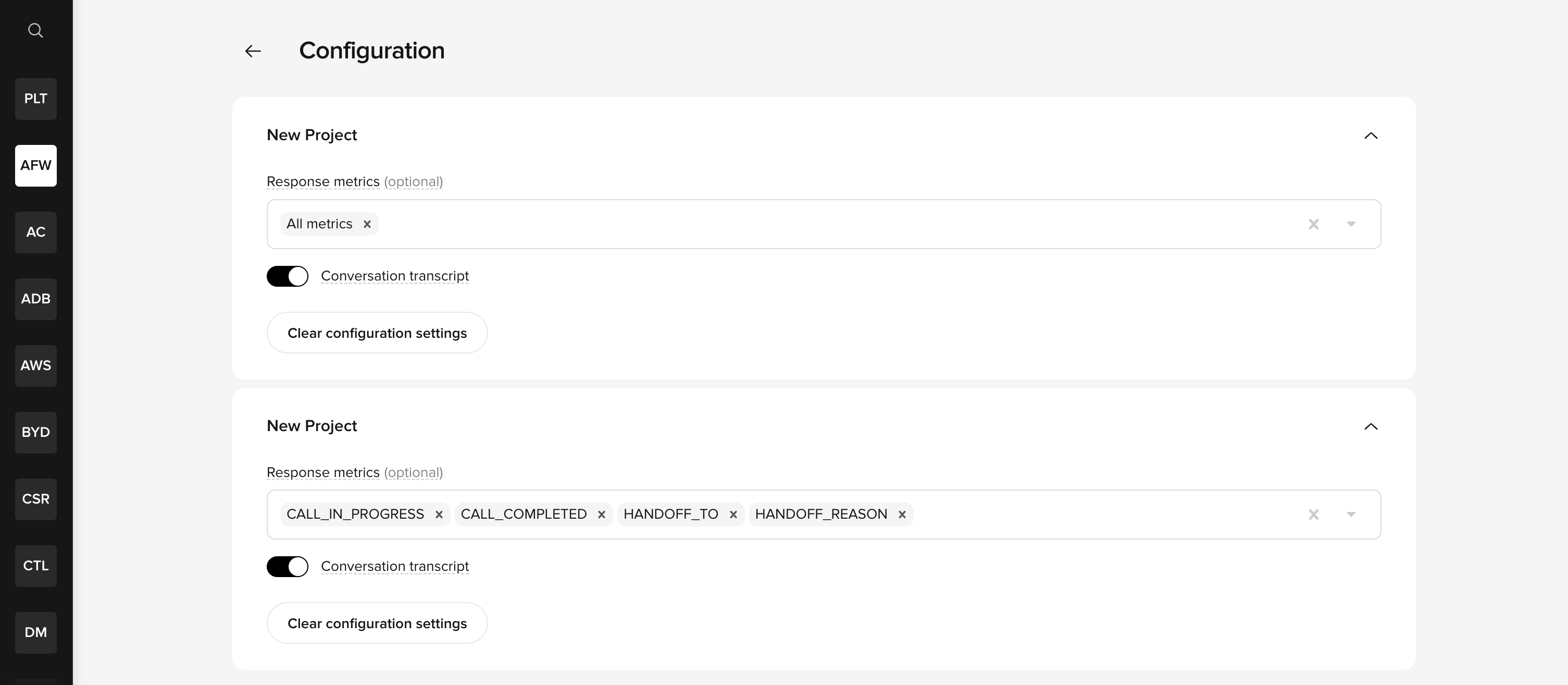 These settings apply at the **project level**, not per key. For data to appear in API responses, both conditions must be met: the API key must have **Conversations data** permission enabled, and the project must have the relevant metrics and transcript access enabled in the Configuration panel. See [API keys](/secrets/api-keys) for key setup details.
## Troubleshooting
### `turns` is empty but `num_turns` is greater than zero
This is the most common issue reported by API users. Use this decision tree to diagnose the cause:
```
Empty turns array?
├── Is num_turns > 0?
│ ├── YES → Transcript visibility is disabled (most common cause).
│ │ Go to API Keys > Configuration on the workspace
│ │ homepage and enable "Conversation transcript".
│ └── NO → No turns were recorded. Check your filters
│ (start_time, end_time, client_env).
└── Are you using the v1 endpoint?
└── YES → v1 is deprecated. Migrate to v3 for full field support.
Contact your PolyAI representative for migration help.
```
Go to the **API Keys** tab on the workspace homepage, then click **Configuration** and verify that the **Conversation transcript** toggle is enabled for your project. This is a project-level setting. See [transcript visibility](#transcript-visibility) for details.
Verify your endpoint URL contains `/v3/`. The v1 API is deprecated and may not return full conversation data. v1 moved to best-effort support on **2 March 2026** and will be unsupported from **31 August 2026**.
If `in_progress` is `true`, turn data may still be arriving and may not be fully available yet.
If none of the above applies, this may indicate a data pipeline delay or ingestion issue.
### Only seeing basic fields (`id`, `account_id`, `project_id`, `started_at`)
If the response only contains a subset of expected fields:
1. **Confirm you are on v3.** The full response schema (including `latency`, `translated_user_input`, `english_agent_response`, etc.) is only available on v3. Check that your base URL uses `/v3/`, not `/v1/`. Contact your PolyAI representative for help migrating from v1.
2. **Check your API key permissions.** On the **API Keys** tab of the workspace homepage, verify the API key has **Conversations data** permission enabled. The key must have the correct permission *and* the project must have the relevant metrics enabled.
3. **Check metric configuration.** On the **API Keys** tab, click **Configuration** and verify the response metrics you expect are enabled (e.g. `CALL_IN_PROGRESS`, `CALL_COMPLETED`, `HANDOFF_TO`). If no metrics are selected, the `metrics` object in the response will be empty.
4. **Check field whitelisting (v1 only).** Projects on v1 may have field whitelisting enabled in their project configuration (`enable_whitelist: true`). When active, the API only returns fields explicitly listed in the project's API config — typically just `id`, `started_at`, `account_id`, and `project_id`. If you are on v1 and see this behavior, migrate to v3 where field visibility is controlled through the [API Keys Configuration panel](#transcript-visibility) instead.
### `include_latency` is not adding data
`include_latency=true` adds per-turn latency metrics to each turn object, but enriches **existing** turn data – it does not populate an empty `turns` array.
If `turns` is empty, this parameter has no effect. Fix the underlying cause first (see [transcript visibility](#transcript-visibility) above).
These settings apply at the **project level**, not per key. For data to appear in API responses, both conditions must be met: the API key must have **Conversations data** permission enabled, and the project must have the relevant metrics and transcript access enabled in the Configuration panel. See [API keys](/secrets/api-keys) for key setup details.
## Troubleshooting
### `turns` is empty but `num_turns` is greater than zero
This is the most common issue reported by API users. Use this decision tree to diagnose the cause:
```
Empty turns array?
├── Is num_turns > 0?
│ ├── YES → Transcript visibility is disabled (most common cause).
│ │ Go to API Keys > Configuration on the workspace
│ │ homepage and enable "Conversation transcript".
│ └── NO → No turns were recorded. Check your filters
│ (start_time, end_time, client_env).
└── Are you using the v1 endpoint?
└── YES → v1 is deprecated. Migrate to v3 for full field support.
Contact your PolyAI representative for migration help.
```
Go to the **API Keys** tab on the workspace homepage, then click **Configuration** and verify that the **Conversation transcript** toggle is enabled for your project. This is a project-level setting. See [transcript visibility](#transcript-visibility) for details.
Verify your endpoint URL contains `/v3/`. The v1 API is deprecated and may not return full conversation data. v1 moved to best-effort support on **2 March 2026** and will be unsupported from **31 August 2026**.
If `in_progress` is `true`, turn data may still be arriving and may not be fully available yet.
If none of the above applies, this may indicate a data pipeline delay or ingestion issue.
### Only seeing basic fields (`id`, `account_id`, `project_id`, `started_at`)
If the response only contains a subset of expected fields:
1. **Confirm you are on v3.** The full response schema (including `latency`, `translated_user_input`, `english_agent_response`, etc.) is only available on v3. Check that your base URL uses `/v3/`, not `/v1/`. Contact your PolyAI representative for help migrating from v1.
2. **Check your API key permissions.** On the **API Keys** tab of the workspace homepage, verify the API key has **Conversations data** permission enabled. The key must have the correct permission *and* the project must have the relevant metrics enabled.
3. **Check metric configuration.** On the **API Keys** tab, click **Configuration** and verify the response metrics you expect are enabled (e.g. `CALL_IN_PROGRESS`, `CALL_COMPLETED`, `HANDOFF_TO`). If no metrics are selected, the `metrics` object in the response will be empty.
4. **Check field whitelisting (v1 only).** Projects on v1 may have field whitelisting enabled in their project configuration (`enable_whitelist: true`). When active, the API only returns fields explicitly listed in the project's API config — typically just `id`, `started_at`, `account_id`, and `project_id`. If you are on v1 and see this behavior, migrate to v3 where field visibility is controlled through the [API Keys Configuration panel](#transcript-visibility) instead.
### `include_latency` is not adding data
`include_latency=true` adds per-turn latency metrics to each turn object, but enriches **existing** turn data – it does not populate an empty `turns` array.
If `turns` is empty, this parameter has no effect. Fix the underlying cause first (see [transcript visibility](#transcript-visibility) above).