> ## Documentation Index
> Fetch the complete documentation index at: https://docs.poly.ai/llms.txt
> Use this file to discover all available pages before exploring further.
# PolyScore
> Automated conversation quality scoring for voice calls.
PolyScore is an AI-powered quality score assigned to every eligible **voice call**. It evaluates the transcript and produces a normalized **0–10 rating** along with per-dimension breakdowns, helping you identify strong and weak conversations without manual review.
 PolyScore and Call Summaries use **GPT-5** for quality assessment, providing detailed explanations for each score dimension.
## How scoring works
PolyScore evaluates every eligible voice conversation automatically. The model reads the full transcript and rates six behavioral signals, which are combined into two sub-scores and then normalized to a 0–10 scale.
### Overall score
The overall PolyScore is a number from **0 to 10**, displayed as a color-coded badge in [Conversation review](/analytics/conversations/review):
| Range | Label | Color |
| ----- | ------ | ----- |
| 7–10 | High | Green |
| 4–6 | Medium | Amber |
| 0–3 | Low | Red |
### Dimensions
PolyScore evaluates three dimensions, each contributing to the overall score:
| Dimension | Weight | What it measures |
| ------------------------ | ------ | -------------------------------------------------------------------------------- |
| **Conversation quality** | 40% | Whether the agent understood the user and maintained a natural conversation flow |
| **Task success** | 40% | Whether the user's request was resolved and the task completed |
| **Customer experience** | 20% | Whether the user had to repeat themselves or showed signs of frustration |
Each dimension is rated as **Poor**, **Fair**, or **Good** with a text explanation. You can view per-dimension ratings and explanations in [Conversation review](/analytics/conversations/review).
In Agent Studio, conversation quality and customer experience are combined into a single **Agent Quality** sub-score in the UI, alongside a separate **Task Success** sub-score. The underlying three-dimension model is the same.
## Where PolyScore appears
* **Conversation review** – Score badge at the top of each transcript, with expandable dimension breakdowns
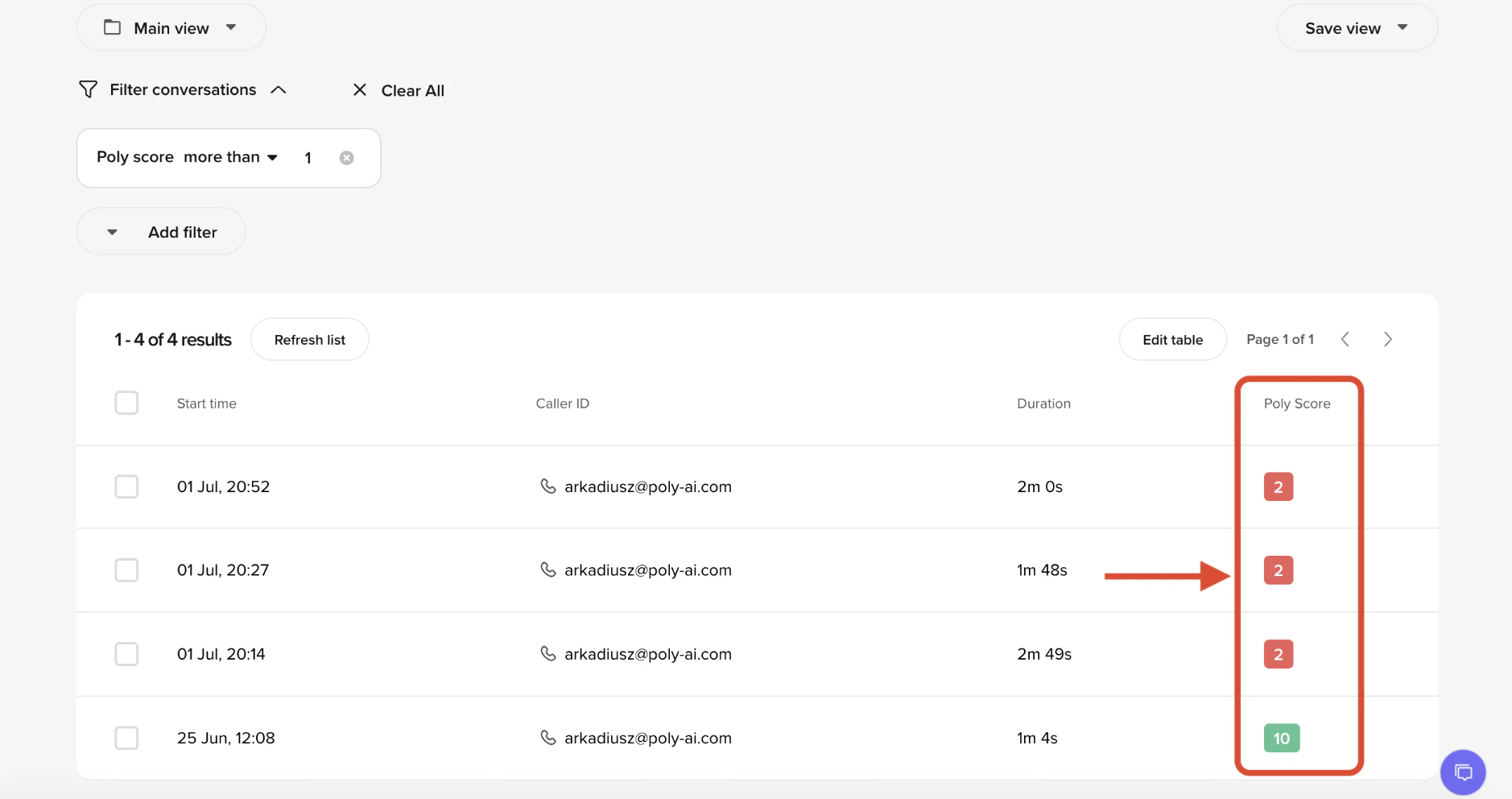
* **Conversations table** – Sortable PolyScore column for quick quality scanning
* **Home page** – Average PolyScore trend chart under Quick Insights
* **Smart Analyst** – Use PolyScore as a sampling criterion or query PolyScore tables directly via SQL
* **Conversations API** – PolyScore data is available in the API response when the conversation has been scored
## Eligibility
Not all conversations receive a PolyScore:
| Requirement | Detail |
| ----------------- | ---------------------------------------------------------------------------------- |
| **Channel** | Voice conversations are scored. Webchat and SMS conversations are not scored. |
| **Minimum turns** | At least 3 turns. Short interactions (for example, immediate hangups) are skipped. |
| **Engagement** | If the user does not engage at all, the score is marked as N/A. |
## Limitations
PolyScore evaluates conversations based on the transcript alone. It does not have access to your knowledge base, flows, external systems, or expected outcomes.
This means:
* PolyScore **cannot verify whether an action was actually completed** in an external system (e.g., a booking made, an appointment canceled). It can only assess whether the conversation *appeared* to resolve the task based on what was said.
* PolyScore does not know what the agent *should* have said – only what it *did* say. If the agent confidently gave an incorrect answer, PolyScore may still rate the conversation highly.
* Scores reflect conversational quality, not business accuracy. Use PolyScore alongside your own QA processes and [custom metrics](/analytics/kpis/introduction) for a complete picture.
## Interpreting scores
Use PolyScore as a **screening tool**, not a definitive quality judgment:
* **High scores (7–10)** – The conversation flowed well, the user's request appeared resolved, and they did not show frustration. Worth spot-checking to confirm the agent followed the correct process.
* **Medium scores (4–6)** – Some issues were detected. Review the dimension breakdowns to understand whether the problem was conversational flow, task completion, or user experience.
* **Low scores (0–3)** – Significant issues detected. Prioritize these for manual review to identify knowledge gaps, flow problems, or agent behavior issues.
Filter conversations by PolyScore in the Conversations table to build a daily QA workflow – review a sample of low-scoring voice calls to catch recurring issues early.
## Related pages
View per-dimension PolyScore breakdowns alongside transcripts.
Query PolyScore data and sample conversations by score.
Access transcripts and call summaries.
PolyScore and Call Summaries use **GPT-5** for quality assessment, providing detailed explanations for each score dimension.
## How scoring works
PolyScore evaluates every eligible voice conversation automatically. The model reads the full transcript and rates six behavioral signals, which are combined into two sub-scores and then normalized to a 0–10 scale.
### Overall score
The overall PolyScore is a number from **0 to 10**, displayed as a color-coded badge in [Conversation review](/analytics/conversations/review):
| Range | Label | Color |
| ----- | ------ | ----- |
| 7–10 | High | Green |
| 4–6 | Medium | Amber |
| 0–3 | Low | Red |
### Dimensions
PolyScore evaluates three dimensions, each contributing to the overall score:
| Dimension | Weight | What it measures |
| ------------------------ | ------ | -------------------------------------------------------------------------------- |
| **Conversation quality** | 40% | Whether the agent understood the user and maintained a natural conversation flow |
| **Task success** | 40% | Whether the user's request was resolved and the task completed |
| **Customer experience** | 20% | Whether the user had to repeat themselves or showed signs of frustration |
Each dimension is rated as **Poor**, **Fair**, or **Good** with a text explanation. You can view per-dimension ratings and explanations in [Conversation review](/analytics/conversations/review).
In Agent Studio, conversation quality and customer experience are combined into a single **Agent Quality** sub-score in the UI, alongside a separate **Task Success** sub-score. The underlying three-dimension model is the same.
## Where PolyScore appears
* **Conversation review** – Score badge at the top of each transcript, with expandable dimension breakdowns
* **Conversations table** – Sortable PolyScore column for quick quality scanning
* **Home page** – Average PolyScore trend chart under Quick Insights
* **Smart Analyst** – Use PolyScore as a sampling criterion or query PolyScore tables directly via SQL
* **Conversations API** – PolyScore data is available in the API response when the conversation has been scored
## Eligibility
Not all conversations receive a PolyScore:
| Requirement | Detail |
| ----------------- | ---------------------------------------------------------------------------------- |
| **Channel** | Voice conversations are scored. Webchat and SMS conversations are not scored. |
| **Minimum turns** | At least 3 turns. Short interactions (for example, immediate hangups) are skipped. |
| **Engagement** | If the user does not engage at all, the score is marked as N/A. |
## Limitations
PolyScore evaluates conversations based on the transcript alone. It does not have access to your knowledge base, flows, external systems, or expected outcomes.
This means:
* PolyScore **cannot verify whether an action was actually completed** in an external system (e.g., a booking made, an appointment canceled). It can only assess whether the conversation *appeared* to resolve the task based on what was said.
* PolyScore does not know what the agent *should* have said – only what it *did* say. If the agent confidently gave an incorrect answer, PolyScore may still rate the conversation highly.
* Scores reflect conversational quality, not business accuracy. Use PolyScore alongside your own QA processes and [custom metrics](/analytics/kpis/introduction) for a complete picture.
## Interpreting scores
Use PolyScore as a **screening tool**, not a definitive quality judgment:
* **High scores (7–10)** – The conversation flowed well, the user's request appeared resolved, and they did not show frustration. Worth spot-checking to confirm the agent followed the correct process.
* **Medium scores (4–6)** – Some issues were detected. Review the dimension breakdowns to understand whether the problem was conversational flow, task completion, or user experience.
* **Low scores (0–3)** – Significant issues detected. Prioritize these for manual review to identify knowledge gaps, flow problems, or agent behavior issues.
Filter conversations by PolyScore in the Conversations table to build a daily QA workflow – review a sample of low-scoring voice calls to catch recurring issues early.
## Related pages
View per-dimension PolyScore breakdowns alongside transcripts.
Query PolyScore data and sample conversations by score.
Access transcripts and call summaries.