> ## Documentation Index
> Fetch the complete documentation index at: https://docs.poly.ai/llms.txt
> Use this file to discover all available pages before exploring further.
# Custom
> Enterprise dashboards tailored to your business metrics.
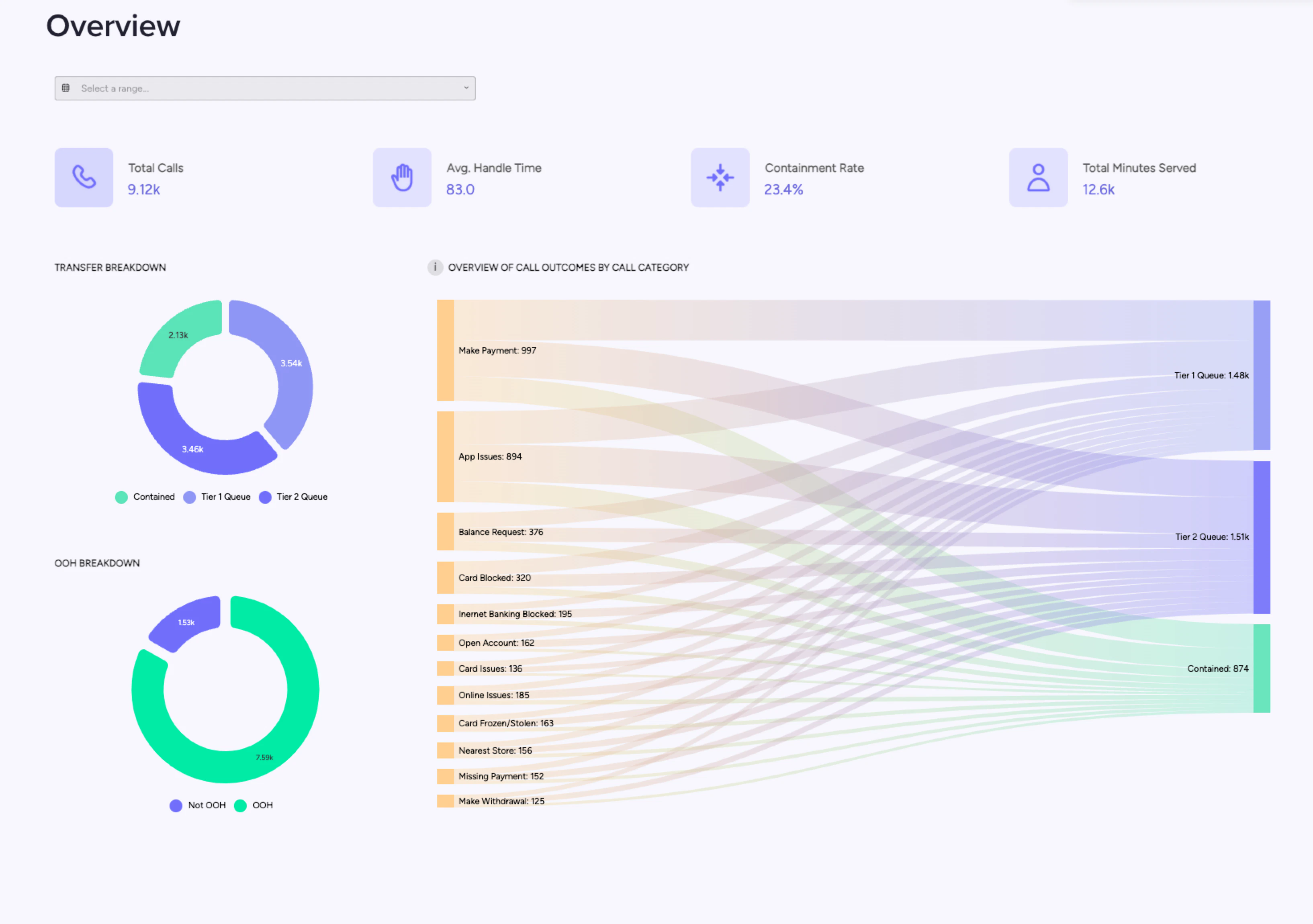
Custom dashboards are built for your specific business needs. Unlike the [standard](/analytics/dashboards/standard) and [safety](/analytics/dashboards/safety) dashboards which are available to all customers, custom dashboards are designed in collaboration with PolyAI to track the metrics that matter most to your organization.
 ## What custom dashboards include
Custom dashboards can track any combination of metrics relevant to your use case. Common examples include:
| Metric | Description |
| ----------------------------- | ---------------------------------------------------------------------------------------------------- |
| **Containment rate** | Percentage of queries resolved by the agent without escalation or [handoff](/voice-channel/handoffs) |
| **Booking performance** | Success rates, conversion funnels, and failure reasons for booking interactions |
| **Call resolution breakdown** | Categorized call outcomes (resolved, transferred, abandoned) with drill-down capability |
| **Call flows and outcomes** | Visual maps of customer journeys showing which paths lead to successful resolution |
| **Revenue impact** | Bookings completed, upsells, or payments processed by the agent |
| **Custom function metrics** | Performance data from your specific [functions](/tools/introduction) and integrations |
## Dashboard platform
Custom dashboards are powered by **Amazon Quick** (formerly Amazon QuickSight) and are embedded directly in Agent Studio. You access them through the Studio interface – no separate login or external tool is required.
## How to get a custom dashboard
Custom dashboards are available to enterprise customers. Contact your PolyAI account manager to:
1. Define the metrics you want to track.
2. PolyAI designs and builds the dashboard based on your requirements.
3. Review and iterate on the design in your Sandbox environment.
4. Deploy the dashboard for your team.
## Related pages
Out-of-the-box performance monitoring for all customers.
Define custom metrics that power custom dashboard widgets.
Query conversation data with natural language for ad-hoc analysis.
## What custom dashboards include
Custom dashboards can track any combination of metrics relevant to your use case. Common examples include:
| Metric | Description |
| ----------------------------- | ---------------------------------------------------------------------------------------------------- |
| **Containment rate** | Percentage of queries resolved by the agent without escalation or [handoff](/voice-channel/handoffs) |
| **Booking performance** | Success rates, conversion funnels, and failure reasons for booking interactions |
| **Call resolution breakdown** | Categorized call outcomes (resolved, transferred, abandoned) with drill-down capability |
| **Call flows and outcomes** | Visual maps of customer journeys showing which paths lead to successful resolution |
| **Revenue impact** | Bookings completed, upsells, or payments processed by the agent |
| **Custom function metrics** | Performance data from your specific [functions](/tools/introduction) and integrations |
## Dashboard platform
Custom dashboards are powered by **Amazon Quick** (formerly Amazon QuickSight) and are embedded directly in Agent Studio. You access them through the Studio interface – no separate login or external tool is required.
## How to get a custom dashboard
Custom dashboards are available to enterprise customers. Contact your PolyAI account manager to:
1. Define the metrics you want to track.
2. PolyAI designs and builds the dashboard based on your requirements.
3. Review and iterate on the design in your Sandbox environment.
4. Deploy the dashboard for your team.
## Related pages
Out-of-the-box performance monitoring for all customers.
Define custom metrics that power custom dashboard widgets.
Query conversation data with natural language for ad-hoc analysis.